Vertical clips for fast-feed channels
Clip extraction pipeline
AI Clip Maker
for Long Videos
Find strong moments in long videos and turn them into reviewed clips.
Reviewed by Maya Chen (AI Video Editing Research Team). Updated April 16, 2026.
Generate short clips from long videos with AI. Recapo helps you find key moments, cut highlight segments, and repurpose podcasts, gaming footage, and more.
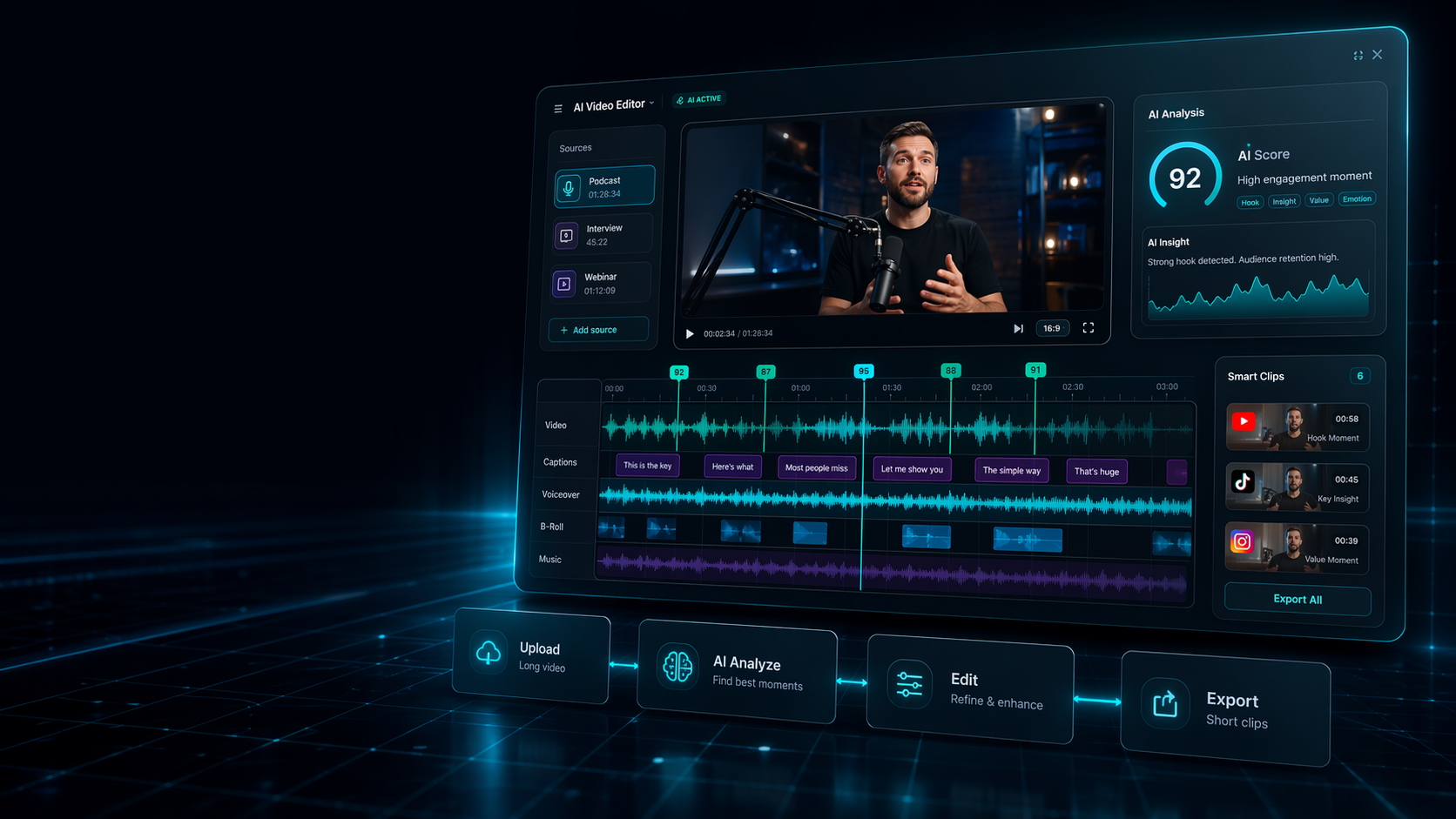
Moment detection flow
Upload a source video, let AI surface moments, then review clips before exporting.
- Who it helps
- Creators and content teams that need usable moments from long recordings
- What you can upload
- Long videos, podcasts, interviews, streams, sports recordings, and gaming sessions
- What you can create
- Candidate clips, highlight cuts, social snippets, and reusable short-form assets
- Why Recapo fits
- The hardest part of clipping is knowing which moments are worth cutting.
- Scan: long videos
- Select: strong moments
- Export: social-ready clips
Workflow map for ai clip generator
- Upload: Long videos, podcasts, interviews, streams, sports recordings, and gaming sessions
- AI analyzes: The hardest part of clipping is knowing which moments are worth cutting.
- Edit: Upload a source video, let AI surface moments, then review clips before exporting.
- Export: Candidate clips, highlight cuts, social snippets, and reusable short-form assets
Upload long videos. Leave with publish-ready assets.
Recapo is built for ai clip generator workflows where teams already have source material and need a faster path to reviewed clips, captions, subtitles, voiceover-ready edits, and social exports.
- Upload source videos: Long videos, podcasts, interviews, streams, sports recordings, and gaming sessions
- Let AI find moments: Recapo helps surface hooks, speakers, scenes, and useful moments before you spend hours in a timeline.
- Review captions and structure: Adjust subtitles, captions, pacing, voiceover-ready structure, and clip context before publishing.
- Export for each channel: Candidate clips, highlight cuts, social snippets, and reusable short-form assets
- ai clip generator
- ai video clip generator
- ai clip generator from video
- free ai clip generator from youtube
- video clipping app
Choose the right Recapo workflow
Best for: ai clip generator
- ai video clip generator
- ai clip generator from video
- free ai clip generator from youtube
- video clipping app
Workflow map
Moment detection flow
Upload a source video, let AI surface moments, then review clips before exporting.
ai clip generatorai video clip generatorai clip generator from videofree ai clip generator from youtubevideo clipping app
-
01
Input
Long source video
Podcasts, webinars, YouTube uploads, courses, streams, interviews, sports footage, and review material.
UploadImportBrief -
02
AI scan
Find usable moments
Recapo analyzes hooks, speakers, scenes, pacing, captions, and strong short-form candidates.
HooksScenesSpeakers -
03
Plan
Build edit structure
Generate clip plans, recap structure, captions, subtitles, and voiceover-ready sequences.
ScriptCaptionsVoice -
04
Review
Human approval
Review the queue, refine the story, adjust context, and keep only the clips worth publishing.
EditApprovePolish -
05
Export
Publish-ready assets
Ship Shorts, Reels, TikTok clips, podcast snippets, highlight cuts, recaps, and captions.
ShortsReelsRecaps
Structured story edits with context
Readable subtitles and hook text
Narration-ready video structure
Generate clips from long videos automatically
Generate clips from long videos automatically explains how creators and content teams that need usable moments from long recordings can use ai clip...
Find key moments for podcasts, gaming, and sports
Find key moments for podcasts, gaming, and sports explains how creators and content teams that need usable moments from long recordings can use ai...
Create social-ready clips from one source file
Create social-ready clips from one source file explains how creators and content teams that need usable moments from long recordings can use ai cli...
Export short clips for Shorts, Reels, and TikTok
Export short clips for Shorts, Reels, and TikTok explains how creators and content teams that need usable moments from long recordings can use ai c...
Related Recapo pages
- Turn Long Videos into Short Videos with AI
- Podcast Clip Maker for Social Clips and Video Highlights
- AI Sports Highlight Maker for Fast Match and Player Clips
- AI Gaming Highlight Maker for Twitch, YouTube, and Shorts
- AI YouTube Shorts Maker for Long Videos and Clip Workflows
- Opus Clip Alternative for AI Clips, Podcasts, and Shorts
- Vizard Alternative for AI Video Clips and Highlight Workflows
FAQ
Questions before you start editing.
Answer the practical questions users ask before they turn source videos into clips, captions, recaps, and short-form assets.
How does an AI clip generator work?
It analyzes a video, finds moments that can work as standalone clips, and helps package them for short-form channels.
Can I use Recapo for podcast clips?
Yes. Recapo can help turn podcast episodes, interviews, webinars, and long recordings into short clips with captions and subtitles.
What makes Recapo different from manual clipping?
Recapo reduces manual scrubbing by using AI to identify candidate moments and structure the clip workflow.