Vertical clips for fast-feed channels
Core editing command center
AI Video Editor
for Long Videos
Turn long videos into reviewed clips, captions, Shorts, Reels, and recaps.
Reviewed by Maya Chen (AI Video Editing Research Team). Updated April 16, 2026.
Edit long videos with AI and turn them into shorts, clips, recaps, and highlight content. Add subtitles, captions, and voiceovers in one Recapo workflow.
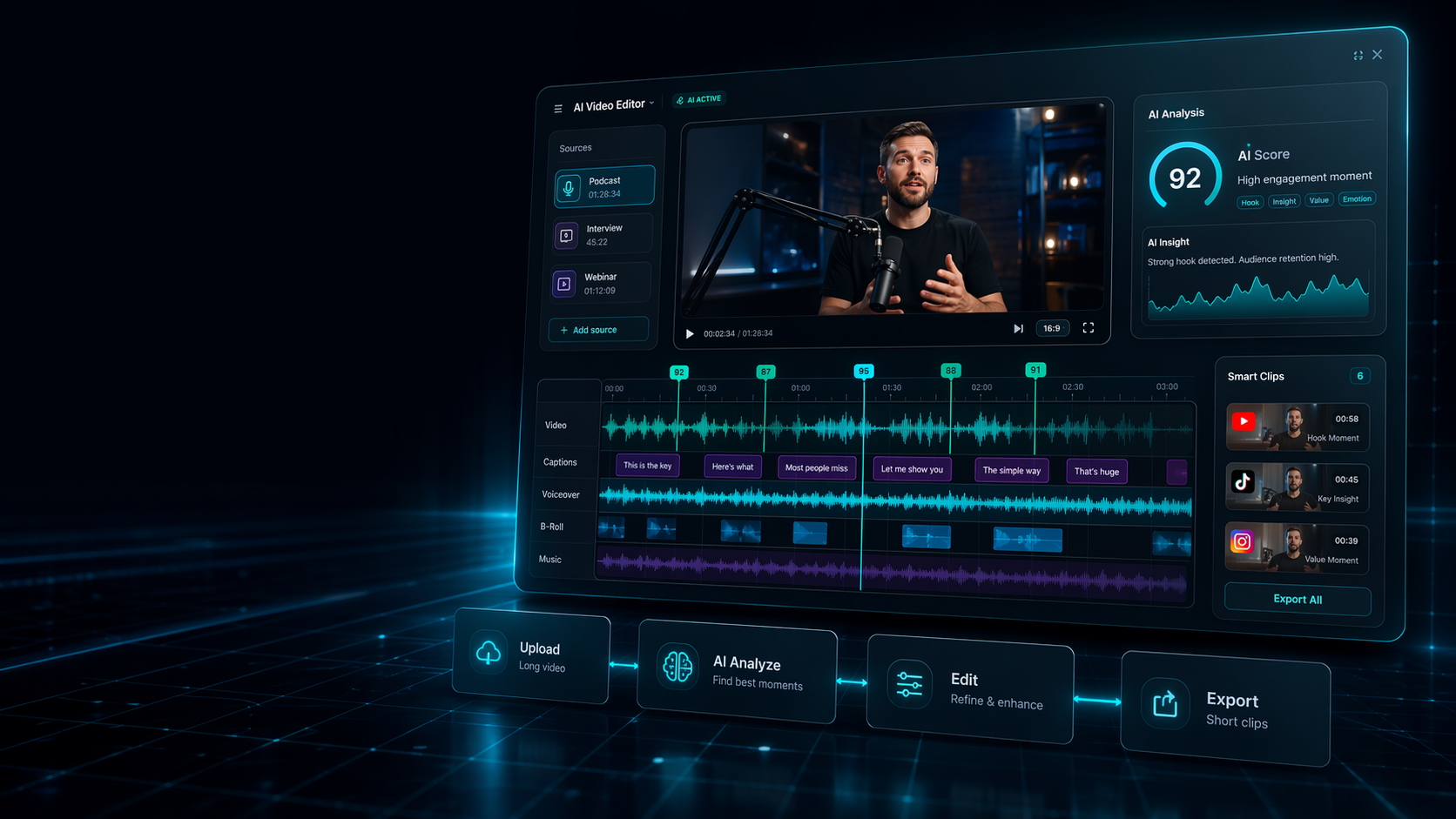
AI video editor workspace
One long source becomes a reviewed queue of clips, subtitles, captions, and export-ready formats.
- Who it helps
- Creators, marketers, educators, and teams repurposing long-form recordings
- What you can upload
- Podcasts, webinars, YouTube videos, courses, streams, sports footage, and interviews
- What you can create
- Shorts, clips, recaps, subtitles, captions, voiceover-ready edits, and highlights
- Why Recapo fits
- Manual timelines force teams to find every usable moment before they can edit anything.
- Upload source: Long video, podcast, webinar, or stream
- AI builds queue: Hooks, captions, subtitles, and formats
- Review and export: Shorts, Reels, TikTok clips, and recaps
Core editing command center for ai video editor
- Upload: Podcasts, webinars, YouTube videos, courses, streams, sports footage, and interviews
- AI analyzes: Manual timelines force teams to find every usable moment before they can edit anything.
- Edit: One long source becomes a reviewed queue of clips, subtitles, captions, and export-ready formats.
- Export: Shorts, clips, recaps, subtitles, captions, voiceover-ready edits, and highlights
Upload long videos. Leave with publish-ready assets.
Recapo is built for ai video editor workflows where teams already have source material and need a faster path to reviewed clips, captions, subtitles, voiceover-ready edits, and social exports.
- Upload source videos: Podcasts, webinars, YouTube videos, courses, streams, sports footage, and interviews
- Let AI find moments: Recapo helps surface hooks, speakers, scenes, and useful moments before you spend hours in a timeline.
- Review captions and structure: Adjust subtitles, captions, pacing, voiceover-ready structure, and clip context before publishing.
- Export for each channel: Shorts, clips, recaps, subtitles, captions, voiceover-ready edits, and highlights
- ai video editor
- free ai video editor
- best ai video editor
- ai video editor for youtube
- ai youtube video editor
Choose the right Recapo workflow
Best for: ai video editor
- free ai video editor
- best ai video editor
- ai video editor for youtube
- ai youtube video editor
Core editing command center
AI video editor workspace
One long source becomes a reviewed queue of clips, subtitles, captions, and export-ready formats.
ai video editorfree ai video editorbest ai video editorai video editor for youtubeai youtube video editor
-
01
Input
Long source video
Podcasts, webinars, YouTube uploads, courses, streams, interviews, sports footage, and review material.
UploadImportBrief -
02
AI scan
Find usable moments
Recapo analyzes hooks, speakers, scenes, pacing, captions, and strong short-form candidates.
HooksScenesSpeakers -
03
Plan
Build edit structure
Generate clip plans, recap structure, captions, subtitles, and voiceover-ready sequences.
ScriptCaptionsVoice -
04
Review
Human approval
Review the queue, refine the story, adjust context, and keep only the clips worth publishing.
EditApprovePolish -
05
Export
Publish-ready assets
Ship Shorts, Reels, TikTok clips, podcast snippets, highlight cuts, recaps, and captions.
ShortsReelsRecaps
Structured story edits with context
Readable subtitles and hook text
Narration-ready video structure
What is an AI video editor?
An AI video editor uses machine learning to analyze video, detect strong moments, and automate repetitive editing work such as clip selection, capt...
Edit long videos with AI, not manual timelines
Traditional editors are powerful, but they still require you to watch, cut, label, caption, and reframe every asset by hand.
Turn one video into multiple shorts and clips
The best AI video editor is not just a faster cutter.
Add subtitles, captions, and voiceover-ready structure
Short-form video is often watched without sound, so captions and readable structure are not optional.
Built for YouTube, Reels, TikTok, podcasts, and recap workflows
Different platforms reward different pacing, context, and formatting.
How Recapo compares with other AI video editing workflows
Teams comparing AI video editors usually need to know whether a tool replaces a manual editor, supports one-off AI effects, or helps build a repeatable long-video-to-short-form workflow.
Best use case
- Manual editor
- Detailed frame-by-frame control
- Generic AI tool
- Single AI task or effect
- Recapo
- Long-video repurposing into shorts, clips, recaps, subtitles, and highlights
Starting point
- Manual editor
- Blank timeline
- Generic AI tool
- Prompt, template, or one uploaded file
- Recapo
- Existing long videos that need multiple reusable assets
Speed advantage
- Manual editor
- Depends on editor time
- Generic AI tool
- Fast for isolated tasks
- Recapo
- Faster for repeatable creator and content-team workflows
Output fit
- Manual editor
- Any format with manual setup
- Generic AI tool
- Varies by tool
- Recapo
- Shorts, Reels, TikTok clips, podcast clips, recaps, captions, and highlights
Why teams trust this workflow
- Human-reviewable AI workflow for creators and content teams.
- Designed around long-video repurposing, not just one-off effects.
- Reviewed by the Recapo editorial team for workflow clarity, practical use cases, and product fit.
Related Recapo pages
- AI Clip Generator for Long Videos, Podcasts, and Highlights
- Turn Long Videos into Short Videos with AI
- AI YouTube Shorts Maker for Long Videos and Clip Workflows
- AI YouTube Video Editor for Shorts, Recaps, and Highlight Clips
- Generate Video Subtitles with AI
- AI Video Caption Generator for Shorts, Reels, and TikTok
- Generate Video Voiceovers with AI
- Vlog Editing App for Faster Clips, Shorts, and Highlight Edits
- Runway Alternative for AI Video Editing and Repurposing
- CapCut Alternative for AI Clips, Shorts, and Recaps
- Canva Alternative for Faster AI Video Editing
FAQ
Questions before you start editing.
Answer the practical questions users ask before they turn source videos into clips, captions, recaps, and short-form assets.
What is an AI video editor?
An AI video editor uses machine learning to analyze source footage, identify useful moments, and automate editing steps such as clip selection, subtitles, captions, and voiceovers.
Can Recapo edit long videos into short clips?
Yes. Recapo is designed for long-video repurposing, including Shorts, Reels, TikTok clips, podcast clips, recaps, and highlight videos.
What makes Recapo different from a traditional video editor?
Traditional editors start with a manual timeline. Recapo starts with the repurposing workflow: finding useful moments in long videos, shaping them into clips, and preparing short-form assets with subtitles, captions, and recap structure.
Which platforms can I create clips for with Recapo?
Recapo is designed for short-form and repurposing workflows across YouTube Shorts, TikTok, Instagram Reels, podcast clips, course previews, gaming clips, sports highlights, and social campaigns.
Is Recapo only for professional editors?
No. Recapo is built for creators, marketers, agencies, and teams that need faster video production without learning complex timeline software.