Otomatik Altyazı
Videonuza otomatik altyazılar ekleyin: bir klip yükleyin, yapay zekanın konuşmayı yazıya dökmesine ve telefonda okunabilir metni kareye yakmasına izin verin, ardından altyazılı bir MP4'ü önizleyin ve indirin.
Yüklemek için tıklayın veya bir video dosyası sürükleyin
MP4, MOV, MKV, WebM, MPEG, MPG, 3GP, 3GPP desteklenmektedir
Dosya başına en fazla 2 GB
Kaynak video en fazla 60 dakika
Very long videos may fail when extracted ASR audio exceeds 100MB — trim first if needed
Upload a video first to adjust settings and preview the result
Sessiz akışlar için tasarlanmış altyazılar
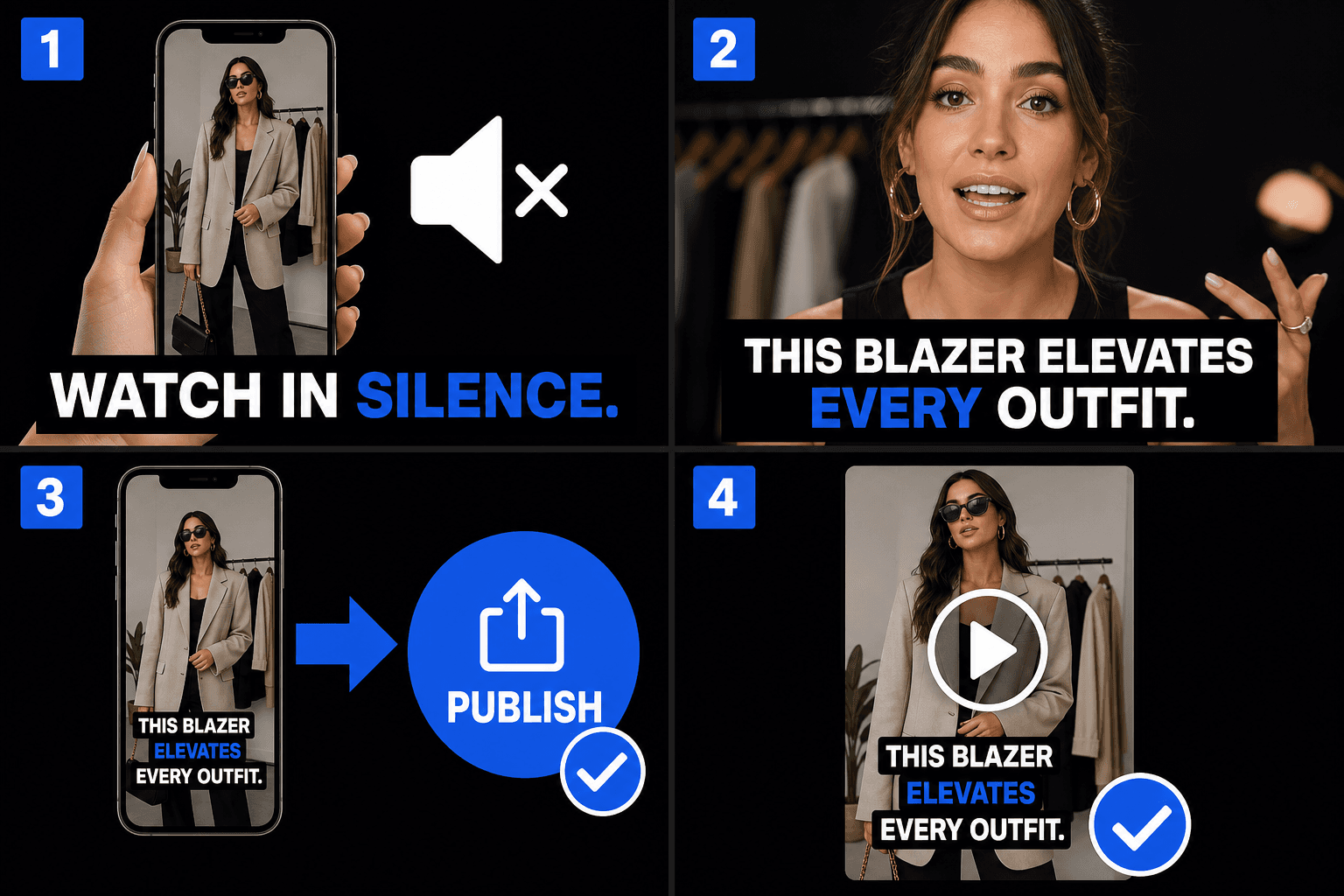
Akışlar sessiz otomatik oynatılır, bu nedenle klibinizin ilk saniyeleri görsel olarak iletişim kurmalıdır. Videoya gömülü altyazılar, ses sıfırda bile kancayı taşır ve çekimin kendisinin bir parçası oldukları için, klip TikTok, Instagram veya YouTube Shorts'a düşse bile aynı görünürler — her platformun kendi altyazı sistemine bağımlılık yoktur.
- 01
Videonuzu yükleyin
Kısa bir klip bırakın. Yapay zeka sesli diyaloğu dinler ve otomatik olarak altyazıya dönüştürür — ayrı bir altyazı dosyasına gerek yoktur.
- 02
Otomatik altyazı ve stil
Konuşma anında ekranda altyazıya dönüşür. Kalın, telefonda okunabilir bir stil seçin ve metni mobil güvenli alanının içine konumlandırın.
- 03
Önizleme ve indirme
Önizlemede altyazılı videoyu izleyin, ardından altyazılar kareye işlenmiş, TikTok, Reels ve Shorts'a gönderilmeye hazır bitmiş bir MP4 indirin.
Metni mobil güvenli alanında tutun
Her kısa video platformu, videoyun üzerine arayüz öğeleri yerleştirir. Çok aşağıya veya çok sağa yerleştirilen altyazılar kapanır. Önizleme, metninizin bu bölgelere göre nerede durduğunu gösterir, böylece indirmeden önce yerleşimi düzeltebilirsiniz, sorunu gönderdikten sonra fark etmek yerine.
- Alt şerit: açıklamalar, ses etiketleri ve ilerleme arayüzü burada bulunur.
- Sağ kenar: beğen, yorum yap ve paylaş düğmeleri dikey olarak üst üste dizilir.
- Altyazıları orta bantta tutun — önizleme bölgeyi belirgin hale getirir.
Gerçek iş akışları için tasarlandı
Sessiz izleme için altyazıları videoya göm
Konuşmacı videosundaki altyazıları stillendir
Altyazılı MP4 indirin
Sıkça Sorulan Sorular
Platformun otomatik altyazılarına güvenmek yerine neden altyazıları videoya gömmeli?
Platform altyazıları doğruluk, stil ve kullanılabilirlik açısından farklılık gösterir ve göndermeden önce onları göremezsiniz. Altyazılarınızı videoya gömmek, size her platformda aynı olan kelime seçimi ve görünüm üzerinde kontrol sağlar — ve indirmeden önce bitmiş sonucu önizlersiniz.
TikTok veya Reels düğmeleri altyazılarımı kapatacak mı?
Metin güvenli alanda kaldığı sürece hayır. Önizleme, tipik arayüz bölgelerine karşı altyazı yerleşimini gösterir, böylece videoyu indirmeden önce metni yukarı taşıyabilir veya ortalamasını sağlayabilirsiniz.
Sonunda ne alıyorum?
Altyazılar kareye işlenmiş bitmiş bir MP4 — sayfada önizlersiniz ve videoyu doğrudan indirirsiniz. Dikey 9:16 klipler ana kullanım durumudur ve ayrı bir altyazı dosyası yüklemenize veya dışa aktarmanıza gerek yoktur.
Hangi altyazı dosyası formatlarını dışa aktarabilirim?
Otomatik Altyazılar, standart SRT ve VTT dosyalarını dışa aktarmak için tasarlanmıştır, böylece zamanlanmış satırlar doğrudan YouTube'a, düzenleyicilere veya Recapo gömme adımına düşer. Ürün hala geliştirme aşamasında olduğundan, kesin format listesi büyüyebilir.
Bunun çalışması için videomun sesli konuşmaya ihtiyacı var mı?
Evet. Otomatik Altyazılar ses parçasını yazıya döker, bu nedenle özet anlatımı veya yorum gibi net konuşma içeren bir klipi gerekir. Sessiz bir klip veya sadece müzik içeren bir video, altyazı için hiçbir şey vermez.
Dışa aktarmadan önce kelime seçimini ve zamanlamayı düzeltebilir miyim?
Evet. Senkronize edilmiş transkript düzenlenebilir, böylece SRT veya VTT'yi indirmeden veya gömme aracına geçirmeden önce isimleri düzeltebilir, uzun satırları sıkılaştırabilir ve giriş-çıkış zamanlarını ayarlayabilirsiniz.
Otomatik Altyazılar aracını kullanmaya başlayın
Yukarıdaki girdileri ve temel ayarları sağlayın. Sonucunuz mevcut araç iş akışında kalacaktır.
Ücretsiz kullan