Yatay videoları 9:16, 1:1 veya 4:3'e akıllıca kırpın
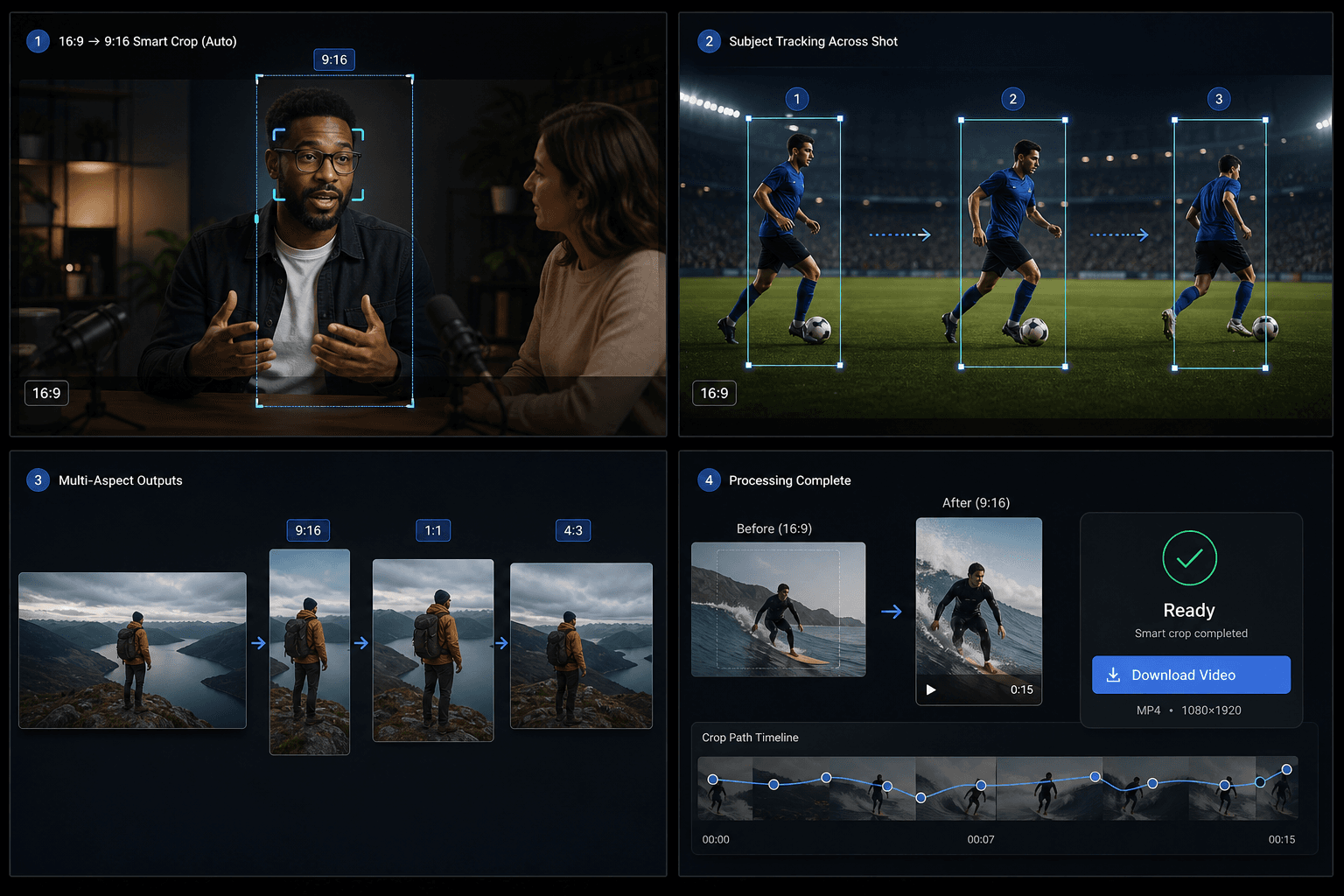
16:9 videonuzu yükleyin; Qwen ana özneyi algılar ve odak kaymasında uzun sahneleri böler. Sonucu 9:16, 1:1 veya 4:3 formatında akıllıca kırpılmış MP4 olarak dışa aktarın.
Yüklemek için tıklayın veya bir video dosyası sürükleyin
MP4, MOV, MKV, WebM, MPEG, MPG, 3GP, 3GPP desteklenmektedir
Dosya başına en fazla 2 GB
Kaynak video en fazla 20 dakika
Bu sayfadan ayrılsanız veya dil değiştirdiğinizde bile işleme arka planda devam eder.
Yapay Zeka Odak Algılama
Araç, görüntüyü her zaman ortadan kırpmak yerine Qwen Vision teknolojisini kullanarak ana konuyu tespit eder ve her segment için en ideal odak noktasını hesaplar.
- 01
16:9 video yükleyin
Kadrajını değiştirmek istediğiniz yatay kaynak dosyayı seçin.
- 02
Hedef en-boy oranını seçin
9:16 dikey, 1:1 kare veya 4:3 yatay çıktı formatını seçin.
- 03
Akıllı kırpmayı indirin
Görevi başlatın, yapay zeka odak analizinin tamamlanmasını bekleyin, ardından sonucu önizleyip indirin.
Anlamsal Alt Segmentler
Tek bir kesintisiz çekim içinde konu veya kompozisyon değiştiğinde, iş akışı çekimi alt segmentlere ayırır ve her biri için ayrı bir kırpma penceresi uygular.
- 16:9 video yükleyin
- Hedef en-boy oranını seçin
- Akıllı kırpmayı indirin
Krediler ve limitler
Görev, birleşik video-toolkit hizmeti üzerinden çalışır ve diğer Recapo araçlarıyla aynı kredi sistemini kullanır. Mevcut kaynak sınırı yaklaşık 20 dakikadır.
Gerçek iş akışları için tasarlandı
Video kapak tasarımı
Sosyal medya görseli
Önemli görsel çıkarma
Sıkça Sorulan Sorular
Dikey videolarda çalışıyor mu?
Henüz değil. Mevcut sürüm yalnızca yatay 16:9 formatındaki videoları destekliyor.
TikTok boyutlandırma aracından farkı nedir?
Standart boyutlandırma aracı sabit merkezli kırpma kullanır. Akıllı kırpma ise yapay zeka ile özneyi takip eder ve tek bir sahneyi birden fazla kırpma penceresine ayırabilir.
Hangi çıktı formatları destekleniyor?
Tek bir işlemde 9:16, 1:1 ve 4:3 formatlarını destekler.
Akıllı En Boy Oranı Kırpma aracını kullanmaya başlayın
Yukarıdaki girdileri ve temel ayarları sağlayın. Sonucunuz mevcut araç iş akışında kalacaktır.
Ücretsiz kullan