
Crop cerdas video lanskap ke rasio 9:16, 1:1, atau 4:3
Unggah video 16:9 dan biarkan Qwen mendeteksi subjek utama, memotong shot panjang saat fokus berpindah, lalu ekspor MP4 hasil crop cerdas dalam rasio 9:16, 1:1, atau 4:3.
Klik untuk mengunggah atau seret file video ke sini
Mendukung MP4, MOV, MKV, WebM, MPEG, MPG, 3GP, 3GPP
Hingga 2 GB per file
Video sumber hingga 20 menit
Proses berlanjut di latar belakang, bahkan jika Anda meninggalkan halaman ini atau mengganti bahasa.
Deteksi Fokus AI
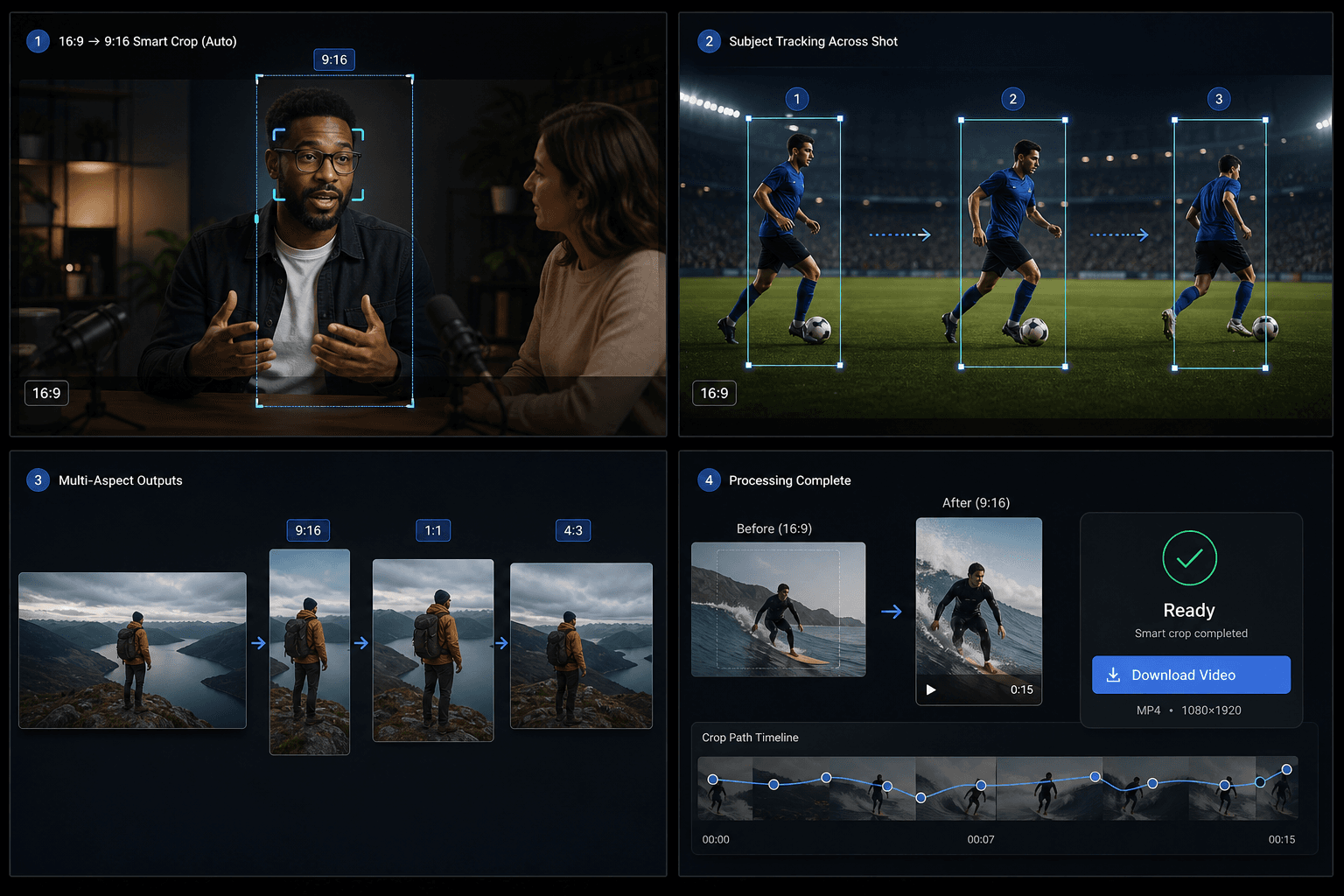
Alat ini memanfaatkan Qwen Vision untuk mendeteksi subjek utama dan menentukan titik fokus pada setiap segmen, alih-alih selalu memotong bagian tengah.
- 01
Unggah video 16:9
Pilih file sumber lanskap yang ingin Anda bingkai ulang.
- 02
Pilih rasio aspek target
Pilih output vertikal 9:16, persegi 1:1, atau lanskap 4:3.
- 03
Unduh hasil pangkas cerdas
Jalankan proses, tunggu analisis fokus AI, lalu pratinjau dan unduh hasilnya.
Sub-segmen Semantik
Ketika subjek atau komposisi berubah dalam satu bidikan fisik, pipeline akan membagi bidikan tersebut menjadi sub-segmen dan menerapkan area crop yang berbeda untuk setiap segmennya.
- Unggah video 16:9
- Pilih rasio aspek target
- Unduh hasil pangkas cerdas
Kredit dan batas
Tugas ini berjalan melalui layanan video-toolkit terpadu dan menggunakan sistem kredit yang sama dengan alat Recapo lainnya. Batas sumber saat ini adalah sekitar 20 menit.
Dirancang untuk alur kerja nyata ini
Desain sampul video
Materi kreatif media sosial
Ekstraksi visual utama
FAQ
Apakah mendukung video portrait?
Belum. Versi saat ini hanya mendukung video sumber landscape 16:9.
Apa bedanya dengan resizer TikTok?
Resizer menggunakan crop tengah yang statis. Sementara itu, Smart Crop melacak subjek dengan AI dan dapat membagi satu klip menjadi beberapa area crop.
Format output apa saja yang didukung?
9:16, 1:1, dan 4:3 dalam satu kali proses.
Mulai menggunakan Crop Rasio Aspek Cerdas
Masukkan input dan pengaturan penting di atas. Hasil Anda akan tetap berada dalam alur kerja alat saat ini.
Coba gratis