Video to Text Converter
Speech to text, di layar. Unggah video dan AI mengenali kata-kata yang diucapkan, mengubahnya menjadi teks, dan membakarnya ke dalam gambar — memberi Anda video berteks lengkap untuk dipratinjau dan diunduh. Recapo.ai.
Klik untuk mengunggah atau seret file video ke sini
Mendukung MP4, MOV, MKV, WebM, MPEG, MPG, 3GP, 3GPP
Hingga 2 GB per file
Video sumber hingga 60 menit
Very long videos may fail when extracted ASR audio exceeds 100MB — trim first if needed
Upload a video first to adjust settings and preview the result
Kata-kata yang tetap di layar, bukan di file sampingan
Tujuan speech to text di sini bukan transkrip yang harus Anda kelola — ini adalah video yang benar-benar dapat ditonton orang dengan kata-kata tepat di sana. Recapo mengenali ucapan, menuliskannya sebagai teks, dan memanggangnya ke dalam bingkai, sehingga klip selesai diputar dengan teksnya di mana saja: dibisukan di feed, di ponsel, di pemutar yang menghapus trek subtitle. Satu file, teks disertakan, tidak ada yang perlu dilampirkan.
- 01
Unggah video Anda
Tambahkan file video dari perangkat Anda, atau impor dari tautan. Wawancara, klip berbicara, kuliah, dan video podcast semuanya berfungsi.
- 02
Biarkan AI mengenali ucapan
Pengenalan ucapan AI mendengarkan audio dan mengubah kata-kata yang diucapkan menjadi baris takarir yang bersih dan mudah dibaca, disesuaikan dengan apa yang sedang dikatakan di layar.
- 03
Pratinjau dan unduh video berteks
Takarir dibakar langsung ke dalam gambar. Pratinjau video selesai di halaman, lalu unduh MP4 bertakarir — kata-kata dan rekaman bersama dalam satu file.
Wawancara dan podcast
ubah jawaban yang diucapkan menjadi teks layar sehingga kutipan dapat dibaca saat klip diputar.
Kuliah dan pembicaraan
tangkap setiap poin yang diucapkan sebagai teks yang dipanggang ke dalam video untuk ditonton tanpa suara.
Video sosial dan feed
kirim potongan berteks yang dapat dibaca dengan suara dimatikan, tanpa file subtitle untuk dikelola.
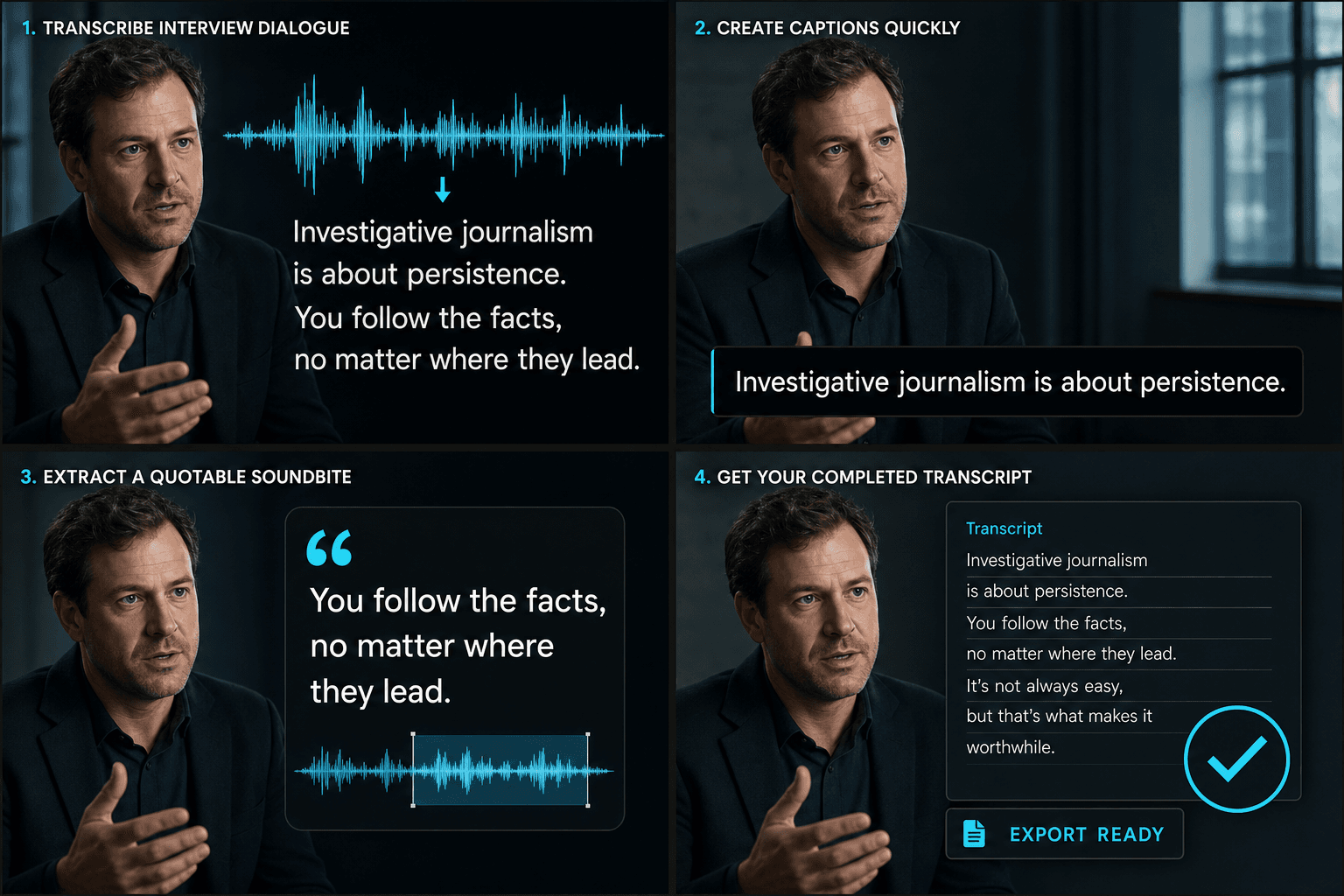
Dari audio yang diucapkan menjadi video berteks yang selesai
AI melakukan pendengaran dan penulisan dalam satu kali proses: ia mengenali ucapan, mengubahnya menjadi baris teks yang mengikuti waktu pembicaraan, dan merendernya ke dalam gambar. Yang keluar adalah satu video berteks — bukan naskah, bukan file untuk disinkronkan nanti — siap untuk dipratinjau di halaman dan diunduh sebagai MP4. Ucapan masuk; potongan yang dapat ditonton dan berteks keluar.
Dirancang untuk alur kerja nyata ini
Kenali wawancara bahasa Mandarin atau Inggris
Atur gaya takarir video
Unduh MP4 dengan takarir tempel (burn-in)
FAQ
Apakah saya mendapat file teks atau video?
Video. Recapo mengubah kata-kata yang diucapkan menjadi teks dan membakarnya ke dalam gambar, sehingga Anda mengunduh MP4 berteks lengkap — kata-kata hidup di layar bersama rekaman, bukan di file transkrip terpisah.
Apakah saya mengunggah audio atau video?
Unggah video. Recapo mendengarkan ucapan dalam audionya, menuliskannya sebagai teks, dan merender teks tersebut kembali ke video yang sama — sehingga yang Anda unduh adalah klip berteks.
Bagaimana jika nama atau istilah teknis keluar dengan salah?
Pengenalan AI menangani ucapan yang jelas dengan baik, termasuk sebagian besar nama dan jargon dalam konteks. Teks disesuaikan dengan ucapan dan dibakar ke dalam video akhir, sehingga kata-kata tetap cocok dengan apa yang dikatakan di layar.
Apa bedanya ini dengan pembuat takarir?
Speech to Text memberi Anda transkrip lengkap yang dapat diedit dari kata-kata untuk digunakan dalam naskah, catatan, atau pencarian. Pembuat takarir ditujukan untuk menghasilkan baris subtitle yang disinkronkan waktu untuk ditampilkan di layar. Banyak kreator melakukan transkripsi terlebih dahulu, mengedit teks, lalu membuat takarir darinya.
Mulai menggunakan Speech to Text
Masukkan input dan pengaturan penting di atas. Hasil Anda akan tetap berada dalam alur kerja alat saat ini.
Coba gratis