Resize Video TikTok
Pangkas video lanskap ke 9:16 untuk TikTok dan jaga agar subjek serta subtitle tetap jelas dari overlay UI. Bingkai zona aman, tambahkan teks, dan ekspor vertikal layar penuh.
Klik untuk mengunggah atau seret file video ke sini
Mendukung MP4, MOV, MKV, WebM, MPEG, MPG, 3GP, 3GPP
Hingga 2 GB per file
Proses berlanjut di latar belakang, bahkan jika Anda meninggalkan halaman ini atau mengganti bahasa.
Zona aman TikTok: di mana UI menutupi video Anda
TikTok merender antarmukanya langsung di atas video, dan area yang tertutup dapat diprediksi. Komposisikan untuk mereka dan potongan vertikal Anda akan terlihat native; abaikan mereka dan penonton akan melihat teks Anda menghilang di bawah tombol.
- 01
Impor potongan lanskap
Unggah video 16:9 atau persegi Anda, atau tarik dari tautan. Ini biasanya merupakan master yang sudah Anda terbitkan di tempat lain.
- 02
Posisikan pangkasan 9:16
Geser jendela pangkas vertikal melintasi bingkai sehingga wajah dan aksi utama tetap terpusat — apa pun yang jatuh di luar jendela akan dipangkas.
- 03
Beri teks dan ekspor
Hasilkan subtitle, jaga agar tetap di dalam area aman, bakar jika Anda ingin menguncinya, dan ekspor potongan vertikal untuk diunggah.
Tepi kanan
rel ikon — profil, suka, komentar, bagikan — bertumpuk di sisi kanan.
Bawah
teks keterangan, judul suara, dan area progres berada di atas pita terendah bingkai.
Atas
status sistem dan afordansi pencarian menyentuh tepi atas.
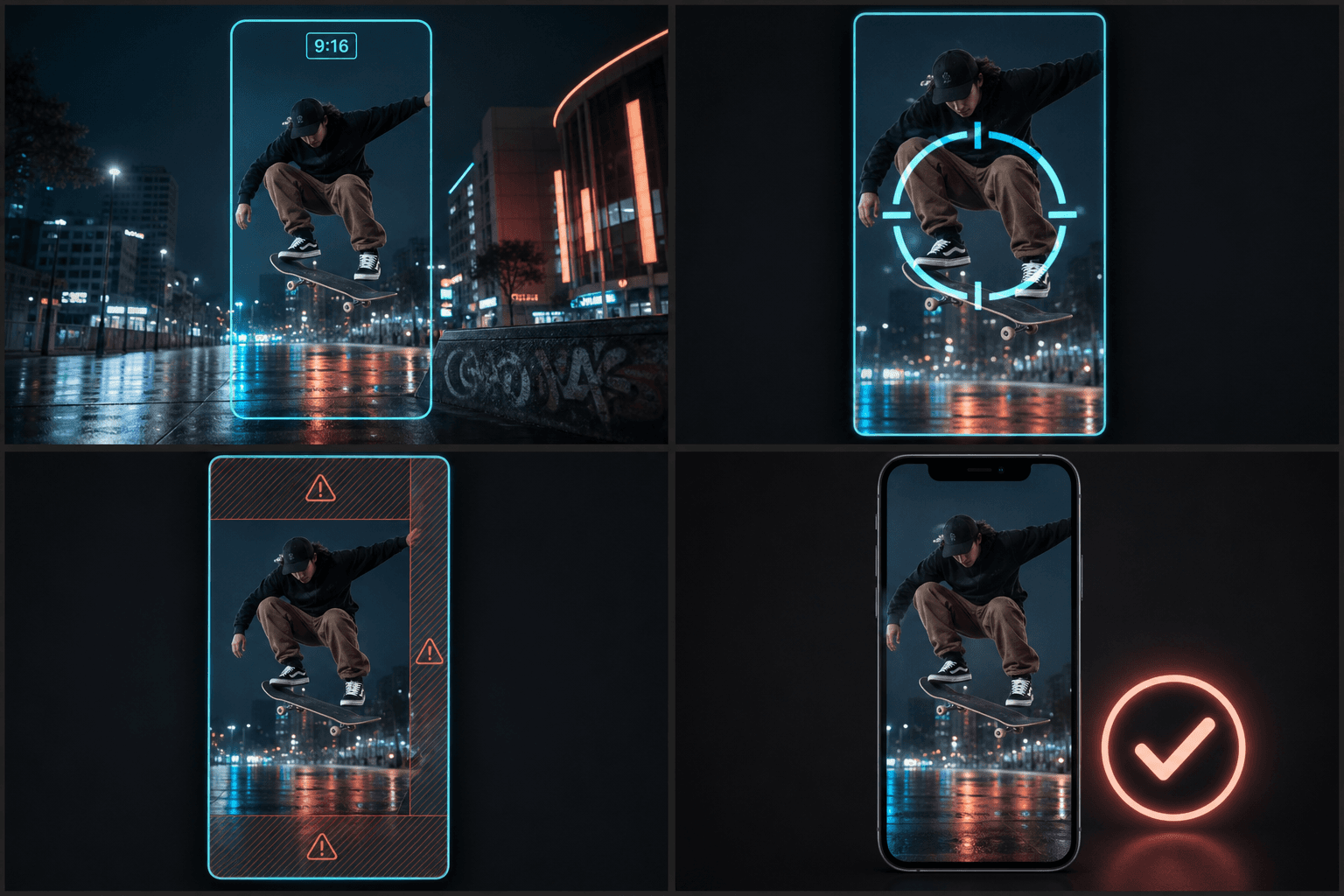
Dari 16:9 ke 9:16 tanpa kehilangan subjek
Jendela 9:16 di atas bingkai 16:9 menyimpan kira-kira sepertiga tengah gambar, sehingga pemangkasan tengah secara membabi buta akan gagal kapan pun aksinya berada di luar tengah — wawancara yang dibingkai ke satu sisi, HUD gameplay di sudut, bidikan dua orang. Memposisikan pangkasan per klip adalah yang memisahkan edit vertikal yang disengaja dari postingan ulang otomatis. Setelah memotong, ruang kerja yang sama menangani subtitle, sulih suara, dan sampul vertikal yang cocok, sehingga versi TikTok dikirim sebagai editan yang selesai alih-alih salinan yang diperas.
Dirancang untuk alur kerja nyata ini
Ubah ukuran video lanskap untuk TikTok
Pilih potong (crop), padding, atau latar belakang buram
Unduh MP4 9:16
FAQ
Rasio aspek apa yang digunakan TikTok?
Vertikal 9:16, ditampilkan layar penuh — 1080×1920 adalah target umum. Rasio lain dapat diunggah dengan baik tetapi akan dileterbox, yang mengurangi area layar dan membuat postingan terlihat digunakan ulang.
Di mana subtitle harus berada agar tombol TikTok tidak menutupinya?
Jaga agar berada di pita tengah bingkai, jelas di atas area keterangan bawah dan menjauh dari rel ikon kanan. Teks yang dipusatkan di sepertiga tengah-bawah — tetapi bukan paling bawah — adalah default paling aman.
Bisakah saya menggunakan kembali potongan 9:16 yang sama untuk Shorts dan Reels?
Sebagian besar ya — ketiganya 9:16. Overlay UI sedikit berbeda per platform, jadi periksa penempatan sampul dan teks; pengubah ukuran Reels mencakup keunikan Instagram, termasuk sampul yang dipangkas grid.
Akankah mengubah ukuran memotong bagian video saya keluar dari bingkai?
Tergantung pada kesesuaian yang Anda pilih. Pangkas untuk mengisi menjaga bingkai dari tepi ke tepi tetapi memotong sisi rekaman yang lebih lebar, sementara padding menjaga seluruh bingkai asli dan menambahkan bilah untuk mencapai 9:16. Anda memilih kompromi mana yang cocok untuk klip.
Bisakah saya mengubah ukuran rekap lanskap yang direkam dalam 16:9?
Ya. Membingkai ulang lanskap 16:9 menjadi vertikal 9:16 adalah tugas utama alat ini, sehingga klip rekap film atau komentar horizontal dapat diubah menjadi file potret siap TikTok.
Mulai menggunakan Pengubah Ukuran Video TikTok
Masukkan input dan pengaturan penting di atas. Hasil Anda akan tetap berada dalam alur kerja alat saat ini.
Coba gratis