Inteligentnie przytnij poziome wideo do 9:16, 1:1 lub 4:3
Prześlij wideo 16:9. Qwen wykryje główny obiekt, podzieli ujęcia przy zmianie kadru i wyeksportuje inteligentnie przycięty plik MP4 w 9:16, 1:1 lub 4:3.
Kliknij, aby przesłać lub przeciągnij plik wideo
Obsługiwane formaty: MP4, MOV, MKV, WebM, MPEG, MPG, 3GP, 3GPP
Do 2 GB na plik
Wideo źródłowe do 20 min
Przetwarzanie kontynuuje się w tle, nawet jeśli opuścisz tę stronę lub zmienisz język.
Wykrywanie głównego obiektu przez AI
Narzędzie wykorzystuje model Qwen Vision do rozpoznawania głównego obiektu i wyznaczania punktu skupienia dla każdego fragmentu, zamiast zawsze stosować kadrowanie do środka.
- 01
Prześlij film w formacie 16:9
Wybierz plik źródłowy w orientacji poziomej, który chcesz przyciąć.
- 02
Wybierz docelowe proporcje
Wybierz format wyjściowy: pionowy 9:16, kwadratowy 1:1 lub poziomy 4:3.
- 03
Pobierz inteligentnie przycięte wideo
Uruchom zadanie, poczekaj na analizę AI, a następnie wyświetl podgląd i pobierz gotowy plik.
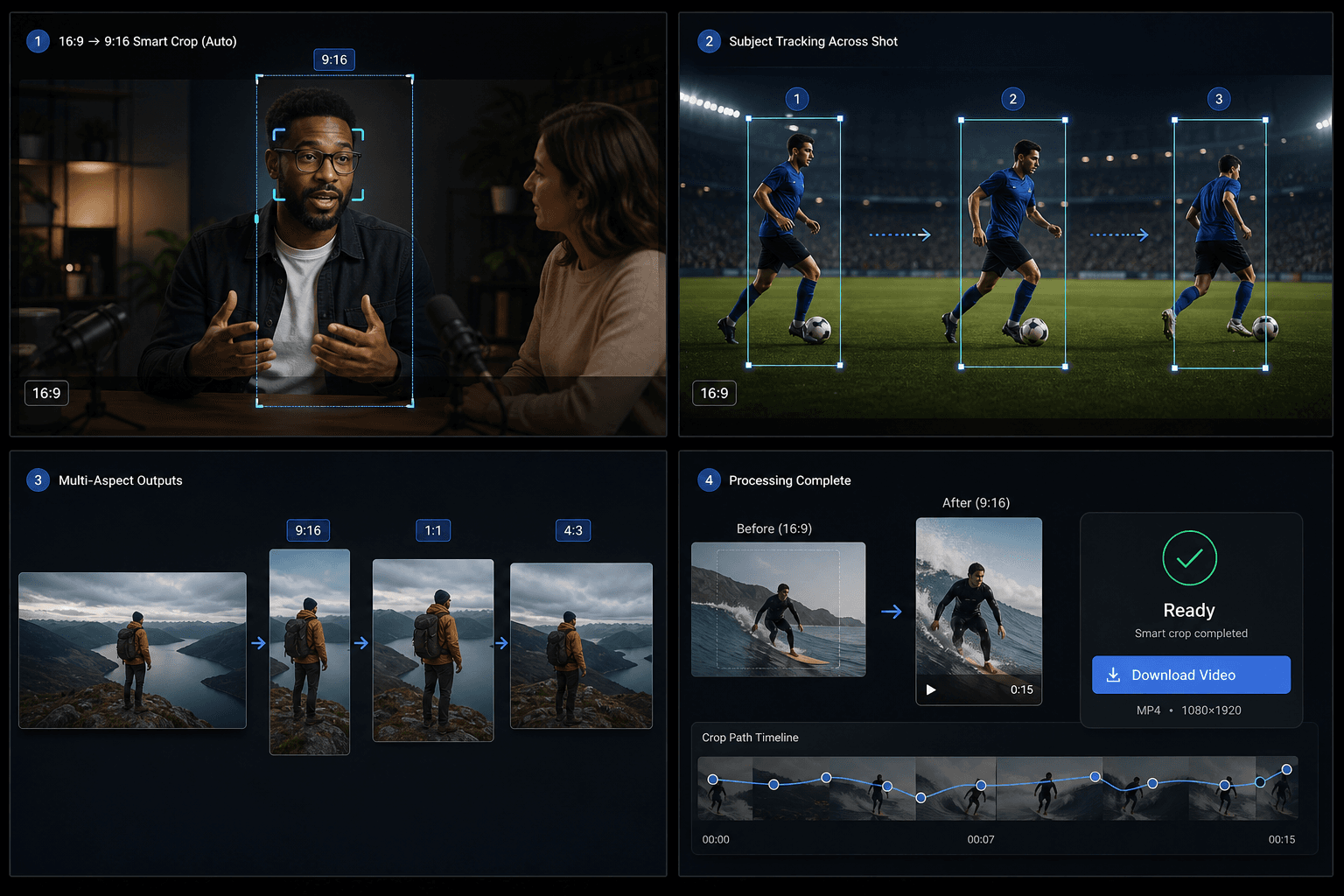
Podsegmenty semantyczne
Gdy w obrębie jednego ciągłego ujęcia zmienia się temat lub kompozycja, system dzieli je na podsegmenty i stosuje osobne okno kadrowania do każdego z nich.
- Prześlij film w formacie 16:9
- Wybierz docelowe proporcje
- Pobierz inteligentnie przycięte wideo
Kredyty i limity
Zadanie jest uruchamiane przez ujednoliconą usługę video-toolkit i korzysta z tego samego systemu kredytów co inne narzędzia Recapo. Obecny limit źródła wynosi około 20 minut.
Stworzone z myślą o tych zastosowaniach
Projektowanie okładek wideo
Kreacja do mediów społecznościowych
Wyodrębnianie kluczowych elementów wizualnych
Najczęstsze pytania
Czy obsługuje pionowe wideo?
Jeszcze nie. Obecna wersja wymaga materiału źródłowego w poziomym formacie 16:9.
Czym różni się to od narzędzia do zmiany rozmiaru w TikToku?
Standardowe narzędzie stosuje stałe kadrowanie od środka. Inteligentne kadrowanie śledzi obiekt za pomocą AI i potrafi podzielić jedno ujęcie na wiele różnych kadrów.
Jakie formaty wyjściowe są obsługiwane?
9:16, 1:1 i 4:3 w jednym zadaniu.
Zacznij korzystać z Inteligentne kadrowanie proporcji
Wprowadź plik i skonfiguruj niezbędne ustawienia powyżej. Twój wynik pozostanie w bieżącym procesie pracy narzędzia.
Wypróbuj za darmo