비리비리 영상 리사이저
Bilibili용 동영상 준비: 메인 업로드를 위해 16:9 마스터를 유지하고, 스토리 모드를 위해 9:16 세로를 크롭하고, 가로형 커버를 계획하세요 — 하나의 작업 공간에서 두 가지 포맷을 모두 처리합니다.
클릭하여 업로드하거나 비디오 파일을 끌어다 놓으세요
MP4, MOV, MKV, WebM, MPEG, MPG, 3GP, 3GPP 지원
파일당 최대 2GB
이 페이지를 떠나거나 언어를 변경해도 백그라운드에서 처리가 계속됩니다.
Bilibili 동영상 크기: 주류는 16:9, 스토리 모드는 9:16
Bilibili의 장편 해설, 애니메이션 분석 및 요약 동영상은 압도적으로 16:9로 공개됩니다. 플레이어, 피드 카드, 시청자 습관 모두 가로형을 전제로 합니다. 스토리 모드는 플랫폼의 세로형 표면입니다: 모바일에서 스와이프하여 보는 짧은 9:16 클립으로, 종종 전체 가로형 동영상으로 시청자를 유도하는 티저로 사용됩니다. 일반적인 워크플로는 정확히 이 쌍을 이루는 것입니다. 16:9 메인 컷을 게시한 다음, 이를 가리키는 1분 길이의 세로형 하이라이트를 스토리 모드에 푸시합니다.
- 01
마스터 컷 불러오기
완성된 16:9 동영상을 업로드하거나 링크로 가져옵니다. 이는 변경되지 않고 Bilibili 기본 업로드로 유지됩니다.
- 02
세로형 컴패니언 자르기
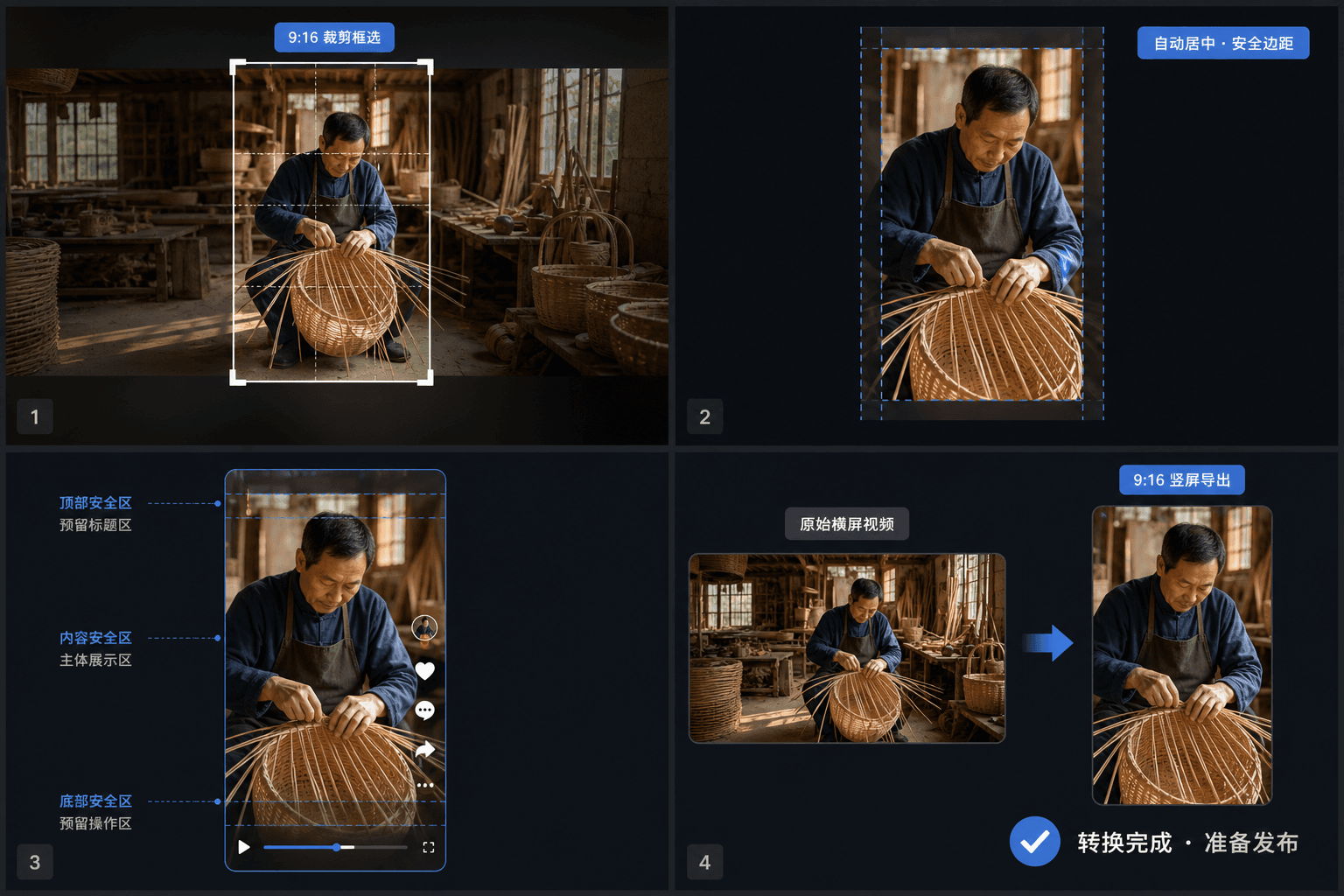
스토리 모드를 위해 9:16 버전을 크롭하되, 무작정 중앙 크롭에 의존하기보다 장면마다 피사체 위에 창을 배치하세요.
- 03
커버를 쌍으로 묶고 내보내기
키프레임에서 가로형 커버를 만들고 두 컷을 모두 내보낸 다음, 가로형 메인 동영상과 세로형 티저를 함께 게시하세요.
메인 업로드
피드와 플레이어가 설계된 포맷인 16:9 가로형.
스토리 모드 / 모바일 스와이프 피드
짧고 후킹 중심의 9:16 세로형.
메인 피드를 위해 세로형 스마트폰 클립을 16
9로 레터박싱하지 마세요. 대신 스토리 모드에 게시하세요.
Bilibili 커버는 가로형입니다 — 별도로 계획하세요
첫 번째 프레임이 커버로 사용되는 경우가 많은 Douyin이나 TikTok과 달리, Bilibili는 디자인된 가로형 썸네일을 기대합니다. 피드에서는 16:10 카드에 가깝습니다. 이 플랫폼에서는 텍스트가 많은 커버가 일반적이므로, 커버 메이커에서 강력한 키프레임을 추출하고 그 위에 제목을 배치하는 것이 현지 관습에 맞습니다. 세로형 스토리 모드 클립에는 별도의 커버가 필요하지 않으므로, 디자인된 하나의 가로형 썸네일로 Bilibili 전체 존재감을 커버할 수 있습니다.
중국 외부에서 Bilibili로 게시하기
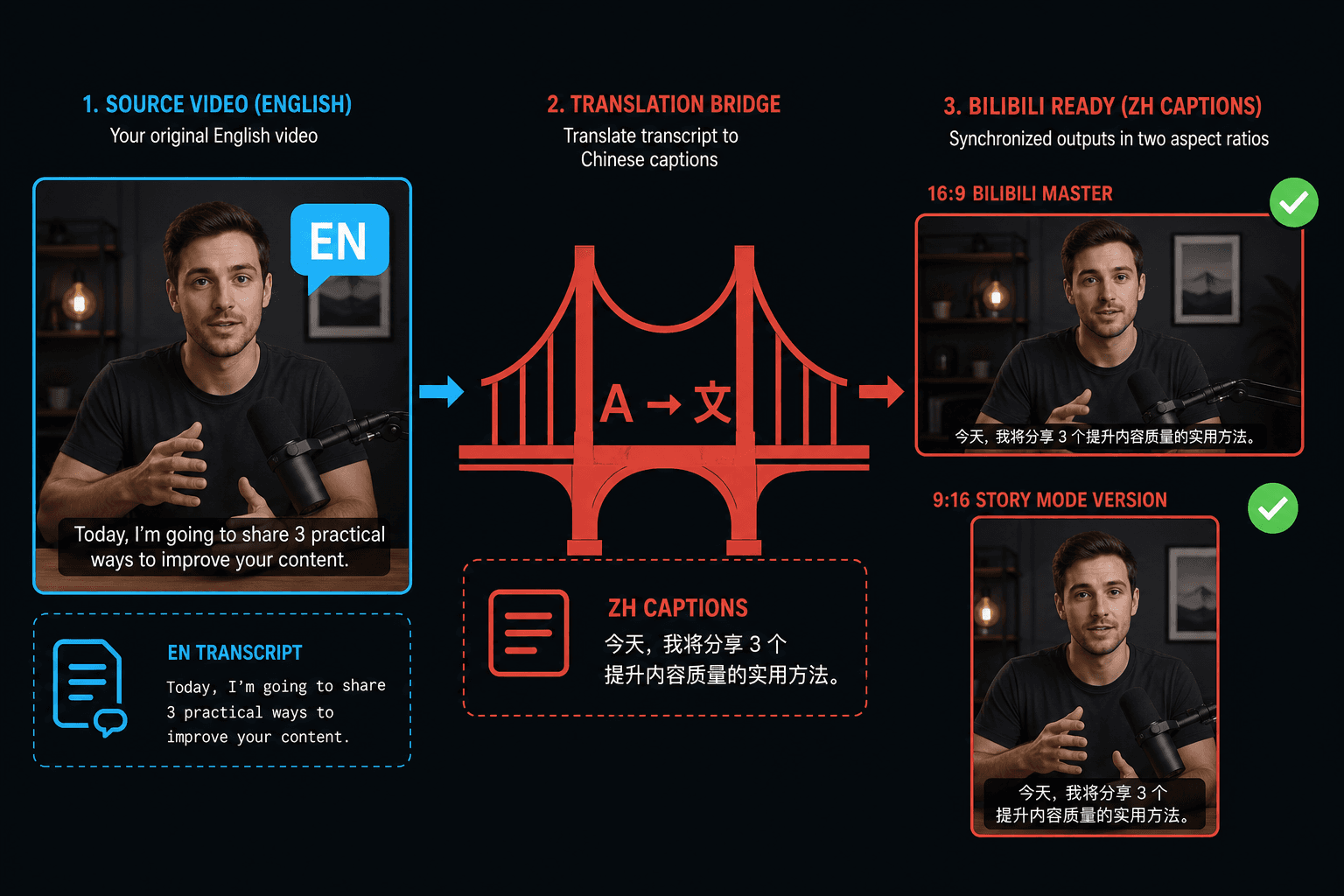
소스 콘텐츠가 영어인 경우 크기 조정은 쉬운 부분입니다. 시청자는 중국어 자막을 기대합니다. 동일한 작업 공간이 오디오를 텍스트로 변환하고 자막 트랙을 중국어로 번역하여 16:9 마스터와 9:16 스토리 모드 컷 모두에 굽기 때문에, 현지화된 버전이 하나의 편집으로 동기화를 유지합니다.
실제 작업 환경에 맞춘 설계
가로 영상을 9:16 세로 비율로 변환
크롭(자르기), 여백 추가, 흐린 배경 중 하나를 선택하세요.
세로형 MP4 다운로드
자주 묻는 질문
Bilibili에 가로형과 세로형 중 어떤 동영상을 업로드해야 하나요?
메인 피드에는 가로형 16:9입니다. 이는 해설 및 요약 콘텐츠의 지배적인 포맷으로 남아 있습니다. 세로형 9:16은 스토리 모드 클립, 일반적으로 전체 가로형 동영상에 대한 짧은 티저로만 사용하세요.
Bilibili 커버의 비율은 어떻게 되나요?
16:10에 가까운 가로형 카드입니다. 다른 플랫폼의 세로형 커버를 재사용하기보다 자체 자산으로 디자인하세요. 굵은 제목이 있는 가로형 프레이밍은 피드 표시와 일치합니다.
Bilibili 시청자를 위해 동영상을 현지화할 수 있나요?
네. 오디오에서 자막을 생성하고 트랙을 중국어로 번역한 다음 내보내기 전에 동영상에 굽습니다. 메인 컷과 세로형 스토리 모드 버전 모두에 번역된 자막을 포함할 수 있습니다.
크기 조정 시 요약 영상 일부가 크롭되나요?
맞춤 모드에 따라 다릅니다. 더 좁은 비율로 크롭하면 가장자리가 잘리지만, 패딩은 전체 프레임을 보이게 하기 위해 막대를 추가합니다. 자막이나 토킹헤드 코너가 있는 해설 동영상의 경우 패딩은 일반적으로 중요한 부분을 시야에 유지합니다.
크기 조정기가 크기 외에 다른 것을 변경하나요?
역할은 프레임 크기와 종횡비만 조정하는 것입니다. 캡션이나 오디오를 다시 작성하지 않으므로, 리프레이밍된 파일이 내보내진 후에도 Bilibili에 업로드하기 전에 Recapo 압축, 캡션 또는 포맷 단계를 거칠 수 있습니다.