TTS 영상 메이커
일반 텍스트를 AI 음성, 동기화된 자막, 그리고 당신의 영상으로 완성된 동영상으로 변환하세요. 카메라나 마이크가 필요 없습니다. Recapo.ai에서 얼굴 없는 동영상을 빠르게 만들어 보세요.
클릭하여 업로드하거나 비디오 파일을 끌어다 놓으세요
MP4, MOV, MKV, WebM, MPEG, MPG, 3GP, 3GPP 지원
파일당 최대 2GB
원본 영상 최대 3분
이 페이지를 떠나거나 언어를 변경해도 백그라운드에서 처리가 계속됩니다.
빈 페이지에서 만드는 얼굴 없는 동영상
얼굴 없는 채널의 성패는 제작 속도에 달려 있습니다. 이 형식이 작동하는 이유는 한 사람이 카메라에 등장하지 않고도 매일 게시할 수 있기 때문입니다. 텍스트 음성 변환 동영상은 내레이션 녹음과 수동 자막 타이밍 맞추기라는 가장 느린 두 단계를 제거합니다. 당신이 단어와 클립을 제공하면, 도구가 음성, 자막 트랙, 조립된 초안을 제공합니다.
- 01
텍스트에서 시작하기
대본이나 기사 스타일의 초안을 붙여넣으세요. 소스 동영상만 있는 경우, 먼저 거기서 요약이나 리캡 대본을 생성하세요.
- 02
음성 및 비주얼 추가
내레이션 음성을 선택한 다음 로컬 업로드 또는 링크 가져오기를 통해 영상을 첨부하세요. 자막은 음성과 동기화되어 생성됩니다.
- 03
렌더링 및 게시
동영상 초안을 내보내고, 자막 스타일이나 커버를 다듬고, Shorts를 위해 9:16으로 자른 다음 플랫폼에 게시하세요.
리캡 및 해설 채널
이야기를 대본화하고, 음성을 입히고, 게시하세요.
설명 및 리스트 기사
촬영 없이 개요를 내레이션 동영상으로 변환하세요.
멀티 플랫폼 게시
하나의 텍스트 소스에서 Shorts, Reels, TikTok용으로 내보내기.
TTS 동영상 생성기가 실제로 생성하는 것
출력물은 슬라이드쇼에 MP3를 붙인 것이 아닙니다. 구조화된 초안을 얻게 됩니다. 텍스트에서 렌더링된 AI 음성 트랙, 음성과 단어 단위로 일치하며 편집 가능한 자막 트랙, 내레이션에 맞춰 배치된 당신의 영상. 그 후 최종 내보내기 전에 모든 부분을 여전히 조정할 수 있습니다. 대사의 수정, 자막 스타일 변경, 클립 교체 등입니다.
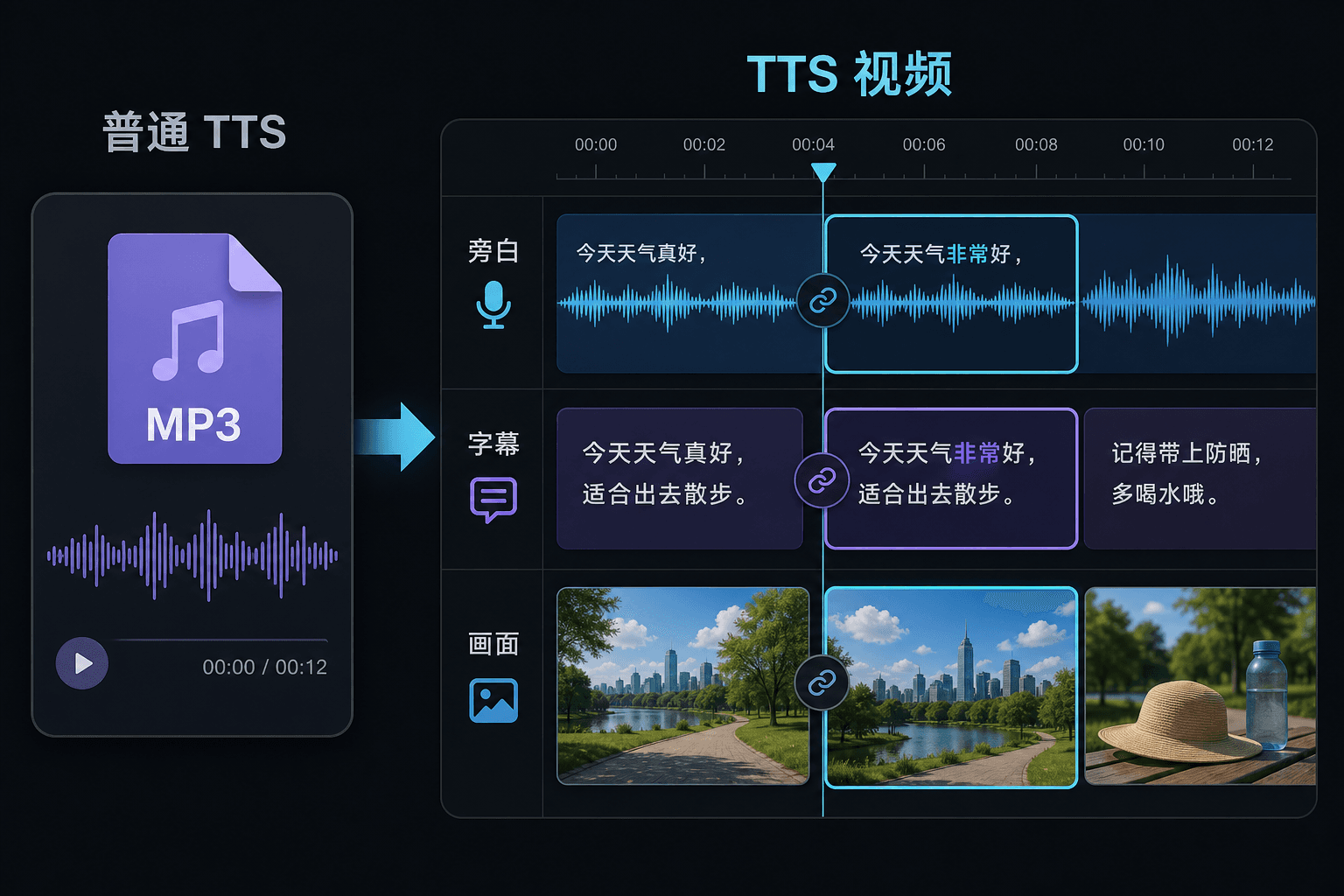
텍스트 음성 변환 동영상 vs 일반 텍스트 음성 변환
일반 TTS 도구는 오디오 파일을 건네주고 에디터에서의 작업은 당신의 운에 맡깁니다. 여기서는 동영상 프로젝트 내에서 음성이 생성되므로 타이밍, 자막, 이미지가 이미 연결되어 있습니다. 이 차이는 수정 시 가장 중요합니다. 텍스트를 변경하면 내레이션과 자막이 함께 업데이트되어 수동 재동기화를 강제하지 않습니다.
실제 작업 환경에 맞춘 설계
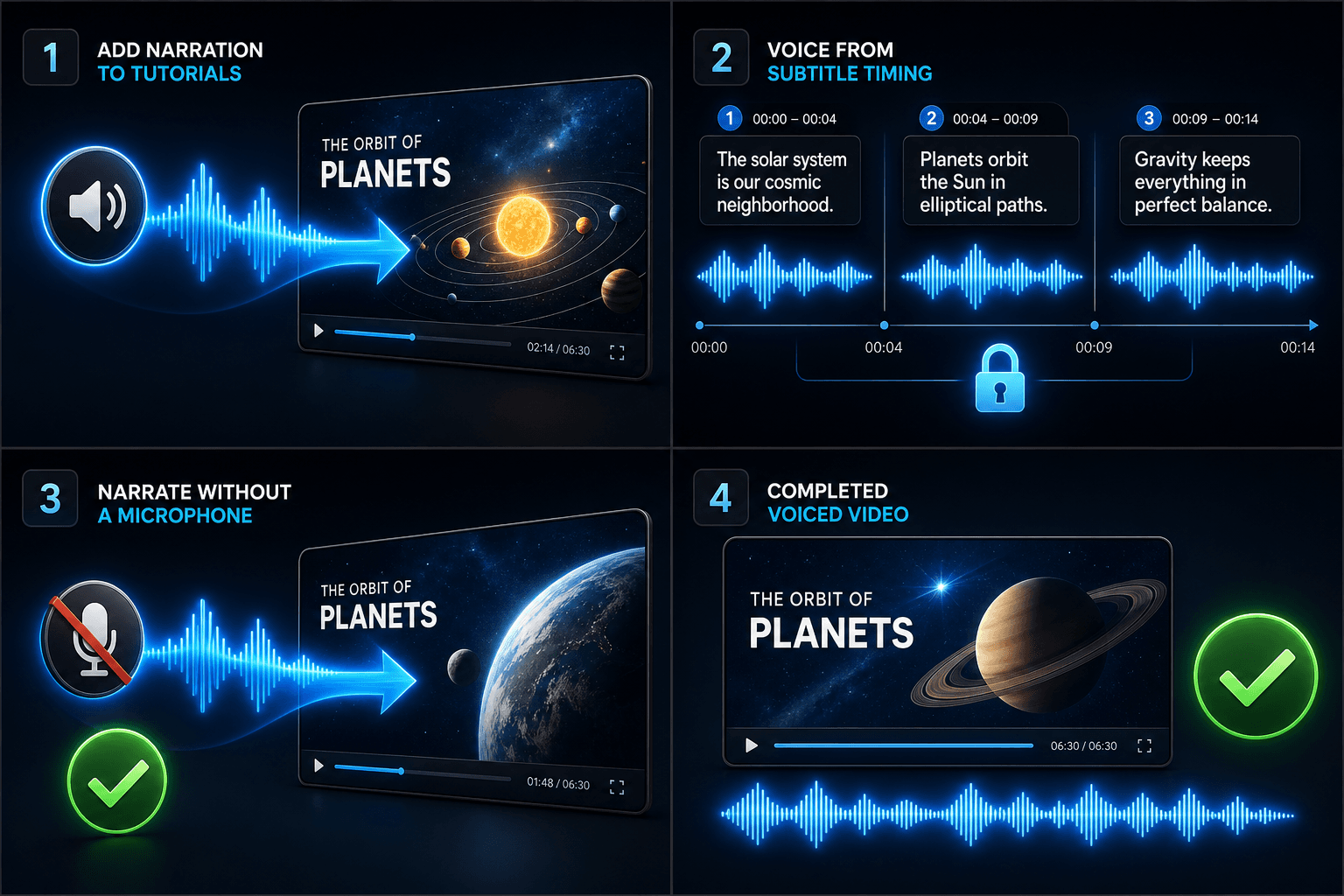
튜토리얼에 내레이션 추가
자막 타이밍에 맞춰 비디오에 보이스오버 추가
마이크 없이 내레이션 생성
자주 묻는 질문
텍스트 음성 변환 동영상을 만들려면 내 자신의 영상이 필요합니까?
일종의 시각적 소스가 필요합니다. 로컬 클립을 업로드하거나 링크에서 가져오세요. 많은 크리에이터가 긴 소스 동영상에서 하이라이트를 가져오고 내레이션이 그 위에 이야기를 전달하게 합니다.
자막이 하드코딩되어 있습니까, 아니면 편집할 수 있습니까?
편집 가능합니다. 자막은 음성과 동기화되어 생성되며, 텍스트를 편집하고, 스타일을 변경하고, SRT/VTT를 내보내거나, 최종 렌더링에 자막을 입힐 수 있습니다. 당신의 선택입니다.
이 방법으로 Shorts 및 TikTok용 세로 동영상을 만들 수 있습니까?
예. 초안이 생성된 후 9:16으로 자르고, 세로 시청을 위해 자막 배치를 조정하고, 플랫폼별로 내보낼 수 있습니다.
무엇을 입력합니까, 텍스트입니까 동영상 파일입니까?
텍스트를 붙여넣습니다. 동영상이 아닙니다. 텍스트 음성 변환 동영상은 입력된 대본이나 붙여넣은 단어를 읽고 음성 내레이션 오디오 파일을 출력합니다. 영상을 처리하지 않으므로, 리캡을 위해 이미 작성한 대본의 음성을 입히는 데 사용하세요.
내레이션 음성과 말하기 속도를 선택할 수 있습니까?
예. 음성을 선택하고 페이스와 톤을 조정하여 얼굴 없는 채널이나 해설 채널에 맞게 읽기를 조정할 수 있습니다. Recapo는 아직 개발 중이므로 사용 가능한 음성 및 컨트롤은 시간이 지남에 따라 확장되고 있습니다.
완료되면 무엇을 돌려받습니까?
다운로드하여 자막 및 클립과 함께 동영상 타임라인에 드롭할 수 있는 내레이션 오디오 트랙을 얻게 됩니다. 음악과 믹싱하고 Recapo 워크플로의 나머지를 통해 내보낼 준비가 됩니다.