가로형 영상을 9:16, 1:1, 4:3으로 스마트 크롭
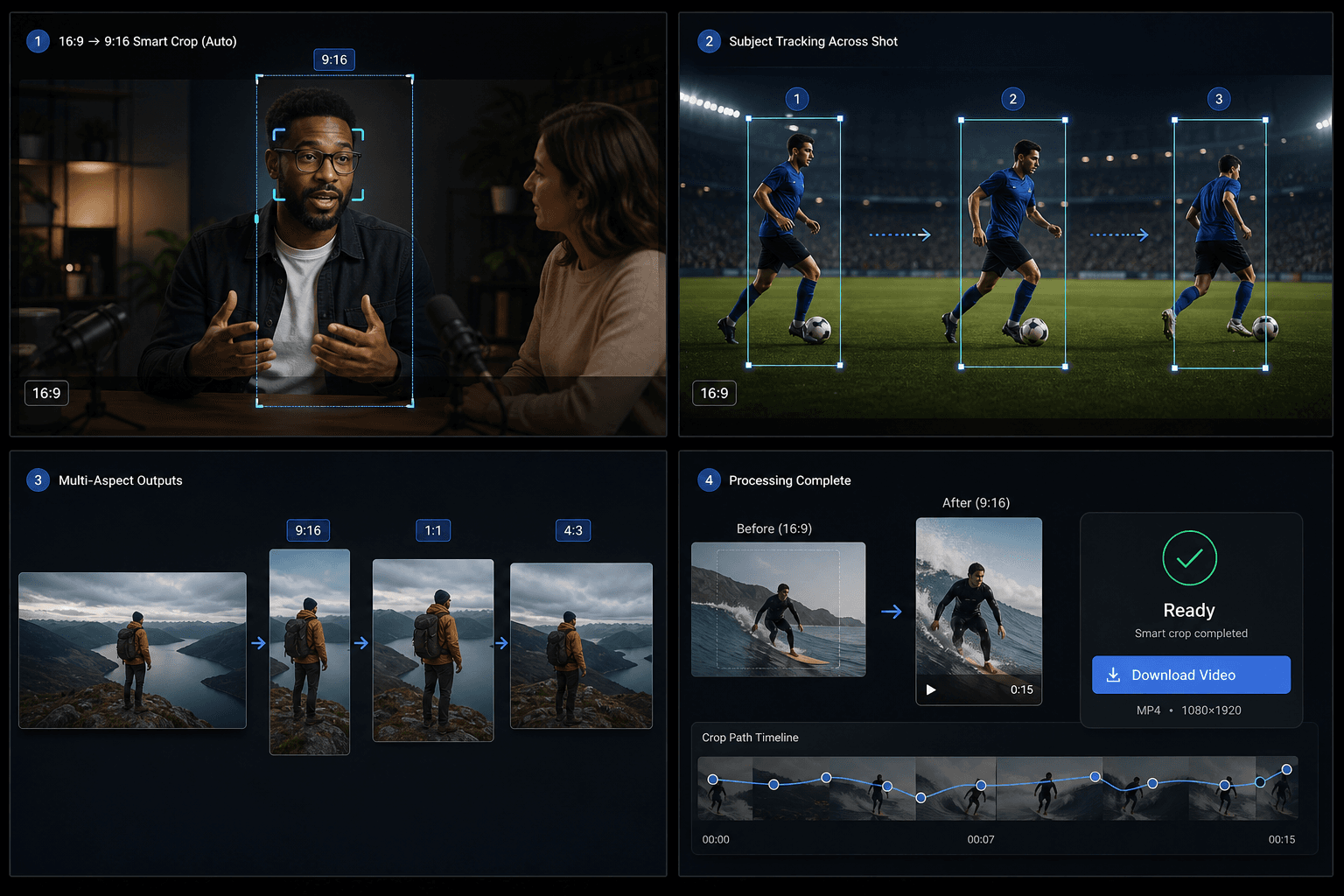
16:9 영상을 업로드하면 Qwen이 주요 피사체를 감지하고, 초점이 이동할 때 긴 장면을 자동으로 분할합니다. 9:16, 1:1, 4:3 비율로 스마트 크롭된 MP4를 바로 내보내세요.
클릭하여 업로드하거나 비디오 파일을 끌어다 놓으세요
MP4, MOV, MKV, WebM, MPEG, MPG, 3GP, 3GPP 지원
파일당 최대 2GB
원본 영상 최대 20분
이 페이지를 떠나거나 언어를 변경해도 백그라운드에서 처리가 계속됩니다.
AI 스마트 포커스 감지
단순한 중앙 크롭 방식에서 벗어나 Qwen Vision 기술을 활용해 각 구간의 주요 피사체를 정확히 식별하고, 최적의 초점 위치를 자동으로 계산합니다.
- 01
16:9 영상 업로드
리프레이밍할 가로형 원본 파일을 선택합니다.
- 02
출력 화면비 선택
9:16 세로, 1:1 정사각형, 4:3 가로 중 원하는 출력 형식을 선택합니다.
- 03
스마트 크롭 다운로드
작업을 실행하고 AI 포커스 분석이 완료되면 결과를 미리 보고 다운로드합니다.
의미 기반 하위 세그먼트
단일 샷 내에서 피사체나 구도가 바뀌면, 파이프라인이 해당 샷을 하위 세그먼트로 분할하여 각 세그먼트에 별도의 크롭 창을 적용합니다.
- 16:9 영상 업로드
- 출력 화면비 선택
- 스마트 크롭 다운로드
크레딧 및 제한
이 작업은 통합 비디오 툴킷 서비스를 통해 실행되며 다른 Recapo 도구와 동일한 크레딧 시스템을 사용합니다. 현재 소스 제한은 약 20분입니다.
실제 작업 환경에 맞춘 설계
비디오 커버 디자인
소셜 크리에이티브
핵심 비주얼 추출
자주 묻는 질문
세로 영상도 지원하나요?
아직은 지원하지 않습니다. 현재 버전에서는 16:9 가로 비율의 원본 영상만 처리할 수 있습니다.
TikTok 리사이저와 어떤 점이 다른가요?
기존 리사이저는 고정된 중앙 크롭 방식을 사용합니다. 반면 스마트 크롭은 AI로 피사체를 추적하고, 하나의 샷을 여러 개의 크롭 영역으로 분할할 수 있습니다.
어떤 출력 비율을 지원하나요?
하나의 작업에서 9:16, 1:1, 4:3 비율을 모두 지원합니다.