온라인 동영상 워터마크 제거
플랫폼 배지, 로고 또는 텍스트 마크가 있는 동영상을 업로드하세요. AI가 워터마크 영역을 자동으로 감지하므로 수동으로 상자를 그릴 필요가 없습니다. 크레딧을 사용한 통합 비디오 툴킷 처리.
클릭하여 업로드하거나 비디오 파일을 끌어다 놓으세요
MP4, MOV, MKV, WebM, MPEG, MPG, 3GP, 3GPP 지원
파일당 최대 2GB
원본 영상 최대 30분
Upload a video first to adjust settings and preview the result
실제 결과 미리보기
로컬 처리 전후 고정 및 이동 워터마크가 포함된 동일 실사 클립을 비교해 보세요.
원클릭 제거가 좋은 이유
수동 워터마크 도구는 프레임마다 상자를 그리도록 강제합니다. Recapo는 클라우드에서 감지 및 복원을 실행합니다. 업로드하고 작업을 시작하세요.
- 01
동영상 업로드
로컬 MP4, MOV 또는 기타 일반적인 형식을 추가하세요. 워터마크 상자는 필요 없습니다.
- 02
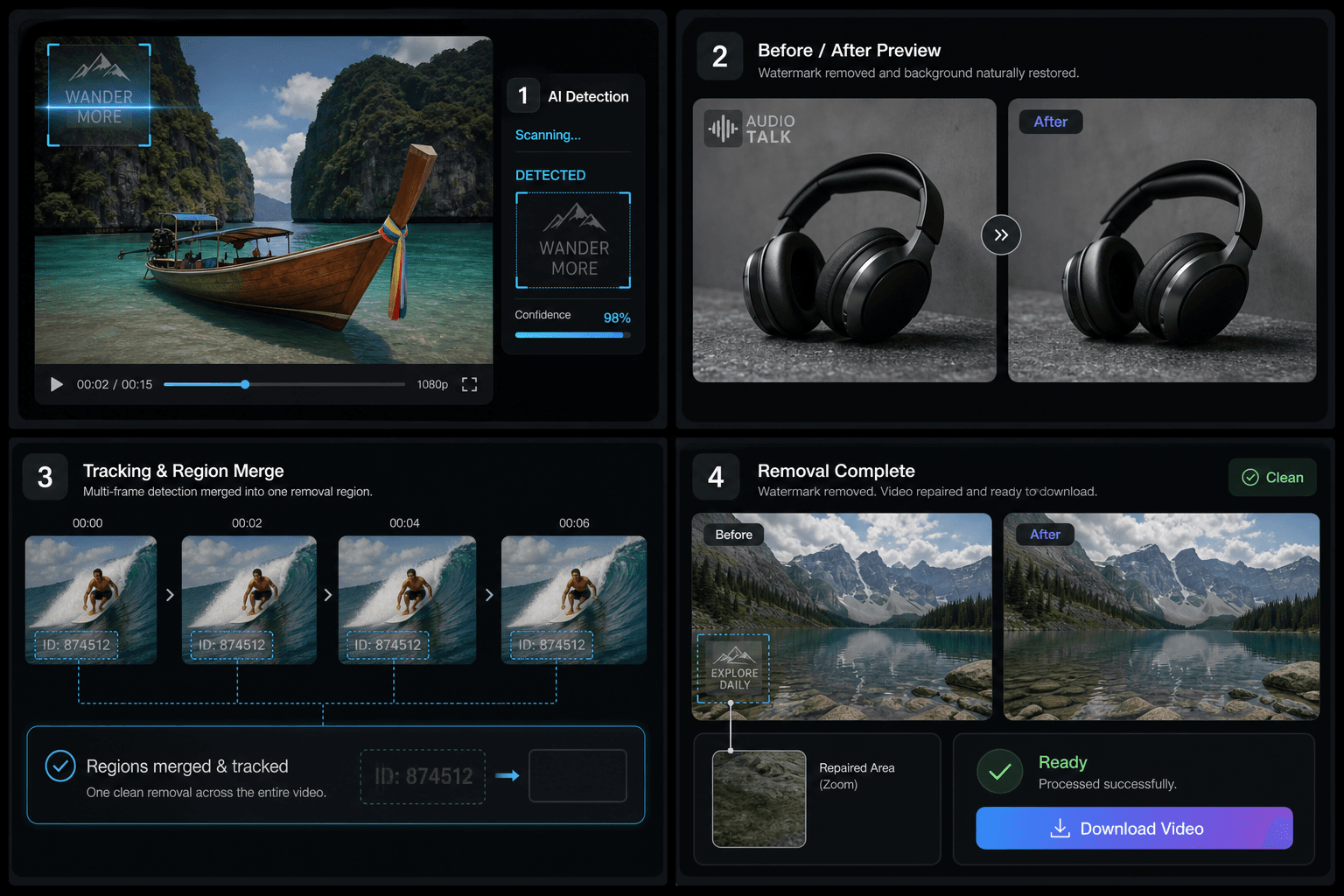
AI 자동 감지
정적 모서리와 가볍게 움직이는 마크를 찾기 위해 여러 타임스탬프에서 프레임이 샘플링됩니다.
- 03
깨끗한 파일 다운로드
복원된 MP4를 저장하고 압축, 자막 또는 게시를 계속하세요.
모서리 로고, 플랫폼 ID 및 반투명 텍스트를 감지합니다.
샘플 시간 동안 동일한 마크의 감지를 병합합니다.
가볍게 움직이는 마크를 합집합 영역으로 커버합니다.
최적의 용도 및 제한 사항
이미지에 오버레이된 플랫폼 배지, 채널 로고 및 검토 스탬프에 잘 작동합니다. 전체 화면 마크, 피사체와 융합된 텍스트 또는 30분을 초과하는 동영상은 제한될 수 있습니다.
실제 작업 환경에 맞춘 설계
다운로드 파일에서 플랫폼 워터마크 제거
재편집 전 로고 제거
검토용 복사본에서 ID 제거
자주 묻는 질문
수동으로 상자를 그려야 하나요?
아니요. 동영상을 업로드하고 작업을 시작하면 AI가 워터마크 영역을 찾아줍니다.
움직이는 워터마크도 처리할 수 있나요?
가벼운 움직임은 여러 프레임을 샘플링하고 마크를 하나의 복원 영역으로 병합하여 처리됩니다.
화질이 떨어지나요?
복원된 영역은 주변 픽셀로 채워집니다. 해당 부분은 약간 흐릿해 보일 수 있지만 전체 인코딩은 일관성을 유지합니다.
워터마크 제거는 무료인가요?
정적 및 동적 제거 모두 시작된 1분당 60크레딧이 소요됩니다. 실패한 작업에는 예약된 크레딧이 반환됩니다.