
Slimme landschapvideo's bijsnijden naar 9:16, 1:1 of 4:3
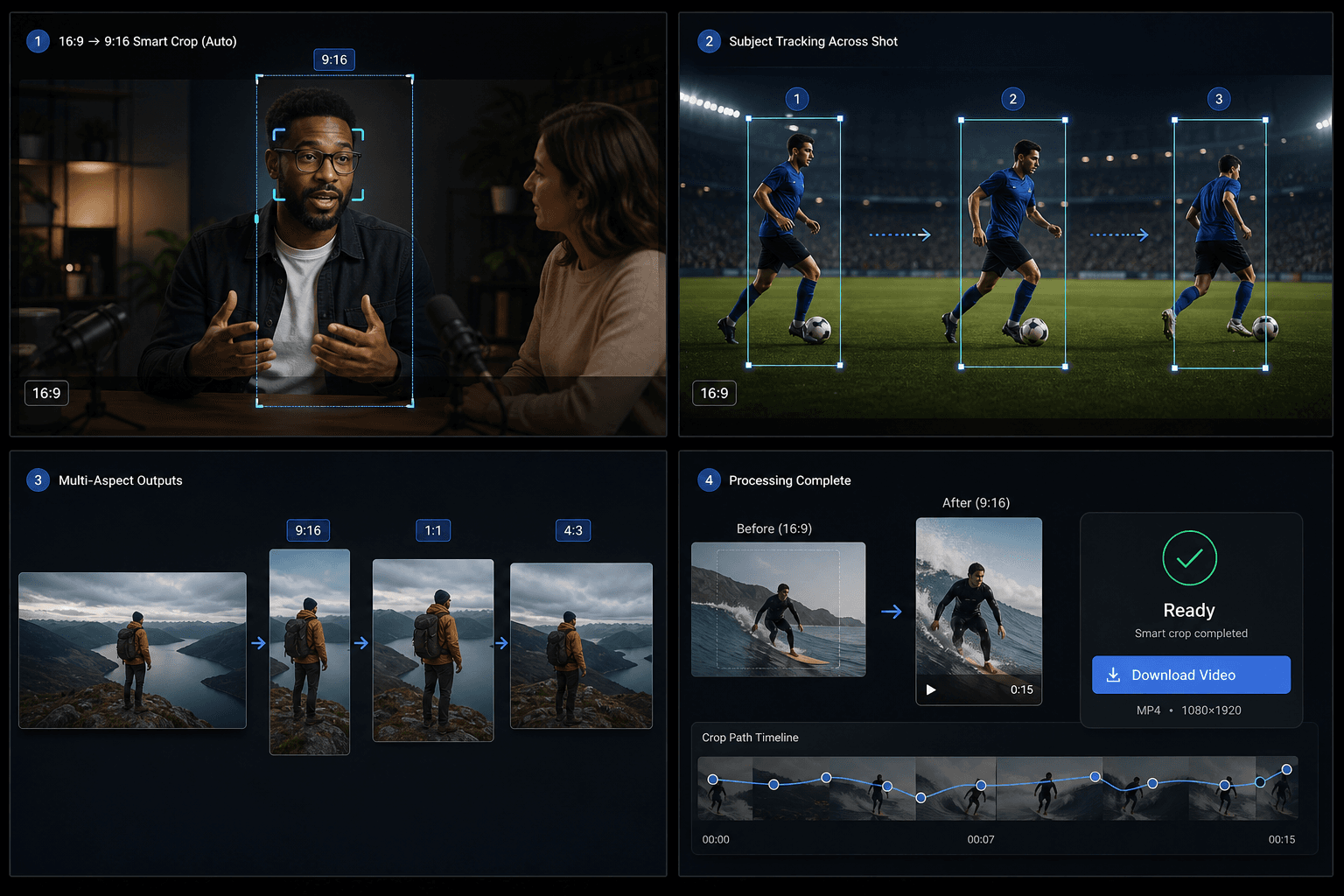
Upload een 16:9-video en laat Qwen het hoofdonderwerp detecteren, lange shots opsplitsen wanneer de focus verschuift, en een slim bijgesneden MP4 exporteren in 9:16, 1:1 of 4:3.
Klik om te uploaden of sleep een videobestand hiernaartoe
Ondersteunt MP4, MOV, MKV, WebM, MPEG, MPG, 3GP, 3GPP
Tot 2 GB per bestand
Bronvideo tot 20 minuten
De verwerking gaat op de achtergrond door, zelfs als je deze pagina verlaat of van taal wisselt.
AI-focusdetectie
De tool maakt gebruik van Qwen Vision om het hoofdonderwerp te identificeren en voor elk segment een focuspunt te berekenen, in plaats van standaard centraal bij te snijden.
- 01
Upload een 16:9-video
Kies het horizontale bronbestand dat je wilt herkaderen.
- 02
Kies de gewenste beeldverhouding
Selecteer 9:16 verticaal, 1:1 vierkant of 4:3 horizontaal als uitvoerformaat.
- 03
Download de slimme uitsnede
Start de taak, wacht op de AI-focusanalyse en bekijk en download vervolgens het resultaat.
Semantische subsegmenten
Wanneer het onderwerp of de beeldcompositie binnen één shot verandert, splitst de pipeline de opname in subsegmenten en past het voor elk segment een eigen uitsnede toe.
- Upload een 16:9-video
- Kies de gewenste beeldverhouding
- Download de slimme uitsnede
Credits en limieten
De taak wordt uitgevoerd via de uniforme video-toolkit-service en gebruikt hetzelfde creditsysteem als andere Recapo-tools. De huidige bronlimiet is ongeveer 20 minuten.
Gemaakt voor deze workflows
Video-cover ontwerpen
Creatieve content voor sociale media
Belangrijkste beelden extraheren
Veelgestelde vragen
Werkt het ook op staande video's?
Nog niet. De huidige versie vereist een liggende video (16:9) als bron.
Wat is het verschil met de TikTok-resizer?
De resizer gebruikt een vaste uitsnede in het midden. Smart Crop volgt het onderwerp met behulp van AI en kan één shot opsplitsen in meerdere uitsneden.
Welke uitvoerformaten worden ondersteund?
9:16, 1:1 en 4:3 in één taak.
Start met Slimme beeldverhouding-crop
Voer hierboven de invoer en de belangrijkste instellingen in. Je resultaat blijft binnen de huidige workflow van de tool.
Gratis proberen