Tekst naar Spraak Video Maker
Zet platte tekst om in een afgewerkte video met AI-spraak, gesynchroniseerde ondertiteling en je eigen beeldmateriaal — geen camera of microfoon vereist. Maak snel video's zonder gezicht op Recapo.ai.
Klik om te uploaden of sleep een videobestand hiernaartoe
Ondersteunt MP4, MOV, MKV, WebM, MPEG, MPG, 3GP, 3GPP
Tot 2 GB per bestand
Bronvideo tot 3 minuten
De verwerking gaat op de achtergrond door, zelfs als je deze pagina verlaat of van taal wisselt.
Video's zonder gezicht vanuit een lege pagina
Kanalen zonder gezicht leven of sterven op productiesnelheid: het formaat werkt omdat één persoon dagelijks kan publiceren zonder ooit in beeld te verschijnen. Tekst-naar-spraakvideo elimineert de twee traagste onderdelen — het opnemen van vertellingen en het handmatig timen van ondertiteling. Jij levert de woorden en de clips; de tool levert de stem, het ondertitelspoor en het samengestelde concept.
- 01
Begin met tekst
Plak je script of concept in artikelstijl. Als je alleen een bronvideo hebt, genereer dan eerst een samenvatting of recap-script.
- 02
Voeg stem en beelden toe
Kies een vertelstem en voeg vervolgens beeldmateriaal toe — lokale uploads of link-imports — terwijl de ondertiteling synchroon met de spraak wordt gegenereerd.
- 03
Renderen en publiceren
Exporteer het videoconcept, werk de stijl van de ondertiteling of de cover bij, snijd bij naar 9:16 voor Shorts en publiceer het op je platforms.
Recap- en commentaarkanalen
schrijf het verhaal, spreek het in, publiceer het.
Uitlegvideo's en lijstjes
maak van een outline een video met vertelling zonder te filmen.
Publiceren op meerdere platforms
één tekstbron, geëxporteerd voor Shorts, Reels en TikTok.
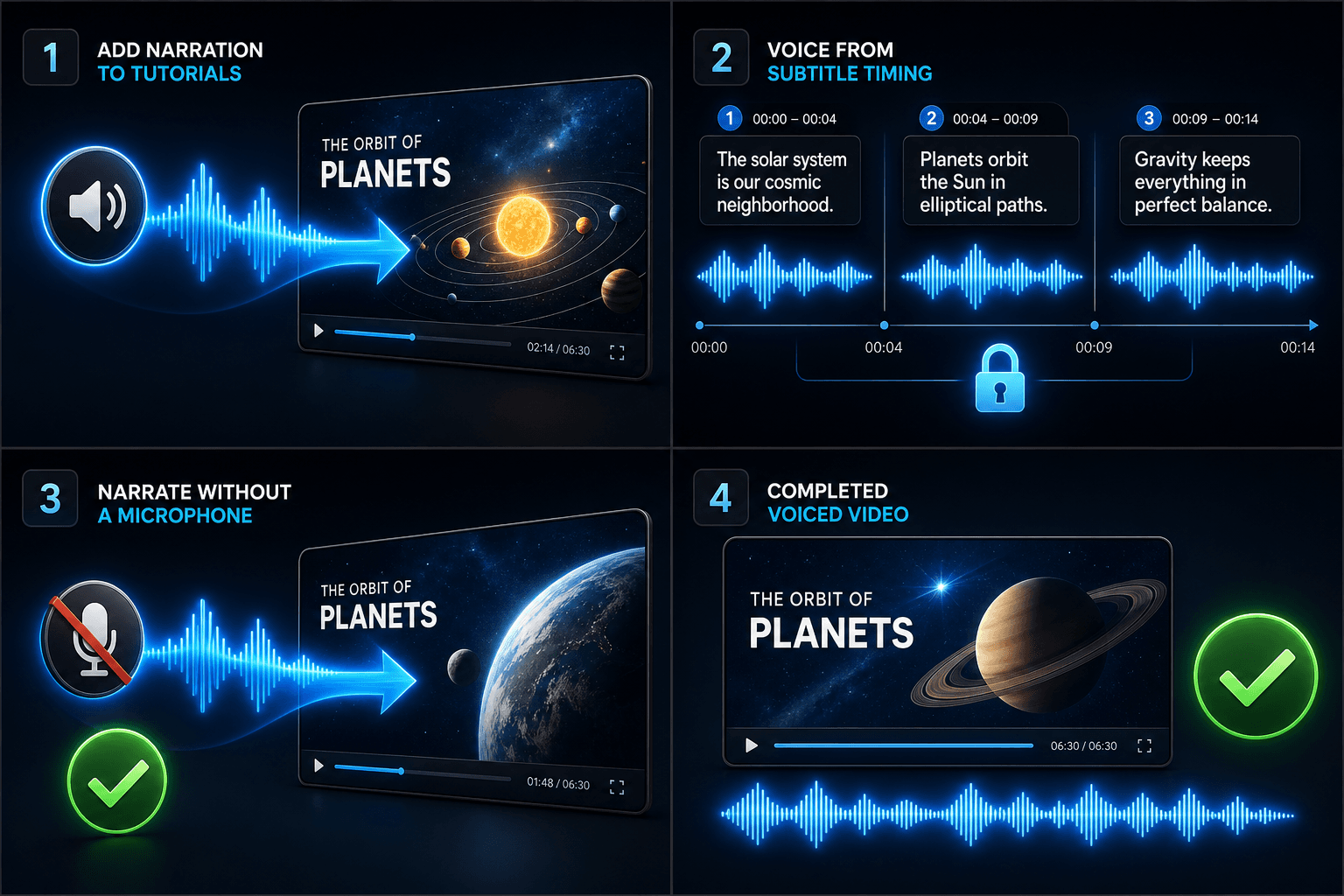
Wat de TTS-videogenerator daadwerkelijk produceert
De output is niet zomaar een MP3 vastgeniet aan een diavoorstelling. Je krijgt een gestructureerd concept: een AI-stemspoor gegenereerd uit je tekst, een ondertitelspoor dat de spraak woord voor woord volgt en bewerkbaar blijft, en je beeldmateriaal gelegd tegen de vertelling aan. Daarna kan elk onderdeel nog worden aangepast — een zin herformuleren, de ondertiteling een andere stijl geven, een clip verwisselen — vóór de definitieve export.
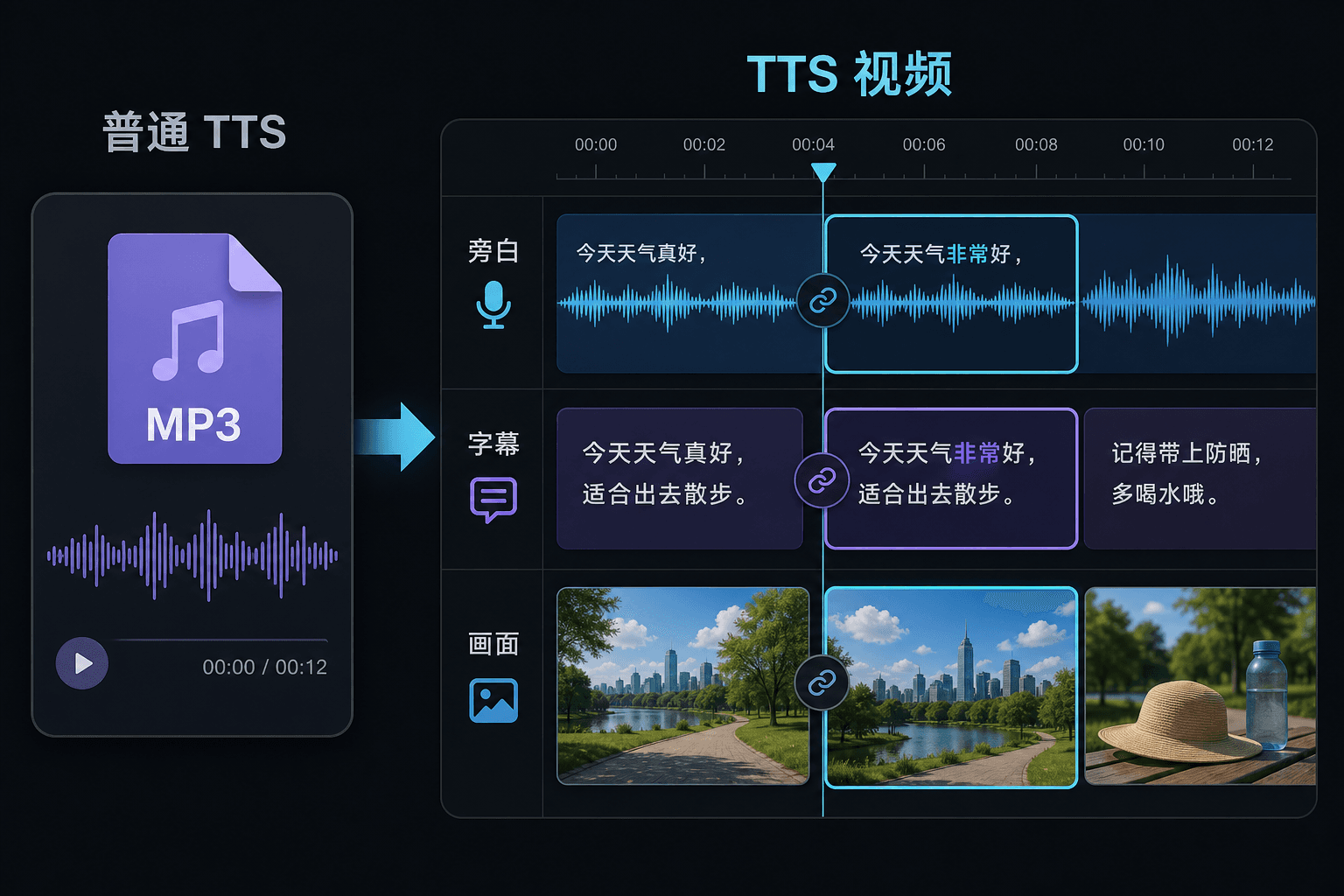
Tekst-naar-spraakvideo versus gewone tekst-naar-spraak
Een gewone TTS-tool geeft je een audiobestand en wenst je veel succes in je editor. Hier wordt de spraak gegenereerd binnen een videoproject, zodat timing, ondertiteling en beeld al met elkaar verbonden zijn. Dat verschil maakt het meeste uit bij het reviseren: als je de tekst wijzigt, worden de vertelling en de ondertiteling samen bijgewerkt, in plaats van dat je handmatig opnieuw moet synchroniseren.
Gemaakt voor deze workflows
Voeg voice-over toe aan handleidingen
Video inspreken op basis van ondertiteltiming
Maak voice-overs zonder microfoon
Gerelateerde tools
Veelgestelde vragen
Heb ik mijn eigen beeldmateriaal nodig om een tekst-naar-spraakvideo te maken?
Je hebt een visuele bron nodig — upload lokale clips of importeer via een link. Veel makers halen hoogtepunten uit een langere bronvideo en laten de vertelling het verhaal eroverheen dragen.
Zitten de ondertitels vast of zijn ze bewerkbaar?
Bewerkbaar. Ondertitels worden synchroon met de spraak gegenereerd, en je kunt de tekst bewerken, de stijl aanpassen, SRT/VTT exporteren of ze inbedden in de definitieve render — jouw keuze.
Kan ik op deze manier verticale video's maken voor Shorts en TikTok?
Ja. Nadat het concept is gegenereerd, kun je bijsnijden naar 9:16, de plaatsing van de ondertiteling aanpassen voor verticaal bekijken en exporteren per platform.
Wat voer ik in, tekst of een videobestand?
Je plakt tekst, geen video. Tekst-naar-spraakvideo leest een getypt script of geplakte woorden en geeft een gesproken audiovertelling als output. Het verwerkt geen beeldmateriaal, dus gebruik het om het script dat je al voor je recap hebt geschreven in te spreken.
Kan ik de vertelstem en spreeksnelheid kiezen?
Ja. Je kiest een stem en kunt tempo en toon aanpassen zodat de lezing past bij je kanaal zonder gezicht of met commentaar. Recapo is nog in ontwikkeling, dus de beschikbare stemmen en bedieningselementen worden in de loop van de tijd uitgebreid.
Wat levert het op als het klaar is?
Je krijgt een audiovertelspoor dat je kunt downloaden en op je videotijdlijn kunt plaatsen naast ondertiteling en clips, klaar om te mixen met muziek en te exporteren via de rest van de Recapo-workflow.
Start met Tekst-naar-spraakvideo
Voer hierboven de invoer en de belangrijkste instellingen in. Je resultaat blijft binnen de huidige workflow van de tool.
Gratis proberen