Bilibili動画リサイズ
Bilibili用の動画準備:メインアップロード用に16:9マスターを保持し、ストーリーモード用に9:16の縦型をクロップし、横型カバーを計画します — 1つのワークスペースで両方のフォーマットに対応。
クリックしてアップロード、または動画ファイルをドロップ
対応フォーマット: MP4, MOV, MKV, WebM, MPEG, MPG, 3GP, 3GPP
1ファイルあたり2GBまで
処理はバックグラウンドで続行されます。このページを離れたり、言語を切り替えても中断されません。
Bilibiliの動画サイズ:主流は16:9、ストーリーモードは9:16
Bilibiliでの長尺の解説、アニメ分析、要約動画は圧倒的に16:9で公開されています。プレーヤー、フィードカード、視聴者の習慣すべてが横型を前提としています。ストーリーモードはプラットフォームの縦型サーフェスです:モバイルでスワイプして見る短い9:16クリップで、完全な横型動画へ視聴者を誘導するティーザーとしてよく使われます。一般的なワークフローはまさにこのペアリングです。16:9のメインカットを公開し、次にそれを指し示す1分間の縦型ハイライトをストーリーモードにプッシュします。
- 01
マスターカットを読み込む
完成した16:9動画をアップロードするか、リンクでインポートします。これが変更されないまま、Bilibiliへのプライマリアップロードとなります。
- 02
縦型コンパニオンをカットする
ストーリーモード用に9:16バージョンをクロップし、盲目的な中央クロップに頼るのではなく、シーンごとに被写体の上にウィンドウを配置します。
- 03
カバーをペアリングしてエクスポート
キーフレームから横型カバーを作成し、両方のカットをエクスポートして、横型メイン動画とその縦型ティーザーを一緒に公開します。
メインアップロード
フィードとプレーヤーが設計されたフォーマットである16:9横型。
ストーリーモード/モバイルスワイプフィード
短くフック駆動型の9:16縦型。
メインフィード用に縦型のスマホクリップを16
9にレターボックス化しないでください。代わりにストーリーモードに投稿してください。
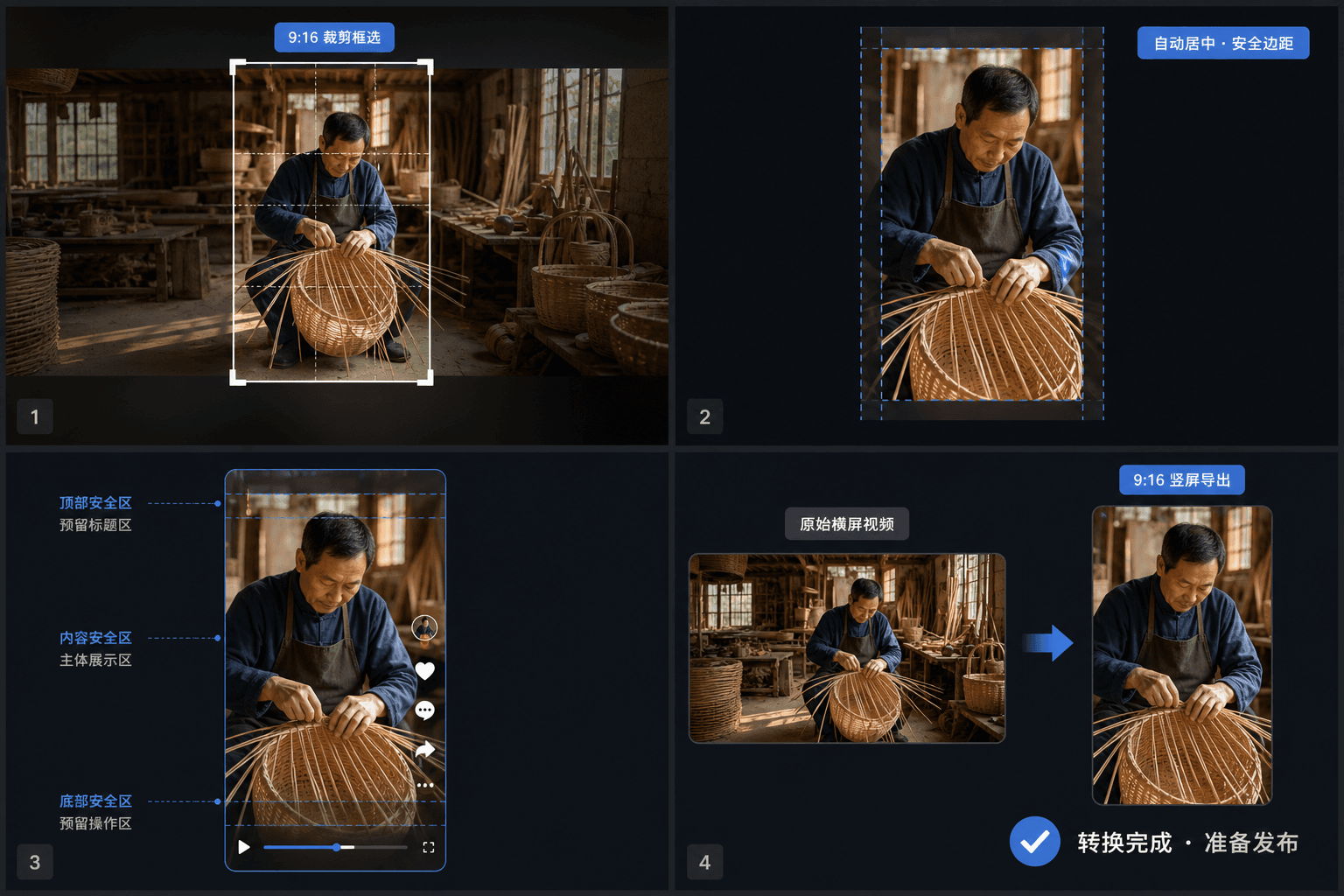
Bilibiliのカバーは横型です — 別途計画しましょう
最初のフレームがカバーとして機能することが多いDouyinやTikTokとは異なり、Bilibiliはデザインされた横型サムネイルを期待しています。フィードでは16:10カードに近いサイズです。このプラットフォームではテキスト重視のカバーが普通なので、カバーメーカーで強力なキーフレームを引き出し、その上にタイトルを配置することは現地の慣習に合致します。縦型のストーリーモードクリップには別途カバーが不要なので、デザインされた1つの横型サムネイルでBilibiliでのプレゼンス全体をカバーできます。
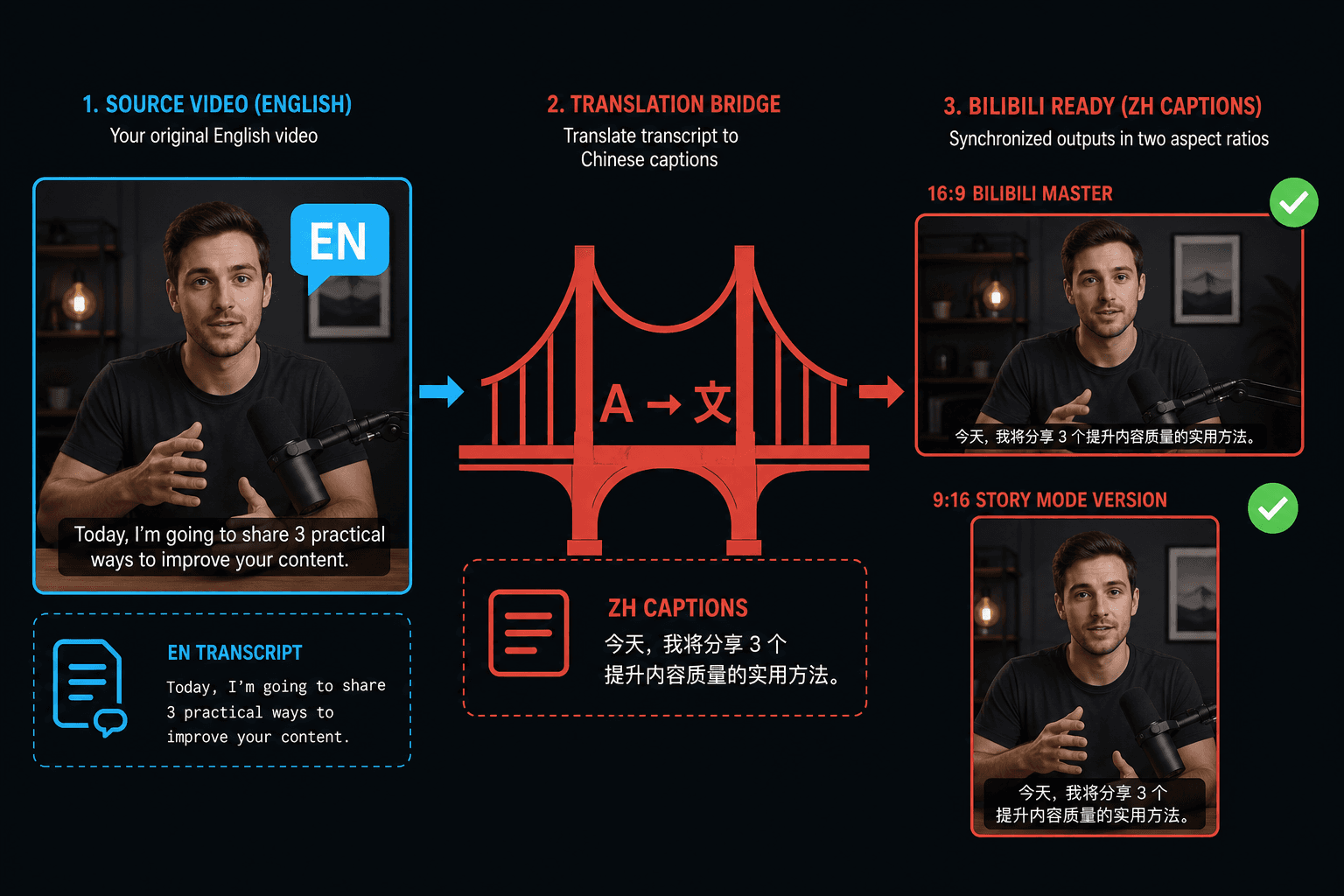
中国国外からBilibiliへ公開する
ソースコンテンツが英語の場合、リサイズは簡単な部分です。視聴者は中国語字幕を期待しています。同じワークスペースがオーディオを文字起こしし、字幕トラックを中国語に翻訳して、16:9マスターと9:16ストーリーモードカットの両方に焼き付けるため、ローカライズされたバージョンが1つの編集で同期を保ちます。
実際のワークフロー向けに設計
横向きの映像を9:16に変換
クロップ、余白追加、または背景ぼかしを選択
縦型MP4をダウンロード
よくある質問
Bilibiliには横型と縦型、どちらの動画をアップロードすべきですか?
メインフィードには横型16:9です。これは解説や要約コンテンツの支配的なフォーマットであり続けています。縦型9:16はストーリーモードクリップ、通常は完全な横型動画の短いティーザーとしてのみ使用してください。
Bilibiliのカバーの比率は何ですか?
16:10に近い横型カードです。他のプラットフォームからの縦型カバーを再利用するのではなく、独自のアセットとしてデザインしてください。太字のタイトルを入れた横型フレーミングは、フィードの表示にマッチします。
Bilibiliの視聴者向けに動画をローカライズできますか?
はい。オーディオから字幕を生成し、トラックを中国語に翻訳してから、エクスポート前に動画に焼き付けます。メインカットと縦型ストーリーモードバージョンの両方に翻訳された字幕を付けることができます。
リサイズすると要約映像の一部がクロップされますか?
フィットモードによります。より狭い比率にクロップすると端がトリミングされますが、パディングはフルフレームを見えたままにするためにバーを追加します。字幕やトーキングヘッドのコーナーがある解説動画の場合、パディングは通常、重要な部分を見えたままにします。
リサイザーはサイズ以外に何か変更しますか?
その役割はフレームサイズとアスペクト比だけです。キャプションやオーディオを書き換えることはないので、リフレームされたファイルがエクスポートされた後でも、Bilibiliにアップロードする前にRecapoの圧縮、キャプション、またはフォーマットステップを通すことができます。