テキスト読み上げ動画メーカー
プレーンテキストをAI音声、同期した字幕、そしてあなたの映像で完成した動画に — カメラやマイクは不要です。Recapo.aiで顔出し不要の動画を素早く作成しましょう。
クリックしてアップロード、または動画ファイルをドロップ
対応フォーマット: MP4, MOV, MKV, WebM, MPEG, MPG, 3GP, 3GPP
1ファイルあたり2GBまで
ソース動画は3分まで
処理はバックグラウンドで続行されます。このページを離れたり、言語を切り替えても中断されません。
真っ白なページから顔出し不要動画を作成
顔出し不要チャンネルの成否は制作速度にかかっています。この形式が機能するのは、1人がカメラに映ることなく毎日公開できるからです。テキスト読み上げ動画は、ナレーションの録音と字幕の手動タイミング合わせという、最も時間がかかる2つの工程を排除します。あなたが言葉とクリップを提供し、ツールが音声、字幕トラック、そして組み立てられたドラフトを提供します。
- 01
テキストから始める
スクリプトや記事形式のドラフトを貼り付けます。ソース動画しかない場合は、まずそこから要約やリキャップスクリプトを生成してください。
- 02
音声とビジュアルを追加
ナレーション音声を選択し、ローカルアップロードまたはリンクインポートで映像を添付します。字幕は音声と同期して生成されます。
- 03
レンダリングして公開
動画ドラフトをエクスポートし、字幕のスタイルやカバーを磨き上げ、Shorts用に9:16にクロップして、プラットフォームに公開します。
リキャップとコメンタリーチャンネル
物語をスクリプト化し、音声をつけ、公開する。
解説とリスト記事
撮影せずにアウトラインをナレーション付き動画に変換。
マルチプラットフォーム投稿
1つのテキストソースから、Shorts、Reels、TikTok用にエクスポート。
TTS動画ジェネレーターが実際に生成するもの
出力は、スライドショーにMP3を貼り付けただけのものではありません。構造化されたドラフトが得られます。テキストからレンダリングされたAI音声トラック、音声と一言一句一致し編集可能なままの字幕トラック、そしてナレーションに合わせて配置されたあなたの映像。そこから最終エクスポート前に、すべての部分をまだ調整できます。行の言い換え、字幕のスタイル変更、クリップの入れ替えなどです。
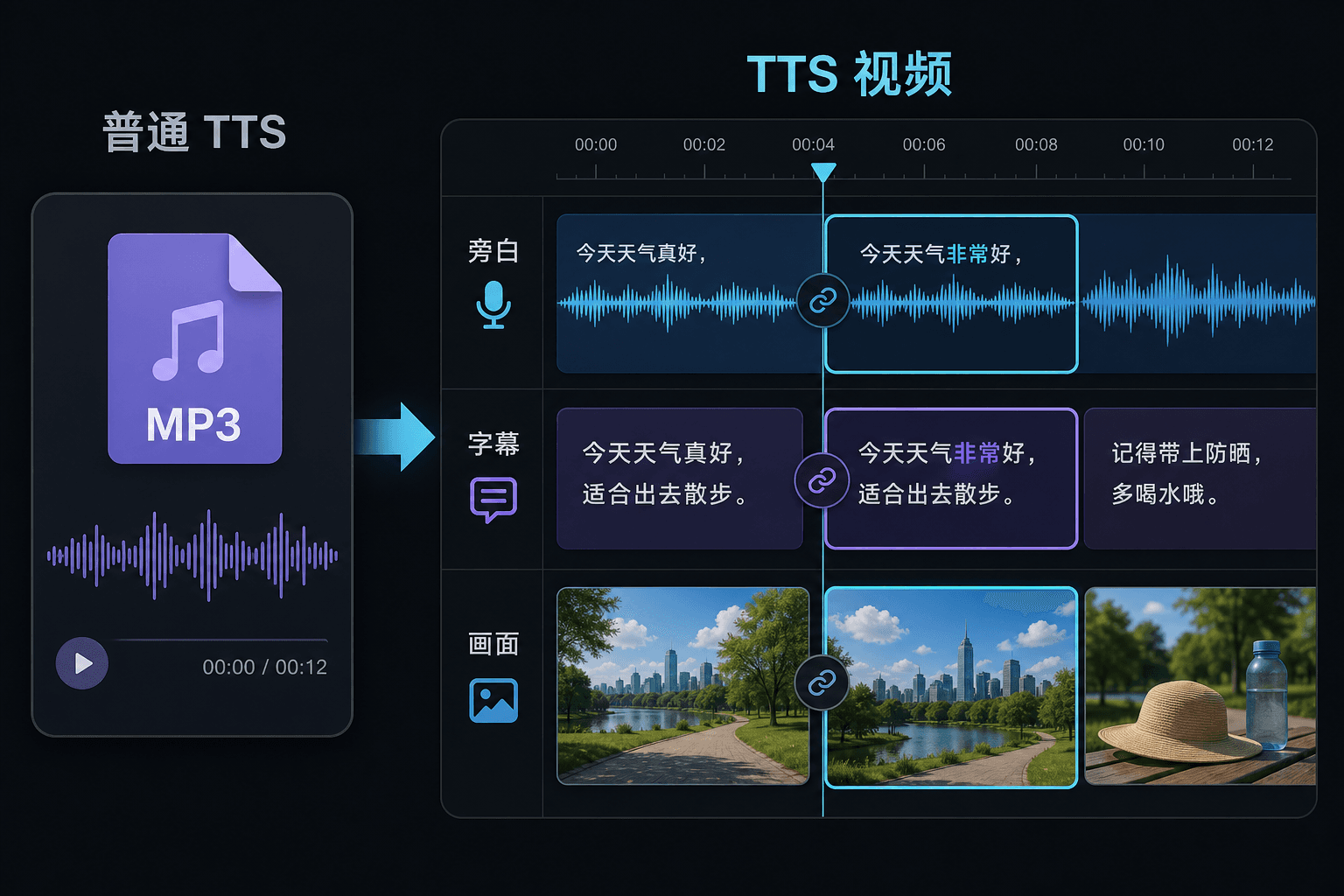
テキスト読み上げ動画とプレーンなテキスト読み上げの違い
プレーンなTTSツールはオーディオファイルを渡して、エディターでの作業はあなたの運次第です。ここでは、動画プロジェクト内で音声が生成されるため、タイミング、字幕、画像はすでに接続されています。この違いは修正時に最も重要です。テキストを変更すると、ナレーションと字幕が一緒に更新され、手動での再同期を強制されません。
実際のワークフロー向けに設計
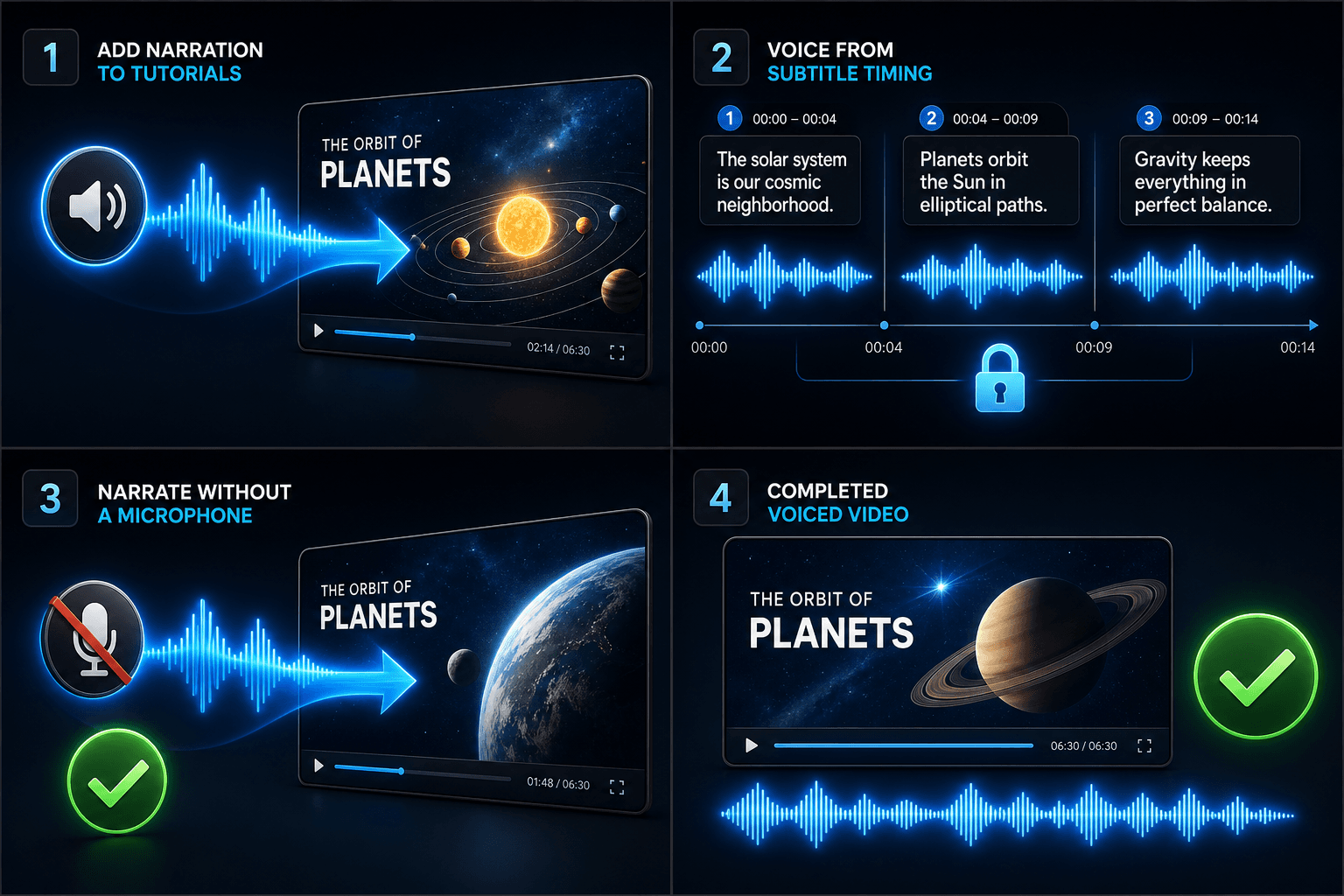
チュートリアル動画にナレーションを追加
字幕のタイミングに合わせて動画にナレーションを追加
マイクなしでナレーションを作成
よくある質問
テキスト読み上げ動画を作るには自分の映像が必要ですか?
何らかの視覚的ソースが必要です。ローカルクリップをアップロードするか、リンクからインポートしてください。多くのクリエイターは、長いソース動画からハイライトを引き出し、ナレーションにその上の物語を語らせています。
字幕は焼き付けられていますか、それとも編集可能ですか?
編集可能です。字幕は音声と同期して生成され、テキストの編集、スタイルの変更、SRT/VTTのエクスポート、または最終レンダリングへの焼き付けが可能です。お選びください。
この方法でShortsやTikTok用の縦型動画を作れますか?
はい。ドラフト生成後、9:16にクロップし、縦型視聴用に字幕の配置を調整し、プラットフォームごとにエクスポートできます。
入力するのはテキストですか、それとも動画ファイルですか?
テキストを貼り付けます。動画ではありません。テキスト読み上げ動画は、タイプされたスクリプトや貼り付けられた言葉を読み取り、音声ナレーションのオーディオファイルを出力します。映像は処理しないため、リキャップ用にすでに書いたスクリプトの音声化に使用してください。
ナレーション音声と話速を選択できますか?
はい。音声を選択し、ペースやトーンを調整して、顔出し不要チャンネルやコメンタリーチャンネルに合う読み上げにできます。Recapoは現在開発中のため、利用可能な音声とコントロールは随時拡大しています。
完了すると何が返されますか?
ダウンロードして、字幕やクリップと一緒に動画タイムラインにドロップできるナレーションオーディオトラックが得られます。音楽とミックスし、Recapoワークフローの残りの部分を通じてエクスポートする準備が整います。