動画モザイクエディター
ブラウザ上で顔、ナンバープレート、機密情報などにモザイクを適用。時間範囲や強度を個別に設定でき、動く被写体にはキーフレームを追加して、モザイク処理済みの動画を簡単にエクスポートできます。
静止モザイクと動的モザイク
静止モードでは、指定した時間範囲内でモザイクボックスを固定できます。ロゴやテキストオーバーレイに最適です。動的モードではキーフレームを使用します。複数のタイムスタンプでボックスの位置を指定すると、出力機能がその間の動きを補間するため、フレームごとの手動作業なしに移動する被写体を追従できます。
- 01
動画のアップロード
ローカルのMP4、MOV、MKV、またはWebMファイルをアップロードします。ブラウザ上で即座に読み込まれ、すぐにプレビューを確認できます。
- 02
モザイク範囲の指定
ぼかしたい範囲を矩形で囲み、開始・終了時刻を設定します。被写体が動く場合は、ダイナミックモードでキーフレームを追加します。
- 03
エクスポート
処理をクラウド上のFFmpegに送信し、完了後に完成した動画をダウンロードできます。
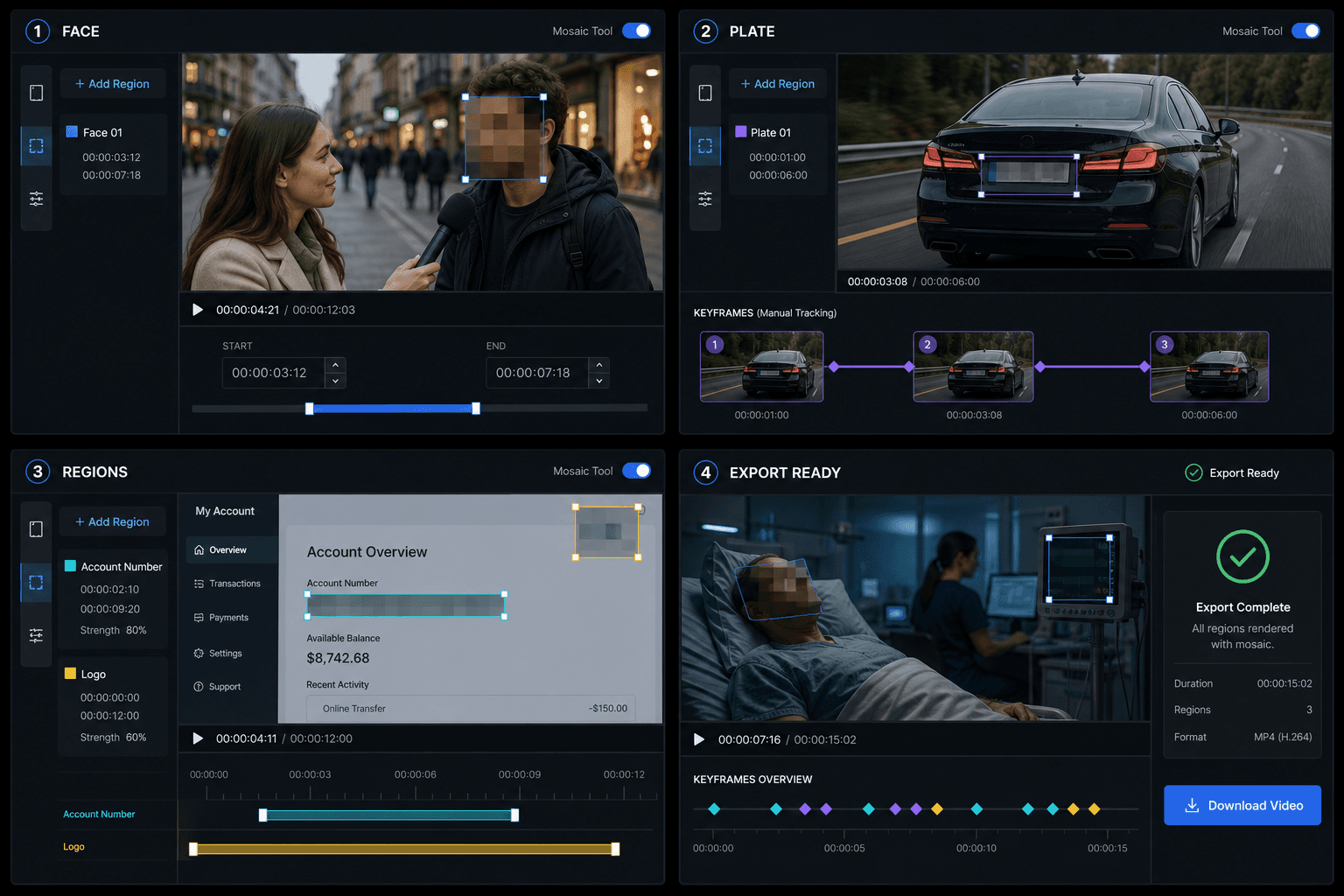
複数の領域をマスクしてまとめてエクスポート
1つの動画に最大30個の領域を追加し、それぞれに開始・終了時間、位置、ピクセル強度を個別に設定できます。顔、ナンバープレート、アカウント情報などを別々に隠して結果を確認した後、完全にモザイク処理された動画を1つにまとめてエクスポートできます。
実際のワークフロー向けに設計
01
動画カバーデザイン
02
SNS用クリエイティブ
03
キービジュアルの抽出
よくある質問
複数の箇所を同時にぼかすことはできますか?
はい。最大30個の領域を追加でき、それぞれに個別の適用時間、サイズ、ピクセル強度を設定できます。
ダイナミックモザイクは被写体を自動的に追従しますか?
任意のタイミングでキーフレームを手動で配置すると、クラウドレンダラーがその間を線形補間して処理します。なお、本バージョンには完全自動のAIトラッキング機能は含まれておりません。
モザイクエディタは無料で使えますか?
他のツールと同様に、毎日の無料利用枠をご利用いただけます。枠を超えて追加で書き出す場合は、料金ページに記載の通りクレジットが消費されます。