تحويل الصوت الى نص
تحويل الكلام إلى نص على الشاشة. ارفع مقطع فيديو وسيقوم الذكاء الاصطناعي بالتعرف على الكلمات المنطوقة، وتحويلها إلى ترجمات، وحرقها في الصورة — مما يمنحك فيديو مترجمًا جاهزًا للمعاينة والتنزيل. Recapo.ai.
انقر للرفع أو اسحب ملف فيديو هنا
يدعم MP4, MOV, MKV, WebM, MPEG, MPG, 3GP, 3GPP
حتى 2 غيغابايت لكل ملف
مدة الفيديو المصدر حتى 60 دقيقة
Very long videos may fail when extracted ASR audio exceeds 100MB — trim first if needed
Upload a video first to adjust settings and preview the result
كلمات تبقى على الشاشة، وليس في ملف جانبي
الهدف من تحويل الكلام إلى نص هنا ليس نصًا مكتوبًا يتعين عليك إدارته — بل فيديو يمكن للناس مشاهدته فعليًا والكلمات موجودة هناك. يتعرف Recapo على الكلام، ويكتبه كترجمات، ويخبزها في الإطار، بحيث يعمل المقطع النهائي مع نصه في أي مكان: مكتوم الصوت في موجز، أو على هاتف، أو في مشغل يزيل مسارات الترجمة. ملف واحد، الترجمات مضمنة، لا شيء لإرفاقه.
- 01
ارفع مقطع الفيديو الخاص بك
أضف ملف فيديو من جهازك، أو استورده من رابط. المقابلات، ومقاطع التحدث إلى الكاميرا، والمحاضرات، ومقاطع البودكاست تعمل جميعها.
- 02
دع الذكاء الاصطناعي يتعرف على الكلام
يستمع التعرف على الكلام بالذكاء الاصطناعي إلى الصوت ويحول الكلمات المنطوقة إلى أسطر ترجمة نصية نظيفة وقابلة للقراءة، مع توقيت يتطابق مع ما يُقال على الشاشة.
- 03
معاينة وتنزيل الفيديو ذي التعليقات التوضيحية
تُحرق التعليقات التوضيحية مباشرة في الصورة. عاين الفيديو النهائي على الصفحة، ثم قم بتنزيل ملف MP4 ذي التعليقات التوضيحية — الكلمات والمشاهد معًا في ملف واحد.
المقابلات والبودكاست
حوّل الإجابات المنطوقة إلى ترجمات على الشاشة بحيث تكون الاقتباسات قابلة للقراءة أثناء تشغيل المقطع.
المحاضرات والخطب
التقط كل نقطة منطوقة كترجمة مخبوزة في الفيديو للمشاهدة الصامتة.
مقاطع الفيديو الاجتماعية وموجزات الأخبار
انشر مقطعًا مترجمًا يُقرأ مع إيقاف الصوت، دون الحاجة لإدارة ملف ترجمة.
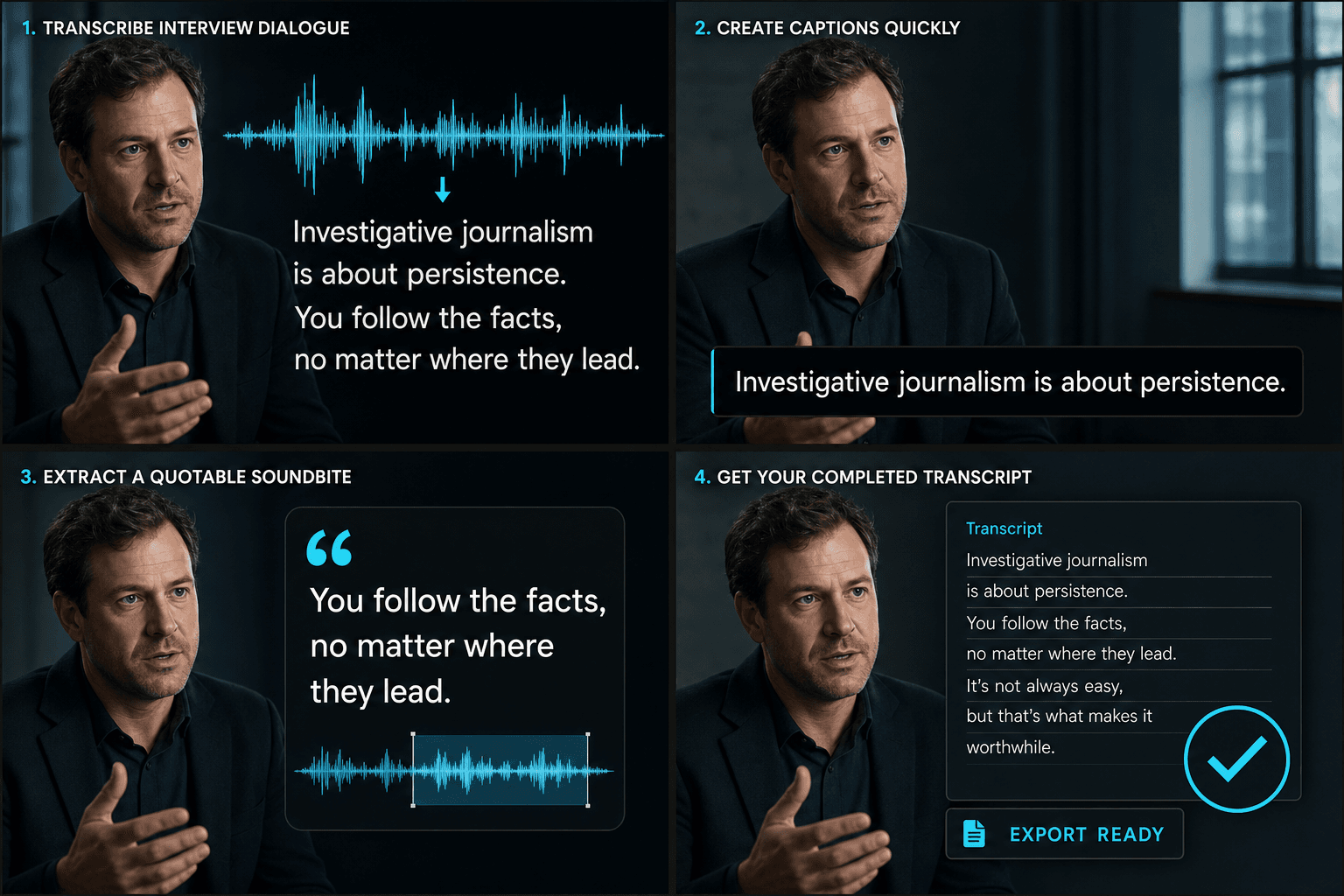
من الصوت المنطوق إلى فيديو نهائي مصحوب بترجمة
يقوم الذكاء الاصطناعي بالاستماع والكتابة في مرور واحد: يتعرف على الكلام، ويحوله إلى أسطر ترجمة توضيحية تتبع توقيت الحديث، ويعرضها في الصورة. ما يخرج هو فيديو واحد مصحوب بترجمة — ليس نصًا، وليس ملفًا للمزامنة لاحقًا — جاهز للمعاينة على الصفحة والتنزيل كـ MP4. يدخل الكلام؛ ويخرج مقطع قابل للمشاهدة ومصحوب بترجمة.
مصمم لخطوات العمل الفعلية هذه
التعرف على المقابلات باللغتين الصينية أو الإنجليزية
تنسيق الشروحات التوضيحية للفيديو
تنزيل ملف MP4 بنصوص مدمجة
الأسئلة الشائعة
هل أحصل على ملف نصي أم فيديو؟
فيديو. يحول Recapo الكلمات المنطوقة إلى ترجمات ويحرقها في الصورة، بحيث تقوم بتنزيل ملف MP4 مترجم نهائي — تعيش الكلمات على الشاشة مع المشاهد، وليس في ملف نص مكتوب منفصل.
هل أرفع ملفًا صوتيًا أم فيديو؟
ارفع فيديو. يستمع Recapo إلى الكلام في صوته، ويكتبه كترجمات، ويعرض تلك الترجمات مرة أخرى في نفس الفيديو — بحيث ما تقوم بتنزيله هو المقطع ذو الترجمات.
ماذا لو ظهر اسم أو مصطلح تقني بشكل خاطئ؟
يتعامل التعرف بالذكاء الاصطناعي مع الكلام الواضح بشكل جيد، بما في ذلك معظم الأسماء والمصطلحات الفنية في سياقها. يتم توقيت الترجمات لتتطابق مع الكلام وتحرق في الفيديو النهائي، بحيث تبقى الكلمات مطابقة لما يُقال على الشاشة.
كيف يختلف هذا عن مولد الترجمات؟
يمنحك تحويل الكلام إلى نص نصًا مكتوبًا كاملاً قابلاً للتحرير للكلمات لاستخدامها في النصوص السيناريوية، أو الملاحظات، أو البحث. يهدف مولد الترجمات إلى إنتاج أسطر ترجمة متزامنة زمنيًا للعرض على الشاشة. يقوم العديد من صناع المحتوى بالتحويل إلى نص أولاً، وتحرير النص، ثم بناء الترجمات منه.
ابدأ استخدام تحويل الكلام إلى نص
أدخل البيانات والإعدادات الأساسية أعلاه. ستبقى النتيجة في مسار عمل الأداة الحالي.
استخدمه مجاناً