
تحويل النص الى كلام لصناعة الفيديو
حوّل النص العادي إلى فيديو مكتمل مع كلام الذكاء الاصطناعي، وترجمات متزامنة، ومقاطعك الخاصة — لا حاجة للكاميرا أو الميكروفون. أنشئ مقاطع فيديو بدون وجه بسرعة على Recapo.ai.
انقر للرفع أو اسحب ملف فيديو هنا
يدعم MP4, MOV, MKV, WebM, MPEG, MPG, 3GP, 3GPP
حتى 2 غيغابايت لكل ملف
مدة الفيديو المصدر حتى 3 دقيقة
تستمر المعالجة في الخلفية، حتى لو غادرت هذه الصفحة أو غيّرت اللغات.
مقاطع فيديو بدون وجه من صفحة بيضاء
تعيش القنوات بدون وجه أو تموت على سرعة الإنتاج: ينجح هذا التنسيق لأن شخصاً واحداً يمكنه النشر يومياً دون الظهور أمام الكاميرا أبداً. يزيل فيديو تحويل النص إلى كلام أبطأ جزأين — تسجيل التعليق وتوقيت الترجمات يدوياً. أنت توفر الكلمات والمقاطع؛ توفر الأداة الصوت، ومسار الترجمة، والمسودة المجمعة.
- 01
ابدأ من النص
الصق السيناريو أو المسودة بأسلوب المقالات. إذا كان لديك فقط فيديو مصدري، فقم بإنشاء ملخص أو سيناريو تلخيص منه أولاً.
- 02
أضف الصوت والمواد المرئية
اختر صوت التعليق، ثم أرفق المقاطع — تحميلات محلية أو استيراد من رابط — بينما يتم إنشاء الترجمات متزامنة مع الكلام.
- 03
التصدير والنشر
صدّر مسودة الفيديو، حسّن تصميم الترجمات أو الغلاف، قصها إلى 9:16 للمقاطع القصيرة، وانشرها على منصاتك.
قنوات الملخصات والتعليقات
اكتب السيناريو للقصة، أضف الصوت، وانشر.
الشروحات وقوائم الحقائق
حوّل المخطط التفصيلي إلى فيديو معلق دون تصوير.
النشر متعدد المنصات
مصدر نصي واحد، يُصدّر للمقاطع القصيرة وReels وTikTok.
ما ينتجه مولد فيديو تحويل النص إلى كلام فعلياً
المخرج ليس مجرد ملف MP3 مرفق بعرض شرائح. تحصل على مسودة منظمة: مسار صوتي بالذكاء الاصطناعي مُنشأ من نصك، ومسار ترجمة يطابق الكلام كلمة بكلمة ويظل قابلاً للتحرير، ومقاطعك موضوعة مقابل التعليق. من هناك يمكن تعديل كل قطعة — إعادة صياغة سطر، إعادة تصميم الترجمات، استبدال مقطع — قبل التصدير النهائي.
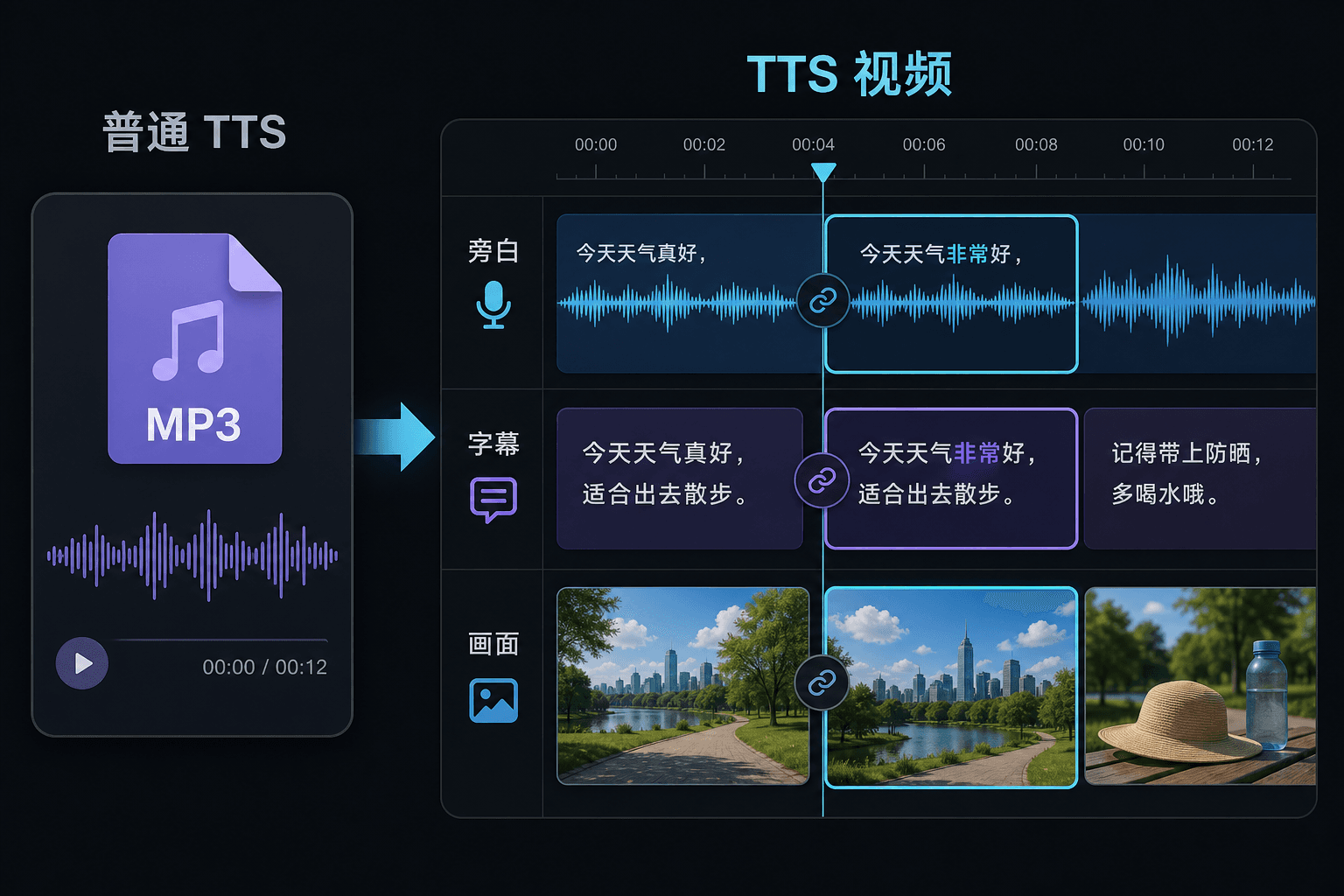
فيديو تحويل النص إلى كلام مقابل تحويل النص إلى كلام العادي
أداة تحويل النص إلى كلام العادية تسلمك ملفاً صوتياً وتتمنى لك التوفيق في محررك. هنا يتم توليد الكلام داخل مشروع فيديو، لذا فإن التوقيت والترجمات والصورة متصلة بالفعل. هذا الاختلاف يهم أكثر في وقت المراجعة: تغيير النص يحدث التعليق والترجمات معاً، بدلاً من إجبارك على إعادة مزامنة يدوية.
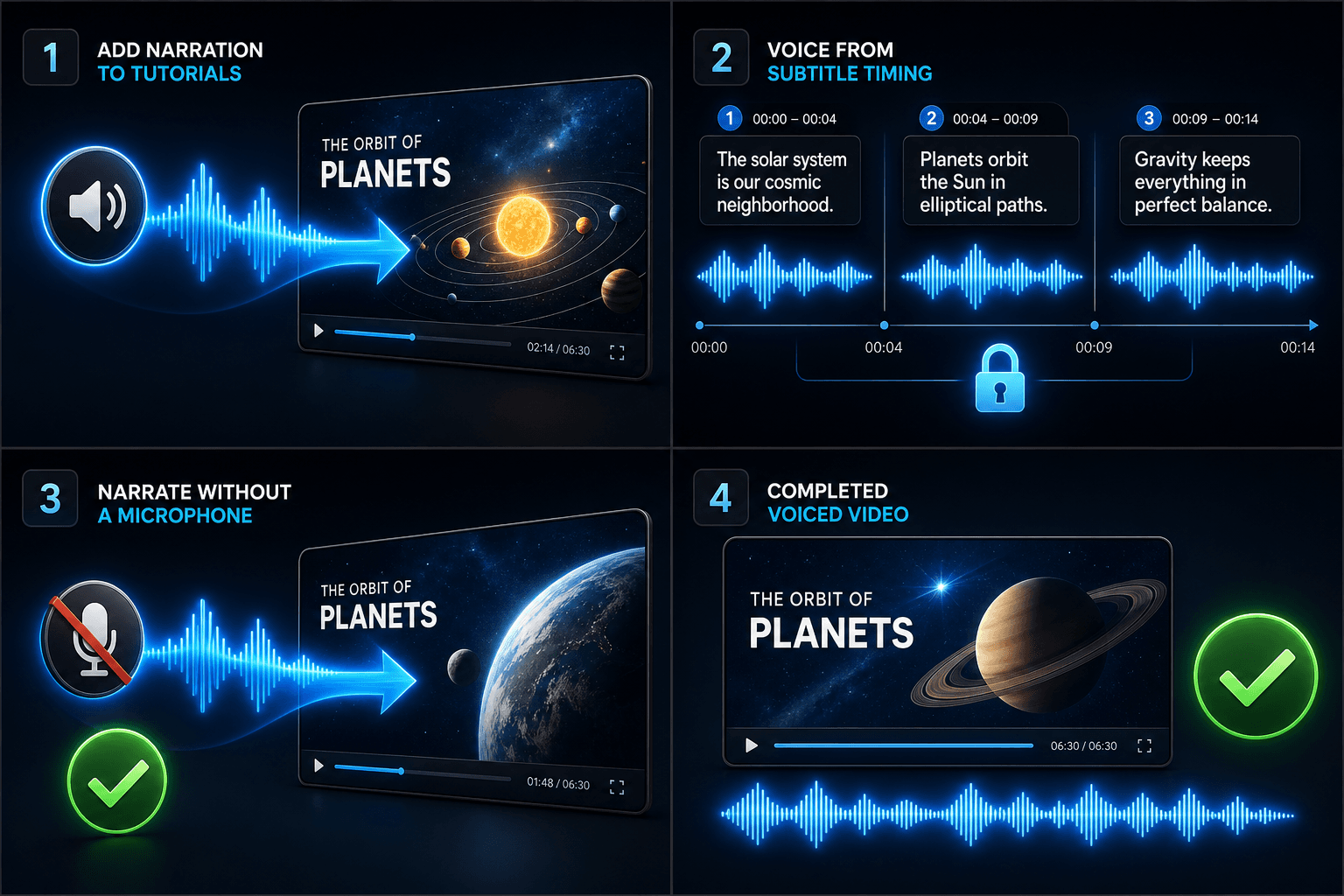
مصمم لخطوات العمل الفعلية هذه
إضافة تعليق صوتي للشروحات
توليد تعليق صوتي للفيديو بناءً على توقيت الترجمة
إنشاء تعليق صوتي بدون ميكروفون
الأسئلة الشائعة
هل أحتاج إلى مقاطع خاصة بي لصنع فيديو تحويل النص إلى كلام؟
تحتاج إلى مصدر مرئي — قم بتحميل مقاطع محلية أو استيراد من رابط. يقوم العديد من صناع المحتوى بسحب أبرز اللقطات من فيديو مصدري أطول ويدعون التعليق يحمل القصة فوقها.
هل الترجمات مدمجة أم قابلة للتحرير؟
قابلة للتحرير. يتم إنشاء الترجمات متزامنة مع الكلام، ويمكنك تحرير النص، إعادة تصميمها، تصدير SRT/VTT، أو تضمينها في التصدير النهائي — الخيار لك.
هل يمكنني صنع مقاطع فيديو عمودية للمقاطع القصيرة وTikTok بهذه الطريقة؟
نعم. بعد إنشاء المسودة يمكنك القص إلى 9:16، ضبط موضع الترجمة للمشاهدة العمودية، والتصدير حسب المنصة.
ما الذي أقوم بإدخاله، نص أم ملف فيديو؟
تلصق نصاً، وليس فيديو. يقرأ فيديو تحويل النص إلى كلام سيناريو مكتوب أو كلمات ملصقة ويخرج ملف صوتي للتعليق المنطوق. لا يعالج المقاطع المصورة، لذا استخدمه لإضافة صوت للسيناريو الذي كتبته بالفعل لملخصك.
هل يمكنني اختيار صوت التعليق وسرعة الكلام؟
نعم. تختار صوتاً ويمكنك ضبط الإيقاع والنبرة بحيث تناسب القراءة قناتك بدون وجه أو قناة التعليقات. لا يزال Recapo قيد التطوير، لذا فإن الأصوات وعناصر التحكم المتاحة تتوسع بمرور الوقت.
ما الذي يعيده عند الانتهاء؟
تحصل على مسار صوتي للتعليق يمكنك تنزيله وإضافته إلى المخطط الزمني للفيديو الخاص بك بجانب الترجمات والمقاطع، جاهزاً للدمج مع الموسيقى والتصدير عبر بقية سير عمل Recapo.
ابدأ استخدام فيديو تحويل النص إلى كلام
أدخل البيانات والإعدادات الأساسية أعلاه. ستبقى النتيجة في مسار عمل الأداة الحالي.
استخدمه مجاناً