ปรับขนาดวิดีโอ Bilibili
เตรียมวิดีโอสำหรับ Bilibili: เก็บต้นฉบับ 16:9 ไว้สำหรับอัปโหลดหลัก ตัดต่อแนวตั้ง 9:16 สำหรับ Story Mode และวางแผนปกแนวนอน — พื้นที่ทำงานเดียว ทั้งสองรูปแบบ
คลิกเพื่ออัปโหลด หรือลากไฟล์วิดีโอมาวางที่นี่
รองรับไฟล์ MP4, MOV, MKV, WebM, MPEG, MPG, 3GP, 3GPP
สูงสุด 2 GB ต่อไฟล์
การประมวลผลดำเนินต่อในพื้นหลัง แม้ว่าคุณจะออกจากหน้านี้หรือเปลี่ยนภาษา
มิติวิดีโอ Bilibili: 16:9 สำหรับกระแสหลัก, 9:16 สำหรับ Story Mode
วิดีโอความคิดเห็นแบบยาว การวิเคราะห์อนิเมะ และวิดีโอสรุปบน Bilibili ส่วนใหญ่เผยแพร่ในรูปแบบ 16:9 — เครื่องเล่น การ์ดฟีด และนิสัยผู้ชมล้วนคาดหวังแนวนอน Story Mode คือพื้นผิวแนวตั้งของแพลตฟอร์ม: คลิป 9:16 สั้นๆ ที่ปัดดูบนมือถือ มักใช้เป็นทีเซอร์ที่ดึงผู้ชมไปยังวิดีโอแนวนอนแบบเต็ม ขั้นตอนการทำงานทั่วไปคือการจับคู่นี้ — เผยแพร่คลิปหลัก 16:9 แล้วดันไฮไลต์แนวตั้งหนึ่งนาทีลงไปใน Story Mode โดยชี้กลับไปที่คลิปหลัก
- 01
โหลดต้นฉบับของคุณ
อัปโหลดวิดีโอ 16:9 ที่เสร็จสมบูรณ์หรือนำเข้าผ่านลิงก์ — วิดีโอนี้จะยังคงเป็นการอัปโหลดหลักบน Bilibili ของคุณโดยไม่เปลี่ยนแปลง
- 02
ตัดต่อเวอร์ชันแนวตั้ง
ครอบตัดเวอร์ชัน 9:16 สำหรับ Story Mode โดยวางหน้าต่างเหนือตัวแบบทีละฉาก แทนที่จะพึ่งพาการครอบตัดกึ่งกลางโดยไม่พิจารณา
- 03
จับคู่ปกและส่งออก
สร้างปกแนวนอนจากคีย์เฟรม ส่งออกทั้งสองเวอร์ชัน และเผยแพร่วิดีโอหลักแนวนอนคู่กับทีเซอร์แนวตั้ง
การอัปโหลดหลัก
16:9 แนวนอน รูปแบบที่ฟีดและเครื่องเล่นถูกออกแบบมาเพื่อรองรับ
Story Mode / ฟีดปัดบนมือถือ
9:16 แนวตั้ง สั้นและดึงดูดความสนใจ
อย่าเพิ่มขอบดำให้คลิปมือถือแนวตั้งเป็น 16
9 สำหรับฟีดหลัก — แต่ให้โพสต์ลง Story Mode แทน
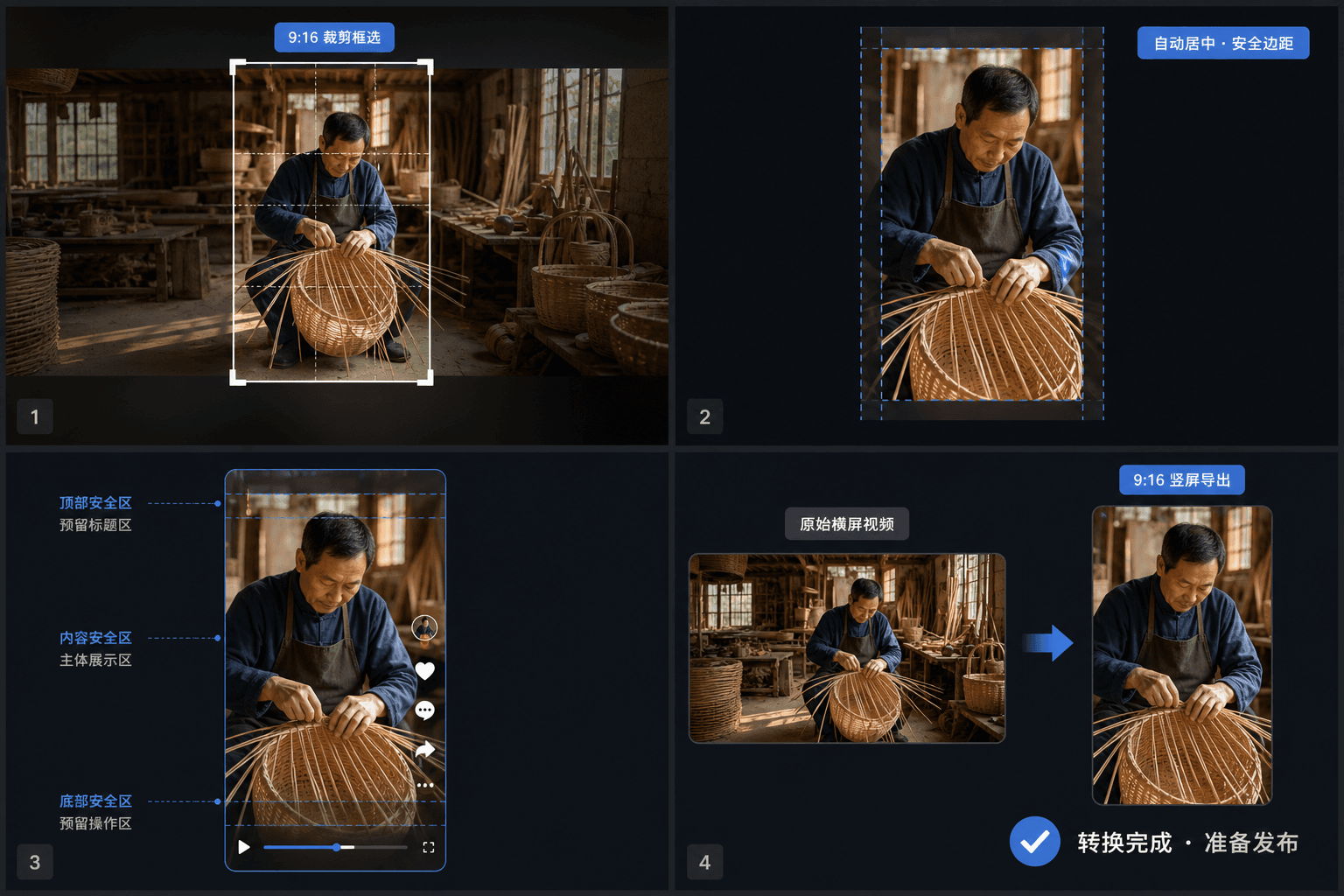
ปก Bilibili เป็นแนวนอน — วางแผนแยกต่างหาก
ต่างจาก Douyin หรือ TikTok ที่เฟรมแรกมักถูกใช้เป็นปก Bilibili คาดหวังภาพขนาดย่อแนวนอนที่ออกแบบมาโดยเฉพาะ — ใกล้เคียงกับการ์ด 16:10 ในฟีด ปกที่มีข้อความเยอะเป็นเรื่องปกติบนแพลตฟอร์ม ดังนั้นการดึงคีย์เฟรมที่โดดเด่นและวางชื่อเรื่องทับลงในเครื่องมือสร้างปกจึงเข้ากับธรรมเนียมท้องถิ่น คลิป Story Mode แนวตั้งไม่จำเป็นต้องมีปกแยก ซึ่งหมายความว่าภาพขนาดย่อแนวนอนที่ออกแบบมาหนึ่งภาพจะครอบคลุมการมีอยู่บน Bilibili ทั้งหมดของคุณ
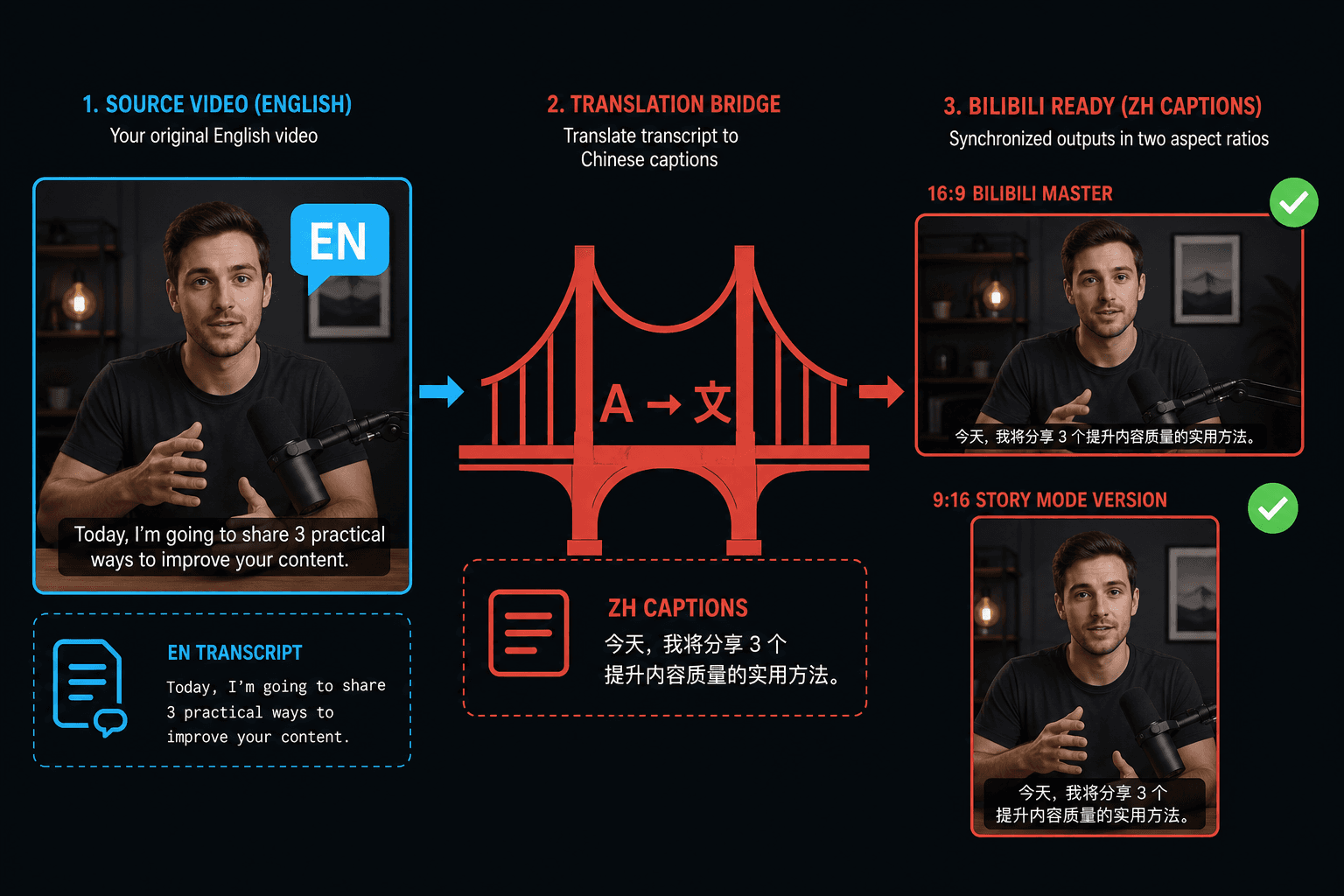
การเผยแพร่บน Bilibili จากนอกประเทศจีน
หากเนื้อหาต้นฉบับของคุณเป็นภาษาอังกฤษ การปรับขนาดเป็นส่วนที่ง่าย — ผู้ชมคาดหวังคำบรรยายภาษาจีน พื้นที่ทำงานเดียวกันนี้จะถอดเสียงของคุณ แปลแทร็กคำบรรยายเป็นภาษาจีน และฝังลงในทั้งต้นฉบับ 16:9 และคลิป Story Mode 9:16 เพื่อให้เวอร์ชันที่แปลภาษาตรงกับหนึ่งการตัดต่อ
ออกแบบมาเพื่อการทำงานจริงเหล่านี้
แปลงฟุตเทจแนวนอนเป็นแนวตั้ง 9:16
เลือกการครอบตัด การเพิ่มขอบ หรือการเบลอพื้นหลัง
ดาวน์โหลดไฟล์ MP4 แนวตั้ง
คำถามที่พบบ่อย
ฉันควรอัปโหลดวิดีโอแนวนอนหรือแนวตั้งลง Bilibili?
16:9 แนวนอนสำหรับฟีดหลัก — ยังคงเป็นรูปแบบหลักสำหรับเนื้อหาความคิดเห็นและวิดีโอสรุป ใช้ 9:16 แนวตั้งสำหรับคลิป Story Mode เท่านั้น โดยปกติจะเป็นทีเซอร์สั้นๆ สำหรับวิดีโอแนวนอนแบบเต็ม
อัตราส่วนปก Bilibili คือเท่าไหร่?
การ์ดแนวนอนที่ใกล้เคียงกับ 16:10 ออกแบบให้เป็นแอสเซ็ตของตัวเองแทนการใช้ปกแนวตั้งจากแพลตฟอร์มอื่น — การจัดเฟรมแนวนอนพร้อมชื่อเรื่องที่โดดเด่นเข้ากับสิ่งที่ฟีดแสดง
ฉันสามารถแปลวิดีโอของฉันสำหรับผู้ชม Bilibili ได้ไหม?
ได้ สร้างคำบรรยายจากเสียง แปลแทร็กเป็นภาษาจีน แล้วฝังลงในวิดีโอก่อนส่งออก ทั้งคลิปหลักและเวอร์ชัน Story Mode แนวตั้งสามารถมีคำบรรยายที่แปลแล้วได้
การปรับขนาดจะตัดส่วนหนึ่งของวิดีโอสรุปของฉันออกไปไหม?
ขึ้นอยู่กับโหมดการปรับให้พอดี การตัดต่อให้อัตราส่วนแคบลงจะตัดขอบออก ในขณะที่การเพิ่มพื้นที่ว่างจะเพิ่มแถบเพื่อให้มองเห็นเฟรมเต็ม สำหรับวิดีโอความคิดเห็นที่มีคำบรรยายหรือมุมคนพูด การเพิ่มพื้นที่ว่างมักจะรักษาส่วนสำคัญไว้ในการมองเห็น
เครื่องปรับขนาดเปลี่ยนอะไรนอกจากมิติหรือไม่?
หน้าที่ของมันคือขนาดเฟรมและอัตราส่วนภาพเท่านั้น มันไม่เขียนคำบรรยายหรือเสียงของคุณใหม่ ดังนั้นเมื่อไฟล์ที่ปรับเฟรมแล้วถูกส่งออก คุณยังสามารถรันผ่านการบีบอัด การใส่คำบรรยาย หรือขั้นตอนรูปแบบของ Recapo ก่อนอัปโหลดลง Bilibili
เริ่มใช้งาน เครื่องปรับขนาดวิดีโอ Bilibili
อัปโหลดไฟล์และตั้งค่าที่จำเป็นด้านบน ผลลัพธ์ของคุณจะแสดงอยู่ในขั้นตอนการทำงานของเครื่องมือปัจจุบัน
ใช้งานฟรี