ปรับขนาดวิดีโอ TikTok
ครอปวิดีโอแนวนอนเป็น 9:16 สำหรับ TikTok และทำให้วัตถุและคำบรรยายไม่ถูกทับด้วย UI กำหนดโซนปลอดภัย เพิ่มคำบรรยาย และส่งออกเป็นแนวตั้งเต็มหน้าจอ
คลิกเพื่ออัปโหลด หรือลากไฟล์วิดีโอมาวางที่นี่
รองรับไฟล์ MP4, MOV, MKV, WebM, MPEG, MPG, 3GP, 3GPP
สูงสุด 2 GB ต่อไฟล์
การประมวลผลดำเนินต่อในพื้นหลัง แม้ว่าคุณจะออกจากหน้านี้หรือเปลี่ยนภาษา
โซนปลอดภัยของ TikTok: จุดที่ UI ทับวิดีโอของคุณ
TikTok แสดงอินเทอร์เฟซทับวิดีโอโดยตรง และพื้นที่ที่ถูกทับนั้นคาดเดาได้ จัดองค์ประกอบโดยคำนึงถึงสิ่งเหล่านี้ และคลิปแนวตั้งของคุณจะดูเป็นธรรมชาติ หากเพิกเฉย ผู้ชมจะเห็นคำบรรยายของคุณหายไปใต้ปุ่มต่างๆ
- 01
นำเข้าคลิปแนวนอน
อัปโหลดวิดีโอ 16:9 หรือสี่เหลี่ยมของคุณ หรือนำเข้าจากลิงก์ โดยปกติแล้วนี่คือไฟล์ต้นฉบับที่คุณได้เผยแพร่ที่อื่นไปแล้ว
- 02
จัดตำแหน่งการครอป 9:16
เลื่อนหน้าต่างครอปแนวตั้งไปทั่วเฟรมเพื่อให้ใบหน้าและการกระทำสำคัญอยู่ตรงกลาง — สิ่งที่อยู่นอกหน้าต่างจะถูกตัดออก
- 03
เพิ่มคำบรรยายและส่งออก
สร้างคำบรรยาย ให้อยู่ในโซนปลอดภัย ฝังคำบรรยายหากต้องการให้ล็อก และส่งออกคลิปแนวตั้งเพื่ออัปโหลด
ขอบขวา
แถบไอคอน — โปรไฟล์ ถูกใจ แสดงความคิดเห็น แชร์ — เรียงลงมาทางขวา
ด้านล่าง
ข้อความคำบรรยาย ชื่อเสียง และพื้นที่ความคืบหน้าอยู่ที่แถบด้านล่างสุดของเฟรม
ด้านบน
สถานะระบบและองค์ประกอบการค้นหาอยู่ชิดขอบบน
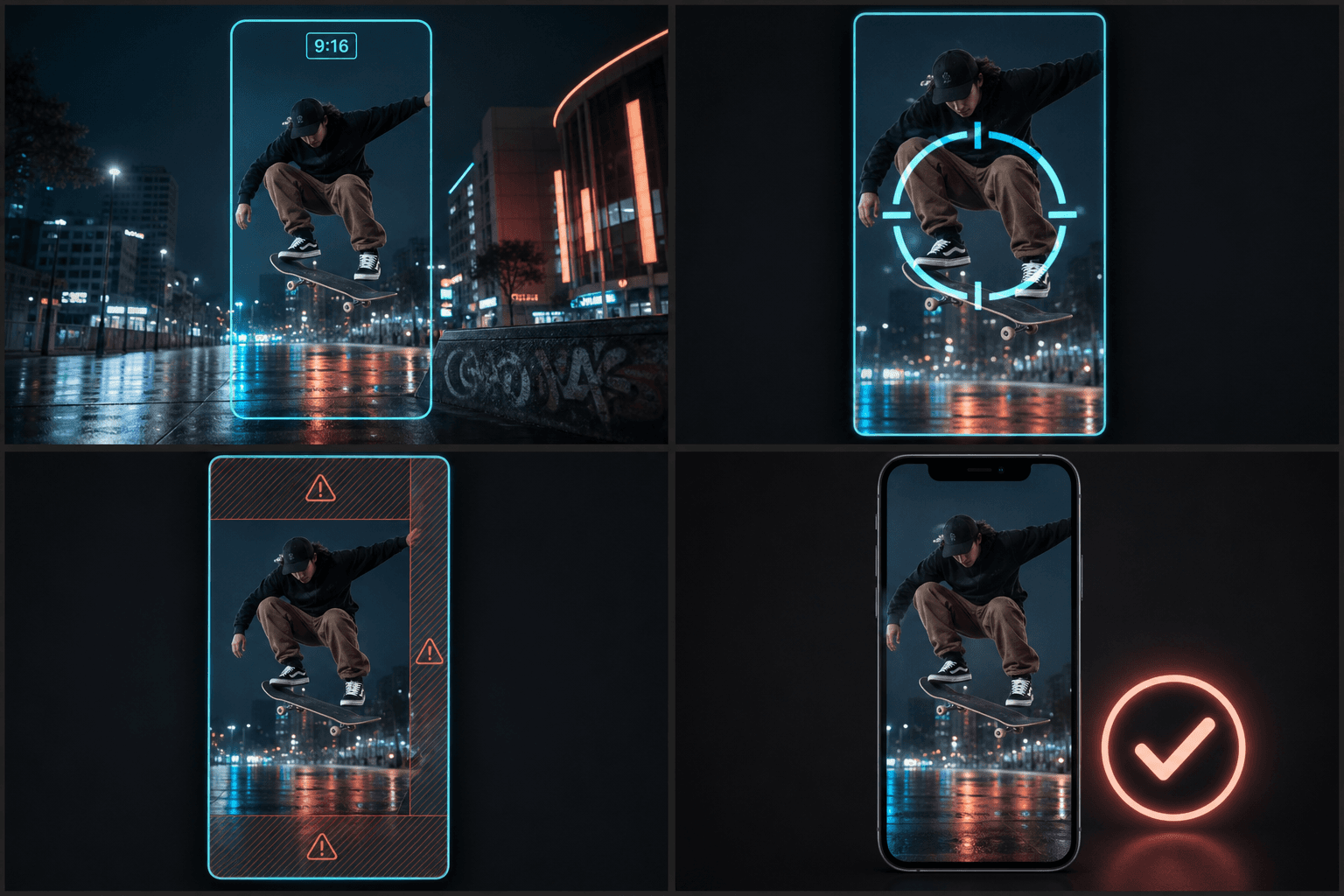
จาก 16:9 เป็น 9:16 โดยไม่สูญเสียวัตถุ
หน้าต่าง 9:16 บนเฟรม 16:9 จะรักษาภาพตรงกลางประมาณหนึ่งในสามไว้ ดังนั้นการครอปตรงกลางแบบสุ่มจึงล้มเหลวเมื่อการกระทำอยู่ไม่ตรงกลาง — สัมภาษณ์ที่จัดเฟรมไปด้านหนึ่ง HUD เกมในมุม หรือช็อตสองคน การจัดตำแหน่งการครอปต่อคลิปคือสิ่งที่แยกการตัดต่อแนวตั้งอย่างตั้งใจออกจากการรีโพสต์อัตโนมัติ หลังจากครอปแล้ว พื้นที่ทำงานเดียวกันจะจัดการคำบรรยาย เสียงพากย์ และหน้าปกแนวตั้งที่เข้ากัน ดังนั้นเวอร์ชัน TikTok จะออกมาเป็นการตัดต่อที่เสร็จสมบูรณ์ ไม่ใช่สำเนาที่ถูกบีบอัด
ออกแบบมาเพื่อการทำงานจริงเหล่านี้
ปรับขนาดฟุตเทจแนวนอนสำหรับ TikTok
เลือกการครอบตัด การเพิ่มขอบ หรือการเบลอพื้นหลัง
ดาวน์โหลดไฟล์ MP4 ขนาด 9:16
คำถามที่พบบ่อย
TikTok ใช้อัตราส่วนภาพเท่าไร?
แนวตั้ง 9:16 แสดงเต็มหน้าจอ — 1080×1920 เป็นเป้าหมายทั่วไป อัตราส่วนอื่นๆ อัปโหลดได้ปกติแต่จะถูกเพิ่มแถบดำ ซึ่งทำให้สูญเสียพื้นที่หน้าจอและทำให้โพสต์ดูถูกนำมาใช้ใหม่
คำบรรยายควรอยู่ที่ไหนเพื่อไม่ให้ปุ่มของ TikTok ทับ?
ให้อยู่ในแถบกลางของเฟรม สูงกว่าพื้นที่คำบรรยายด้านล่างอย่างชัดเจน และห่างจากแถบไอคอนด้านขวา คำบรรยายที่กึ่งกลางในส่วนล่างตรงกลาง — แต่ไม่ใช่ด้านล่างสุด — เป็นค่าเริ่มต้นที่ปลอดภัยที่สุด
ฉันสามารถใช้คลิป 9:16 เดียวกันสำหรับ Shorts และ Reels ได้ไหม?
ส่วนใหญ่ได้ — ทั้งสามแบบเป็น 9:16 การทับซ้อนของ UI แตกต่างกันเล็กน้อยในแต่ละแพลตฟอร์ม ดังนั้นตรวจสอบการวางหน้าปกและคำบรรยาย เครื่องมือปรับขนาด Reels ครอบคลุมความเฉพาะของ Instagram รวมถึงหน้าปกที่ครอปตามตาราง
การปรับขนาดจะครอปส่วนต่างๆ ของวิดีโอออกนอกเฟรมหรือไม่?
ขึ้นอยู่กับโหมดการเติมที่คุณเลือก การครอปเพื่อเติมจะรักษาขอบเฟรมไว้แต่จะตัดด้านข้างของฟุตเทจที่กว้างกว่าออก ในขณะที่การเพิ่มพื้นที่ว่างจะรักษาเฟรมต้นฉบับทั้งหมดและเพิ่มแถบเพื่อให้ได้ 9:16 คุณเลือกได้ว่าข้อแลกเปลี่ยนแบบไหนเหมาะกับคลิป
ฉันสามารถปรับขนาดวิดีโอสรุปแนวนอนที่ถ่ายทำใน 16:9 ได้ไหม?
ได้ การปรับเฟรม 16:9 แนวนอนเป็น 9:16 แนวตั้งคืองานหลักของเครื่องมือนี้ ดังนั้นคลิปสรุปภาพยนตร์หรือเสียงบรรยายแนวนอนสามารถเปลี่ยนเป็นไฟล์แนวตั้งที่พร้อมสำหรับ TikTok
เริ่มใช้งาน เครื่องมือปรับขนาดวิดีโอ TikTok
อัปโหลดไฟล์และตั้งค่าที่จำเป็นด้านบน ผลลัพธ์ของคุณจะแสดงอยู่ในขั้นตอนการทำงานของเครื่องมือปัจจุบัน
ใช้งานฟรี