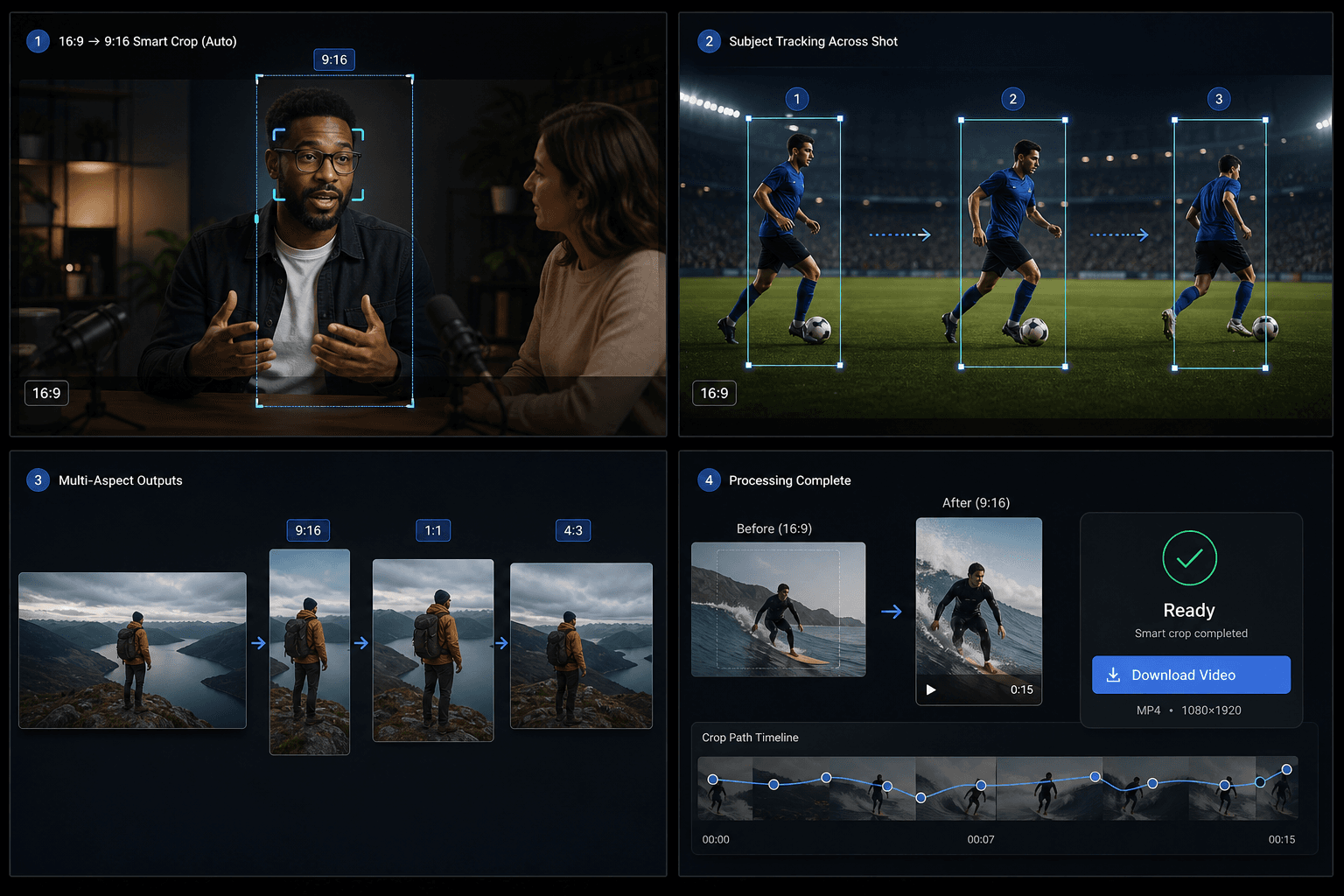
ครอปวิดีโอแนวนอนเป็น 9:16, 1:1 หรือ 4:3 แบบอัจฉริยะ
อัปโหลดวิดีโอ 16:9 ให้ Qwen ตรวจจับจุดสนใจหลัก ตัดช็อตยาวอัตโนมัติเมื่อโฟกัสเปลี่ยน และส่งออกไฟล์ MP4 ที่ครอปอย่างอัจฉริยะในขนาด 9:16, 1:1 หรือ 4:3
คลิกเพื่ออัปโหลด หรือลากไฟล์วิดีโอมาวางที่นี่
รองรับไฟล์ MP4, MOV, MKV, WebM, MPEG, MPG, 3GP, 3GPP
สูงสุด 2 GB ต่อไฟล์
วิดีโอต้นฉบับยาวได้สูงสุด 20 นาที
การประมวลผลดำเนินต่อในพื้นหลัง แม้ว่าคุณจะออกจากหน้านี้หรือเปลี่ยนภาษา
การตรวจจับจุดโฟกัสด้วย AI
เครื่องมือใช้เทคโนโลยี Qwen Vision เพื่อระบุวัตถุหลักและคำนวณจุดโฟกัสในแต่ละช่วงวิดีโอ แทนการครอปภาพจากกึ่งกลางแบบเดิม
- 01
อัปโหลดวิดีโอ 16:9
เลือกไฟล์ต้นฉบับแบบแนวนอนที่คุณต้องการปรับสัดส่วน
- 02
เลือกสัดส่วนภาพเป้าหมาย
เลือกรูปแบบผลลัพธ์เป็นแนวตั้ง 9:16 สี่เหลี่ยมจัตุรัส 1:1 หรือแนวนอน 4:3
- 03
ดาวน์โหลดผลลัพธ์การครอปอัจฉริยะ
เริ่มประมวลผล รอให้ AI วิเคราะห์จุดสนใจ จากนั้นดูตัวอย่างและดาวน์โหลดผลลัพธ์
เซกเมนต์ย่อยเชิงความหมาย
เมื่อตัวแบบหรือองค์ประกอบภาพเปลี่ยนแปลงไปภายในช็อตเดียวกัน ระบบจะแบ่งช็อตออกเป็นเซกเมนต์ย่อย และกำหนดกรอบการครอปแยกตามแต่ละเซกเมนต์
- อัปโหลดวิดีโอ 16:9
- เลือกสัดส่วนภาพเป้าหมาย
- ดาวน์โหลดผลลัพธ์การครอปอัจฉริยะ
เครดิตและขีดจำกัด
งานจะทำงานผ่านบริการ video-toolkit แบบรวม และใช้ระบบเครดิตเดียวกันกับเครื่องมือ Recapo อื่นๆ ขีดจำกัดแหล่งที่มาปัจจุบันอยู่ที่ประมาณ 20 นาที
ออกแบบมาเพื่อการทำงานจริงเหล่านี้
ออกแบบภาพหน้าปกวิดีโอ
ชิ้นงานสร้างสรรค์สำหรับโซเชียล
ดึงภาพคีย์วิชวลหลัก
คำถามที่พบบ่อย
รองรับวิดีโอแนวตั้งไหม
ยังไม่ได้ครับ ปัจจุบันระบบรองรับเฉพาะวิดีโอต้นฉบับแบบแนวนอนอัตราส่วน 16:9 เท่านั้น
ต่างจากตัวปรับขนาดของ TikTok อย่างไร
ตัวปรับขนาดทั่วไปจะครอปภาพตรงกลางแบบตายตัว แต่ Smart crop จะใช้ AI ติดตามวัตถุหลัก และยังสามารถแบ่งภาพจากช็อตเดียวออกเป็นหลายกรอบภาพได้อีกด้วย
รองรับรูปแบบผลลัพธ์อะไรบ้าง
รองรับอัตราส่วน 9:16, 1:1 และ 4:3 ในการทำงานหนึ่งครั้ง
เริ่มใช้งาน ครอปอัตราส่วนภาพอัจฉริยะ
อัปโหลดไฟล์และตั้งค่าที่จำเป็นด้านบน ผลลัพธ์ของคุณจะแสดงอยู่ในขั้นตอนการทำงานของเครื่องมือปัจจุบัน
ใช้งานฟรี