แปลงข้อความเป็นเสียงพูดทำวิดีโอ
เปลี่ยนข้อความธรรมดาให้เป็นวิดีโอที่สมบูรณ์พร้อมเสียงพูด AI คำบรรยายที่ซิงค์แล้ว และฟุตเทจของคุณ — ไม่ต้องใช้กล้องหรือไมโครโฟน สร้างวิดีโอแบบไม่เปิดหน้าได้รวดเร็วบน Recapo.ai
คลิกเพื่ออัปโหลด หรือลากไฟล์วิดีโอมาวางที่นี่
รองรับไฟล์ MP4, MOV, MKV, WebM, MPEG, MPG, 3GP, 3GPP
สูงสุด 2 GB ต่อไฟล์
วิดีโอต้นฉบับยาวได้สูงสุด 3 นาที
การประมวลผลดำเนินต่อในพื้นหลัง แม้ว่าคุณจะออกจากหน้านี้หรือเปลี่ยนภาษา
วิดีโอแบบไม่เปิดหน้าจากหน้ากระดาษเปล่า
ช่องแบบไม่เปิดหน้าจะอยู่รอดหรือล้มเหลวขึ้นอยู่กับความเร็วในการผลิต: รูปแบบนี้ได้ผลเพราะคนคนเดียวสามารถเผยแพร่ได้ทุกวันโดยไม่ต้องออกกล้อง วิดีโอแปลงข้อความเป็นเสียงพูดจะลบส่วนที่ช้าที่สุดสองส่วนออกไป — การบันทึกเสียงบรรยายและการจับเวลาคำบรรยายด้วยตนเอง คุณจัดหาข้อความและคลิป เครื่องมือจะจัดหาเสียง แทร็กคำบรรยาย และร่างที่ประกอบเสร็จแล้ว
- 01
เริ่มต้นจากข้อความ
วางสคริปต์หรือร่างบทความของคุณ หากคุณมีเพียงวิดีโอต้นฉบับ ให้สร้างบทสรุปหรือสคริปต์สรุปจากวิดีโอนั้นก่อน
- 02
เพิ่มเสียงและภาพ
เลือกเสียงบรรยาย จากนั้นแนบฟุตเทจ — การอัปโหลดในเครื่องหรือนำเข้าจากลิงก์ — ในขณะที่คำบรรยายจะถูกสร้างให้ซิงค์กับเสียงพูด
- 03
เรนเดอร์และเผยแพร่
ส่งออกร่างวิดีโอ ปรับแต่งสไตล์คำบรรยายหรือหน้าปก ตัดเป็นอัตราส่วน 9:16 สำหรับ Shorts และเผยแพร่ไปยังแพลตฟอร์มของคุณ
ช่องสรุปและแสดงความคิดเห็น
เขียนสคริปต์เรื่องราว พากย์เสียง และเผยแพร่
วิดีโออธิบายและบทความแบบรายการ
เปลี่ยนโครงร่างเป็นวิดีโอที่มีเสียงบรรยายโดยไม่ต้องถ่ายทำ
การโพสต์หลายแพลตฟอร์ม
แหล่งข้อความเดียว ส่งออกสำหรับ Shorts, Reels และ TikTok
เครื่องสร้างวิดีโอ TTS สร้างอะไรออกมาจริงๆ
ผลลัพธ์ไม่ใช่แค่ไฟล์ MP3 ที่แนบกับสไลด์โชว์ คุณจะได้ร่างที่มีโครงสร้าง: แทร็กเสียง AI ที่เรนเดอร์จากข้อความของคุณ แทร็กคำบรรยายที่ตรงกับเสียงพูดทุกคำและยังคงแก้ไขได้ และฟุตเทจของคุณที่วางทับกับเสียงบรรยาย จากจุดนั้นทุกส่วนยังสามารถปรับแต่งได้ — เขียนประโยคใหม่ ปรับสไตล์คำบรรยาย สลับคลิป — ก่อนส่งออกสุดท้าย
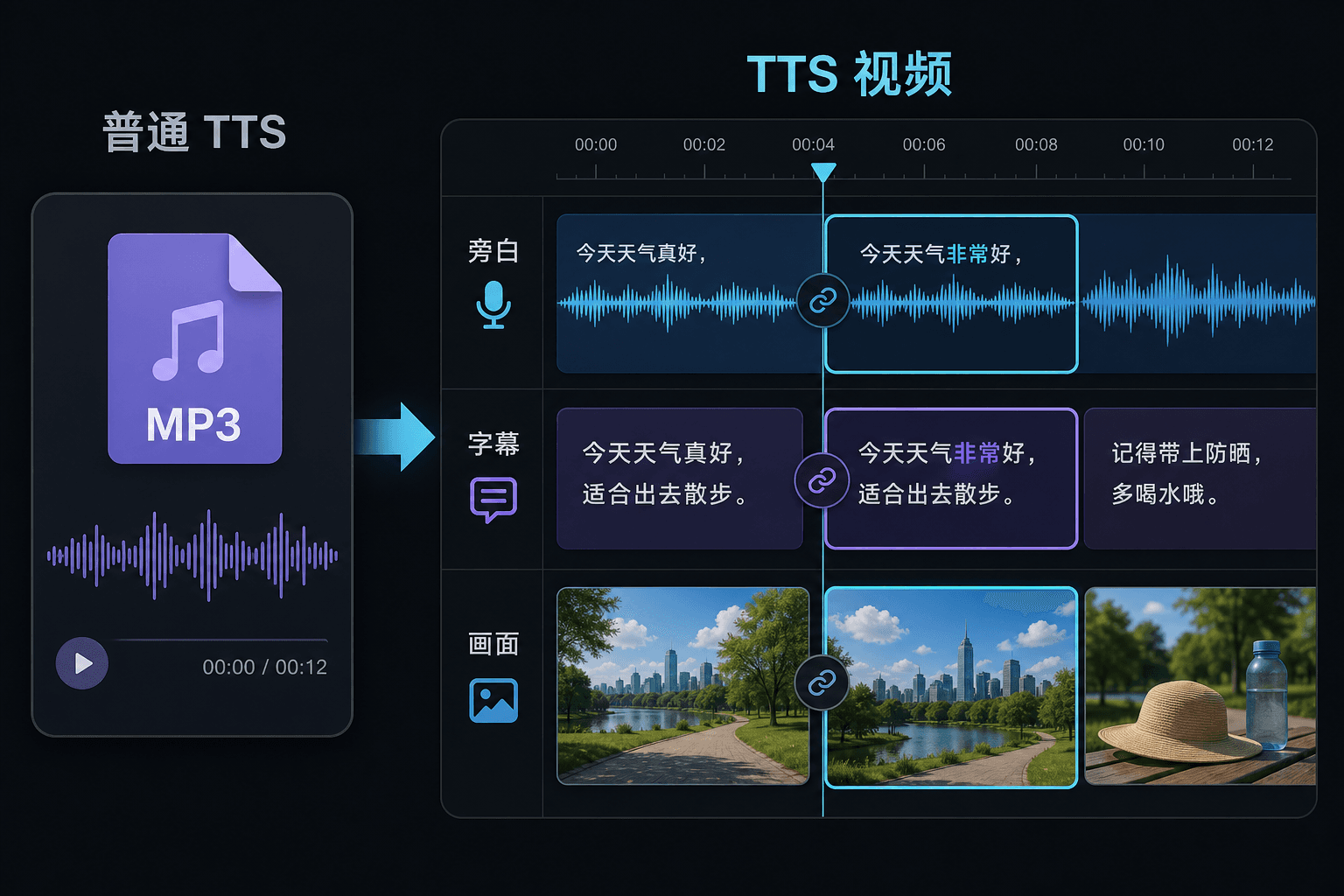
วิดีโอแปลงข้อความเป็นเสียงพูด เทียบกับ การแปลงข้อความเป็นเสียงพูดแบบธรรมดา
เครื่องมือ TTS ธรรมดาจะมอบไฟล์เสียงให้คุณและอวยพรให้คุณโชคดีในโปรแกรมตัดต่อของคุณ แต่ที่นี่เสียงพูดจะถูกสร้างภายในโปรเจ็กต์วิดีโอ ดังนั้นการจับเวลา คำบรรยาย และภาพจึงเชื่อมโยงกันอยู่แล้ว ความแตกต่างนี้สำคัญที่สุดเมื่อถึงเวลาแก้ไข: การเปลี่ยนข้อความจะอัปเดตเสียงบรรยายและคำบรรยายไปพร้อมกัน แทนที่จะบังคับให้ซิงค์ใหม่ด้วยตนเอง
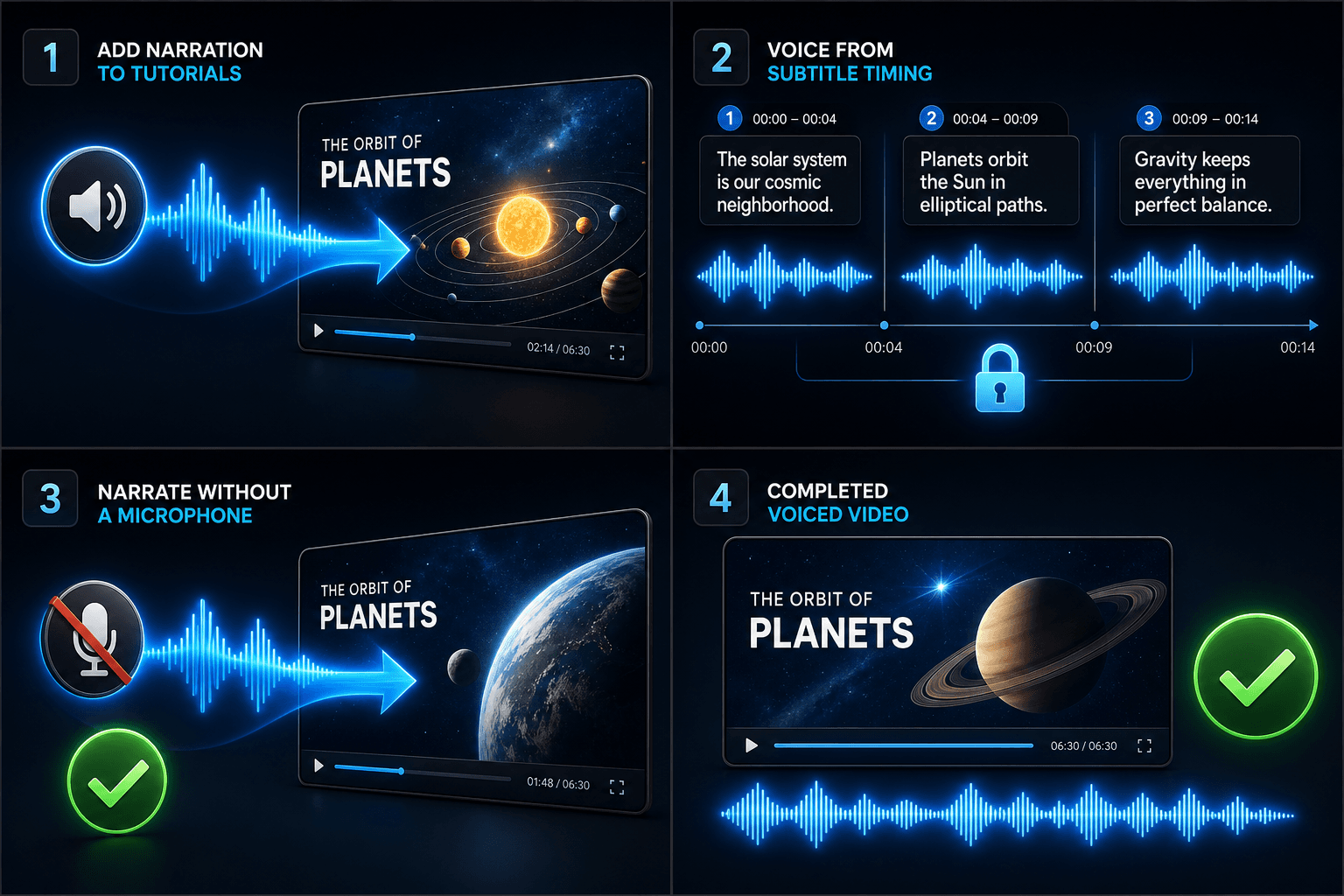
ออกแบบมาเพื่อการทำงานจริงเหล่านี้
เพิ่มเสียงบรรยายในวิดีโอสอนการใช้งาน
สร้างเสียงพากย์วิดีโอตามเวลาของซับไตเติล
สร้างเสียงบรรยายโดยไม่ต้องใช้ไมโครโฟน
เครื่องมือที่เกี่ยวข้อง
คำถามที่พบบ่อย
ฉันต้องใช้ฟุตเทจของตัวเองเพื่อสร้างวิดีโอแปลงข้อความเป็นเสียงพูดหรือไม่
คุณต้องมีแหล่งภาพบางอย่าง — อัปโหลดคลิปในเครื่องหรือนำเข้าจากลิงก์ ผู้สร้างหลายคนดึงไฮไลท์จากวิดีโอต้นฉบับที่ยาวกว่าและปล่อยให้เสียงบรรยายเล่าเรื่องราวทับลงไป
คำบรรยายถูกฝังมาเลยหรือแก้ไขได้
แก้ไขได้ คำบรรยายจะถูกสร้างให้ซิงค์กับเสียงพูด และคุณสามารถแก้ไขข้อความ ปรับสไตล์ใหม่ ส่งออกเป็น SRT/VTT หรือฝังลงในเรนเดอร์สุดท้าย — เลือกได้ตามต้องการ
ฉันสามารถสร้างวิดีโอแนวตั้งสำหรับ Shorts และ TikTok ด้วยวิธีนี้ได้หรือไม่
ได้ หลังจากสร้างร่างเสร็จแล้ว คุณสามารถตัดเป็นอัตราส่วน 9:16 ปรับตำแหน่งคำบรรยายสำหรับการรับชมแบบแนวตั้ง และส่งออกตามแพลตฟอร์มได้
ฉันป้อนอะไรเข้าไป ข้อความหรือไฟล์วิดีโอ
คุณวางข้อความ ไม่ใช่วิดีโอ วิดีโอแปลงข้อความเป็นเสียงพูดจะอ่านสคริปต์ที่พิมพ์หรือข้อความที่วาง และส่งออกไฟล์เสียงบรรยายที่พูดออกมา มันไม่ประมวลผลฟุตเทจ ดังนั้นให้ใช้มันเพื่อพากย์เสียงสคริปต์ที่คุณเขียนไว้สำหรับการสรุปของคุณ
ฉันสามารถเลือกเสียงบรรยายและความเร็วในการพูดได้หรือไม่
ได้ คุณเลือกเสียงและสามารถปรับจังหวะและน้ำเสียงให้การอ่านเหมาะกับช่องแบบไม่เปิดหน้าหรือช่องแสดงความคิดเห็นของคุณ Recapo ยังอยู่ระหว่างการพัฒนา ดังนั้นเสียงและตัวควบคุมที่มีจะขยายเพิ่มขึ้นตามเวลา
มันส่งคืนอะไรเมื่อเสร็จสิ้น
คุณจะได้รับแทร็กเสียงบรรยายที่คุณสามารถดาวน์โหลดและวางลงบนไทม์ไลน์วิดีโอของคุณพร้อมกับคำบรรยายและคลิป พร้อมผสมกับเพลงและส่งออกผ่านเวิร์กโฟลว์ที่เหลือของ Recapo
เริ่มใช้งาน วิดีโอแปลงข้อความเป็นเสียงพูด
อัปโหลดไฟล์และตั้งค่าที่จำเป็นด้านบน ผลลัพธ์ของคุณจะแสดงอยู่ในขั้นตอนการทำงานของเครื่องมือปัจจุบัน
ใช้งานฟรี