
Querformat-Videos intelligent auf 9:16, 1:1 oder 4:3 zuschneiden
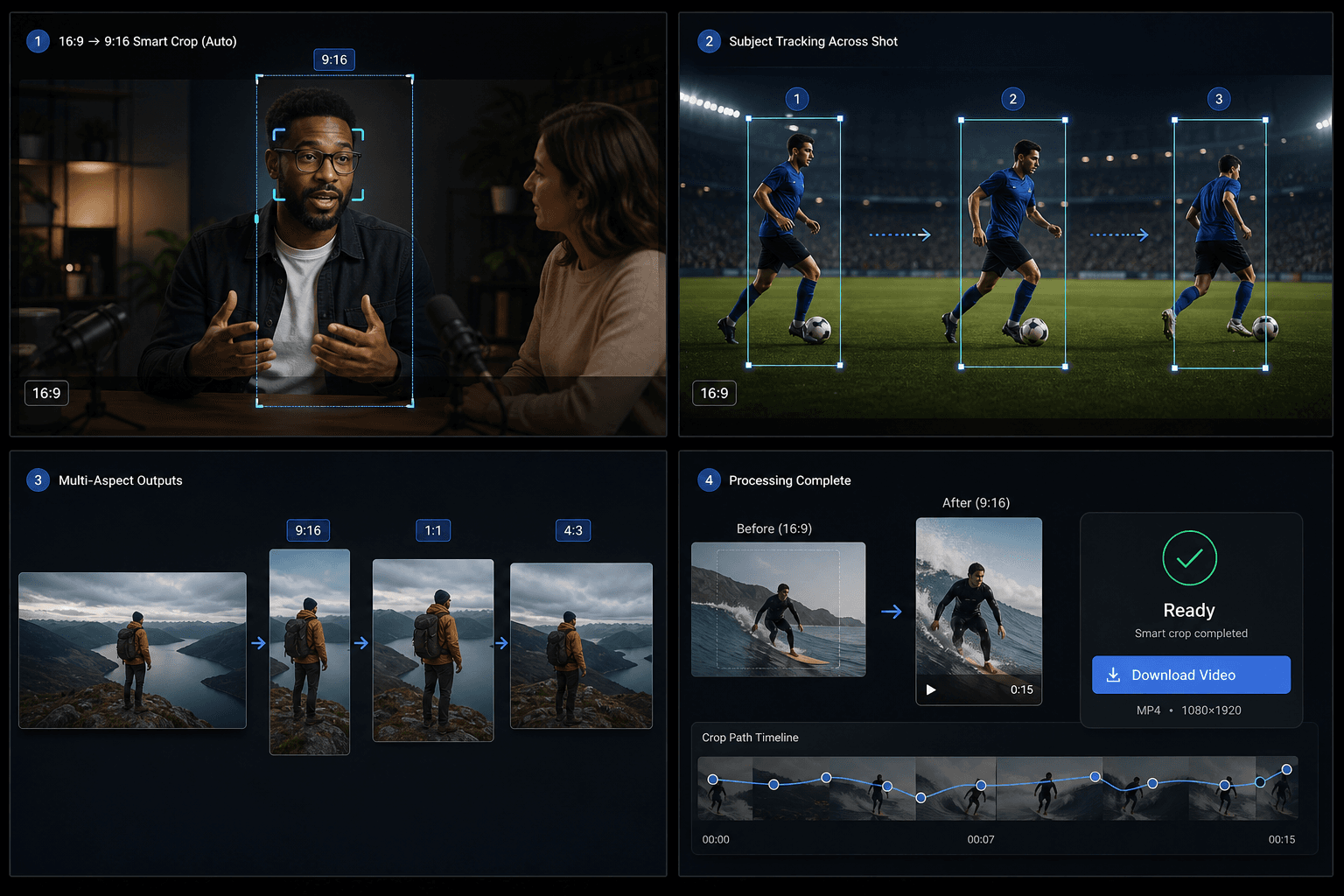
16:9-Video hochladen: Qwen erkennt das Hauptmotiv, teilt Szenen bei Fokuswechsel und exportiert eine intelligent zugeschnittene MP4 in 9:16, 1:1 oder 4:3.
Klicken Sie hier oder ziehen Sie eine Videodatei in diesen Bereich
Unterstützt MP4, MOV, MKV, WebM, MPEG, MPG, 3GP, 3GPP
Bis zu 2 GB pro Datei
Quellvideo bis zu 20 Minuten
Die Verarbeitung läuft im Hintergrund weiter, auch wenn Sie diese Seite verlassen oder die Sprache wechseln.
KI-Fokuserkennung
Das Tool nutzt Qwen Vision, um das Hauptmotiv zu erkennen und für jedes Segment den optimalen Fokuspunkt zu berechnen, anstatt standardmäßig auf die Bildmitte zuzuschneiden.
- 01
16:9-Video hochladen
Wählen Sie die Quelldatei im Querformat aus, die Sie neu formatieren möchten.
- 02
Ziel-Seitenverhältnis auswählen
Wählen Sie 9:16 Hochformat, 1:1 Quadrat oder 4:3 Querformat als Ausgabeformat.
- 03
Smart Crop herunterladen
Starten Sie den Vorgang, warten Sie auf die KI-Fokusanalyse und laden Sie das Ergebnis nach der Vorschau herunter.
Semantische Untersegmente
Wenn sich das Motiv oder die Bildkomposition innerhalb einer einzigen Einstellung ändert, teilt die Pipeline die Aufnahme in Untersegmente auf und passt den Bildausschnitt für jedes Segment individuell an.
- 16:9-Video hochladen
- Ziel-Seitenverhältnis auswählen
- Smart Crop herunterladen
Guthaben und Limits
Die Aufgabe läuft über den einheitlichen Video-Toolkit-Service und verwendet dasselbe Credit-System wie andere Recapo-Tools. Das aktuelle Quellenlimit beträgt etwa 20 Minuten.
Entwickelt für diese Praxis-Workflows
Video-Cover-Design
Social-Media-Creative
Extraktion von Key-Visuals
FAQ
Funktioniert das auch für Videos im Hochformat?
Noch nicht. Die aktuelle Version erwartet ein Quellvideo im 16:9-Querformat.
Wie unterscheidet sich das vom TikTok-Resizer?
Der Resizer nutzt einen festen Zuschnitt in der Bildmitte. Smart Crop verfolgt das Motiv hingegen mit KI und kann eine einzelne Aufnahme in mehrere Zuschnittsfenster aufteilen.
Welche Ausgabeformate werden unterstützt?
9:16, 1:1 und 4:3 in einem einzigen Vorgang.
Intelligenter Zuschnitt für Seitenverhältnisse jetzt starten
Geben Sie oben Ihre Datei und die gewünschten Einstellungen ein. Ihr Ergebnis bleibt direkt im aktuellen Tool-Workflow.
Kostenlos nutzen