
Text to Speech Video Maker
Verwandeln Sie einfachen Text in ein fertiges Video mit KI-Sprache, synchronisierten Untertiteln und Ihrem Filmmaterial – keine Kamera oder kein Mikrofon erforderlich. Erstellen Sie schnell gesichtslose Videos auf Recapo.ai.
Klicken Sie hier oder ziehen Sie eine Videodatei in diesen Bereich
Unterstützt MP4, MOV, MKV, WebM, MPEG, MPG, 3GP, 3GPP
Bis zu 2 GB pro Datei
Quellvideo bis zu 3 Minuten
Die Verarbeitung läuft im Hintergrund weiter, auch wenn Sie diese Seite verlassen oder die Sprache wechseln.
Gesichtslose Videos von einer leeren Seite
Gesichtslose Kanäle leben oder sterben mit der Produktionsgeschwindigkeit: Das Format funktioniert, weil eine Person täglich Inhalte veröffentlichen kann, ohne jemals vor der Kamera zu erscheinen. Text-to-Speech-Video eliminiert die zwei langsamsten Schritte – das Aufnehmen der Erzählung und das manuelle Timen der Untertitel. Sie liefern die Worte und die Clips; das Tool liefert die Stimme, die Untertitelspur und den zusammengebauten Entwurf.
- 01
Aus Text starten
Fügen Sie Ihr Skript oder Ihren artikelartigen Entwurf ein. Wenn Sie nur ein Quellvideo haben, generieren Sie zuerst eine Zusammenfassung oder ein Recap-Skript daraus.
- 02
Stimme und visuelle Elemente hinzufügen
Wählen Sie eine Erzählstimme und fügen Sie dann Filmmaterial hinzu – lokale Uploads oder Link-Importe – während die Untertitel synchron zur Sprache generiert werden.
- 03
Rendern und veröffentlichen
Exportieren Sie den Videoentwurf, verfeinern Sie das Untertitel-Design oder das Cover, schneiden Sie es auf 9:16 für Shorts zu und veröffentlichen Sie es auf Ihren Plattformen.
Recap- und Kommentar-Kanäle
Story skripten, vertonen, veröffentlichen.
Erklärungen und Listen
Verwandeln Sie eine Gliederung in ein erzähltes Video ohne Dreharbeiten.
Multi-Plattform-Posting
Eine Textquelle, exportiert für Shorts, Reels und TikTok.
Was der TTS-Videogenerator tatsächlich erzeugt
Die Ausgabe ist nicht nur eine MP3, die an eine Diashow geheftet wurde. Sie erhalten einen strukturierten Entwurf: eine KI-Stimmspur, die aus Ihrem Text gerendert wird, eine Untertitelspur, die der Sprache Wort für Wort entspricht und bearbeitbar bleibt, und Ihr Filmmaterial, das über die Erzählung gelegt wird. Von dort aus kann jedes Teil noch angepasst werden – eine Zeile umformulieren, die Untertitel neu gestalten, einen Clip austauschen – vor dem endgültigen Export.
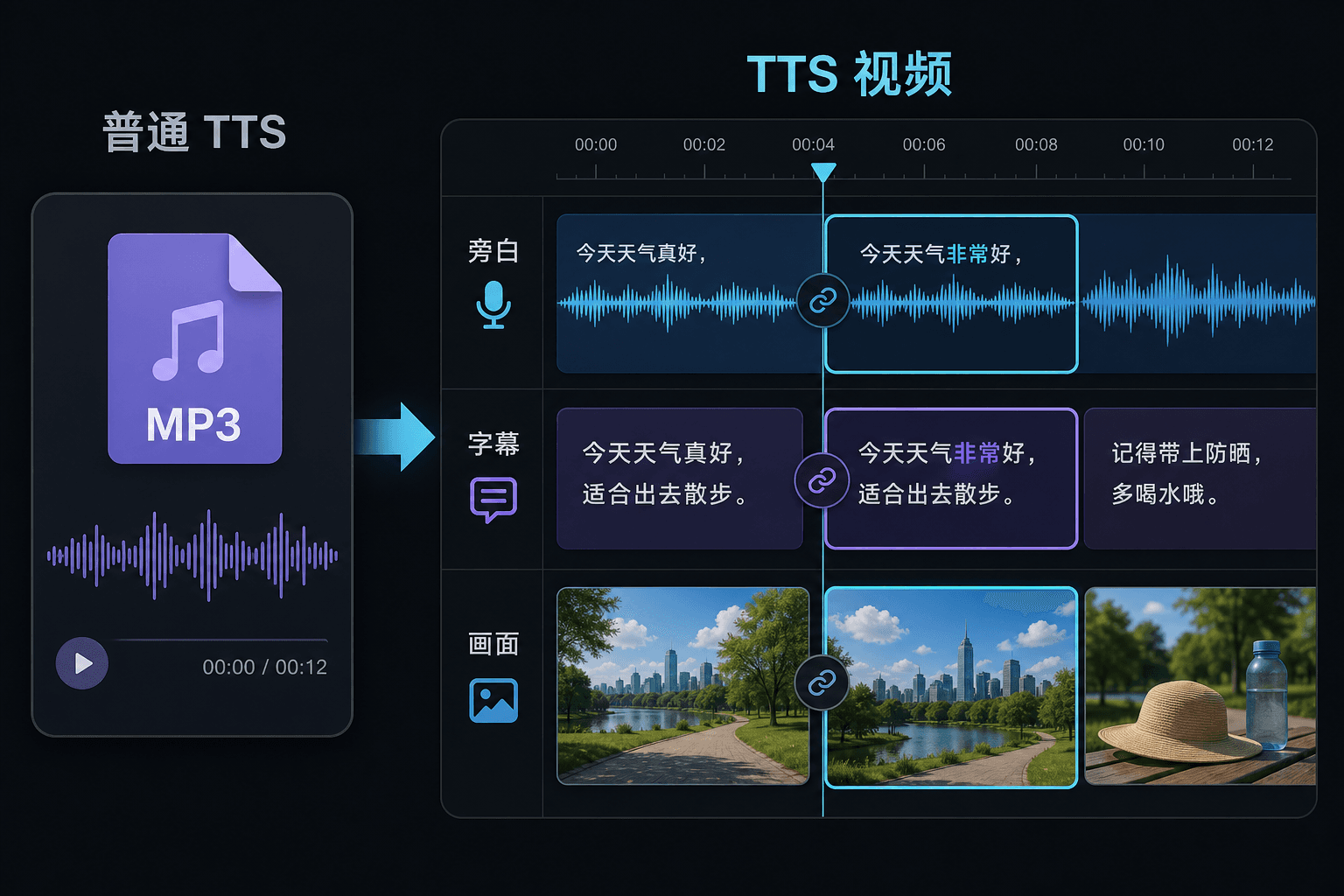
Text-to-Speech-Video vs. reines Text-to-Speech
Ein reines TTS-Tool gibt Ihnen eine Audiodatei und wünscht Ihnen viel Glück in Ihrem Editor. Hier wird die Sprache innerhalb eines Videoprojekts generiert, sodass Timing, Untertitel und Bild bereits verbunden sind. Dieser Unterschied macht sich besonders bei der Überarbeitung bemerkbar: Das Ändern des Textes aktualisiert die Erzählung und die Untertitel gleichzeitig, anstatt eine manuelle Neusynchronisierung zu erzwingen.
Entwickelt für diese Praxis-Workflows
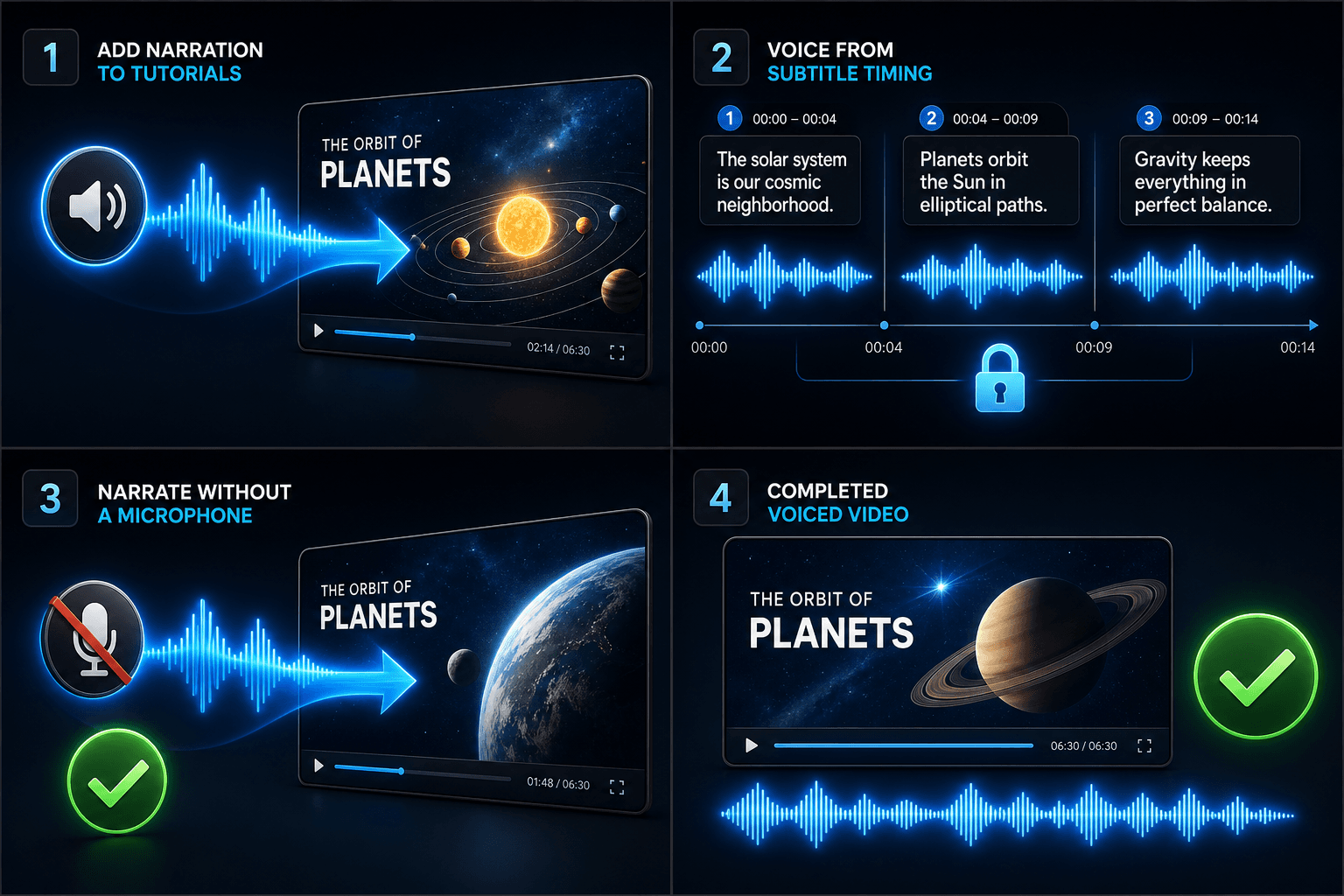
Tutorials mit Voiceover versehen
Video basierend auf Untertitel-Timing vertonen
Vertonung ohne Mikrofon erstellen
FAQ
Brauche ich eigenes Filmmaterial, um ein Text-to-Speech-Video zu erstellen?
Sie benötigen eine visuelle Quelle – laden Sie lokale Clips hoch oder importieren Sie sie über einen Link. Viele Creator ziehen Highlights aus einem längeren Quellvideo und lassen die Erzählung die Geschichte darüber tragen.
Sind die Untertitel fest eingebrannt oder bearbeitbar?
Bearbeitbar. Untertitel werden synchron zur Sprache generiert, und Sie können den Text bearbeiten, sie neu gestalten, SRT/VTT exportieren oder sie in das endgültige Render einbetten – Sie haben die Wahl.
Kann ich auf diese Weise vertikale Videos für Shorts und TikTok erstellen?
Ja. Nachdem der Entwurf generiert wurde, können Sie ihn auf 9:16 zuschneiden, die Untertitelplatzierung für die vertikale Ansicht anpassen und plattformspezifisch exportieren.
Was gebe ich ein, Text oder eine Videodatei?
Sie fügen Text ein, kein Video. Text-to-Speech-Video liest ein getipptes Skript oder eingefügte Wörter und gibt eine gesprochene Erzähl-Audiodatei aus. Es verarbeitet kein Filmmaterial, also nutzen Sie es, um das Skript zu vertonen, das Sie bereits für Ihren Recap geschrieben haben.
Kann ich die Erzählstimme und die Sprechgeschwindigkeit wählen?
Ja. Sie wählen eine Stimme und können Tempo und Tonfall anpassen, damit die Lesung zu Ihrem gesichtslosen Kanal oder Kommentar-Kanal passt. Recapo befindet sich noch in der Entwicklung, daher werden die verfügbaren Stimmen und Steuerungsmöglichkeiten im Laufe der Zeit erweitert.
Was gibt es zurück, wenn es fertig ist?
Sie erhalten eine Erzähl-Audiospur, die Sie herunterladen und zusammen mit Untertiteln und Clips in Ihre Video-Timeline einfügen können, bereit zum Abmischen mit Musik und zum Exportieren durch den Rest des Recapo-Workflows.
Text-to-Speech-Video jetzt starten
Geben Sie oben Ihre Datei und die gewünschten Einstellungen ein. Ihr Ergebnis bleibt direkt im aktuellen Tool-Workflow.
Kostenlos nutzen