How to Make YouTube Shorts From Long Videos (Creator Workflow)
Turn one long video into 10 YouTube Shorts: transcript-based clip selection, 9:16 reframing, hooks and captions — a complete creator workflow.
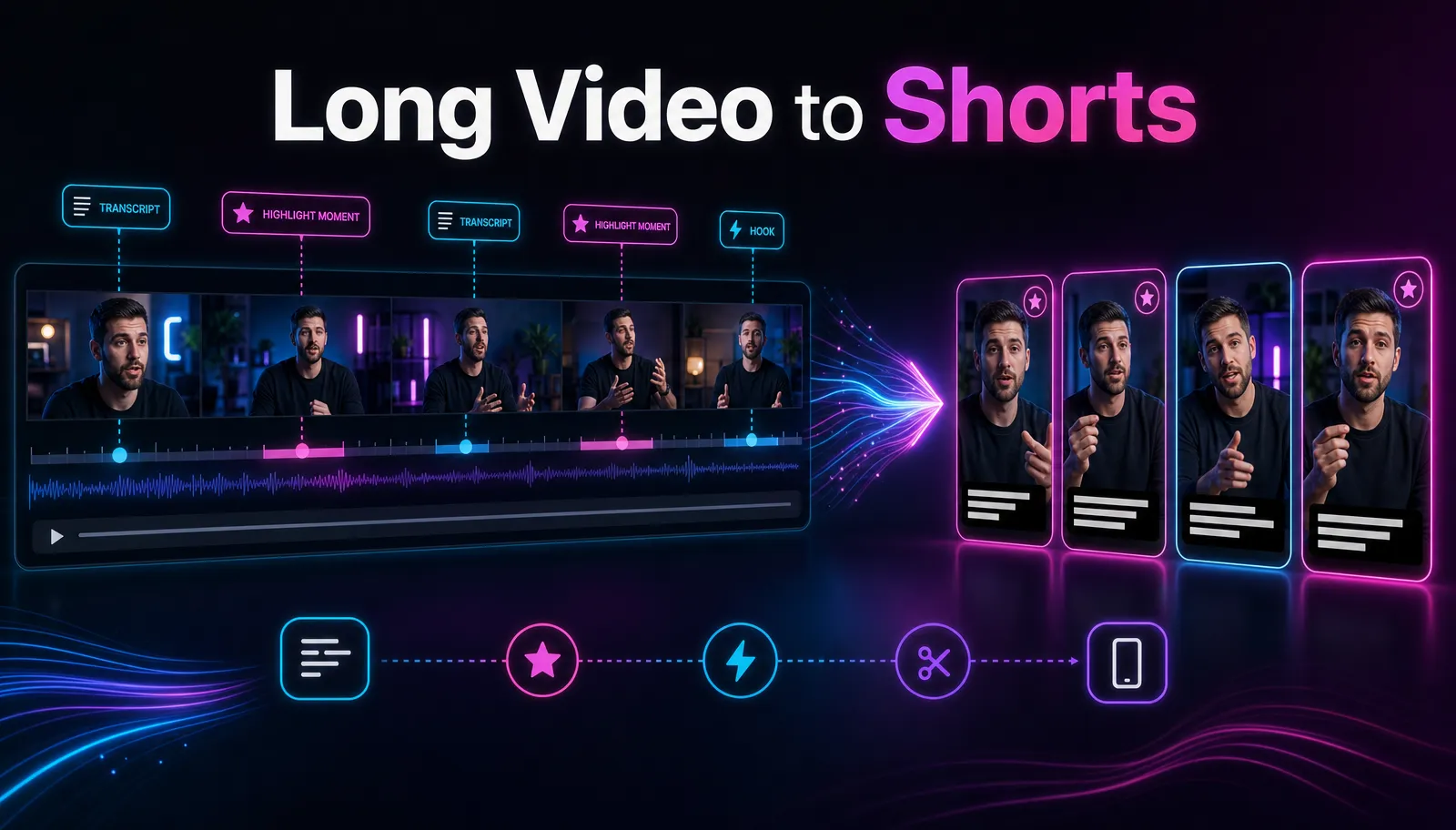
The fastest way to make YouTube Shorts from a long video is to work from the transcript, not the timeline: transcribe the video, pick segments that stand on their own, trim each one to a single complete thought, reframe to 9:16, move the payoff into the first three seconds, and burn in captions. A long video will not give you unlimited Shorts, but it will reliably give you a handful of good ones for a fraction of the effort of filming new content. This guide covers that workflow end to end, including the parts most tutorials skip: how many Shorts per video is actually realistic, and what you should refuse to clip.
Why repurpose instead of filming new Shorts
Time economics. The long video already absorbed the expensive work — research, setup, recording, the main edit. Cutting a Short from it costs minutes per clip. Filming a native Short costs another full production cycle, every time.
Repurposing also tests topics cheaply. If a 35-second segment about one narrow question takes off as a Short, that is a strong signal the topic deserves its own long video. You are mining your own material for demand signals, not just extra views.
One honest caveat before the workflow: a repurposed clip is not automatically a good Short. Most of a long video depends on context and will not survive being cut out. Everything below is really a filter — its job is to find the few segments that work alone, then package them properly.
The transcript-first workflow
Scrubbing a 40-minute timeline by eye is slow, and it biases you toward visually loud moments. Reading a transcript takes minutes and exposes what actually matters for Shorts: which passages are self-contained ideas. Every step below starts from text.
If you want the tedious part done for you, a long video to short video AI will transcribe the upload and propose candidate segments. You still make the final calls — you just skip the scrubbing.
Step 1: Transcribe the whole video
- Upload the source file. Recapo runs in the browser and accepts MP4, MOV and other common formats, up to 6GB per task — enough for most 1080p long-form exports.
- Generate the transcript and skim it once, top to bottom, without cutting anything yet.
- Note the timestamps where you stopped skimming and started reading. Those involuntary pauses are your first candidate list.
Step 2: Select segments using three strategies
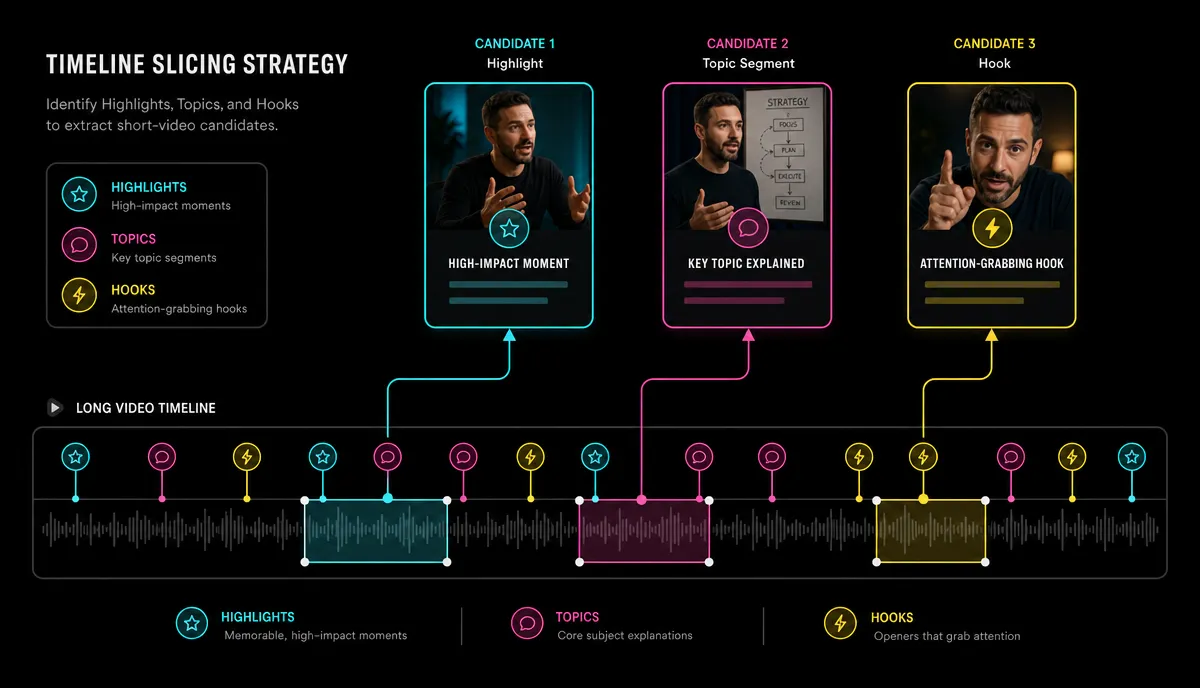
Go through the transcript three times, once per lens:
- Highlight peaks. Moments of maximum energy: a demo that visibly works, a surprising result, a strong opinion stated without hedging. These clip well because the emotion is already on screen.
- Self-contained topics. One tip, one answer, one step of a process. The test: would someone who never saw the long video understand this segment cold? If it needs a "previously on", it fails.
- Hook-worthy questions. Passages that pose or answer a question people actually type into search. These convert most naturally into Short titles later.
An AI YouTube Shorts generator can run this pass for you and surface candidates straight from the transcript. Treat the output as a shortlist, not a verdict — it finds structure, but it does not know which claims your audience argues about.
Step 3: Trim each candidate to one complete thought
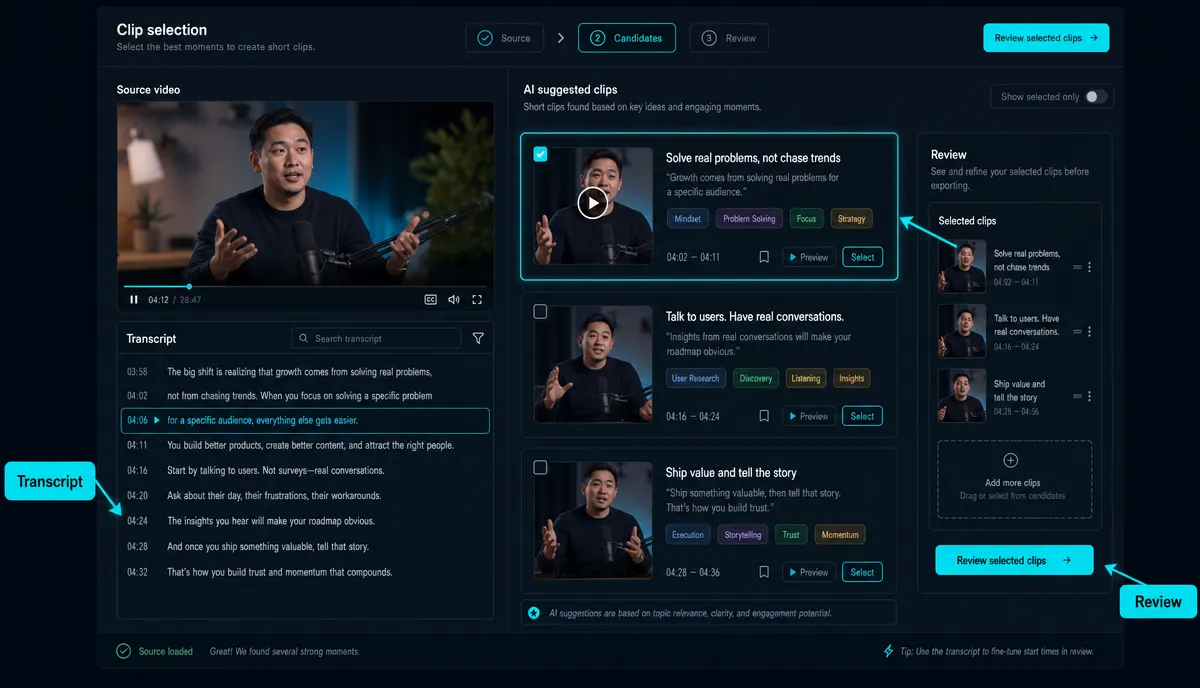
This is where most repurposed Shorts fail. Four rules that hold up:
- Start at the first word of the idea, not the wind-up. Cut the "so, um, like I was saying" — enter mid-energy.
- End when the idea resolves, not when the speaker pauses. A Short that stops on an unresolved sentence feels broken, not intriguing.
- For talking content, 20–45 seconds is a reliable working range. Go longer only when the segment genuinely carries a second beat.
- If you feel the urge to add on-screen text explaining what happened before the clip, the segment fails. Reject it and move on.
Step 4: Reframe to 9:16
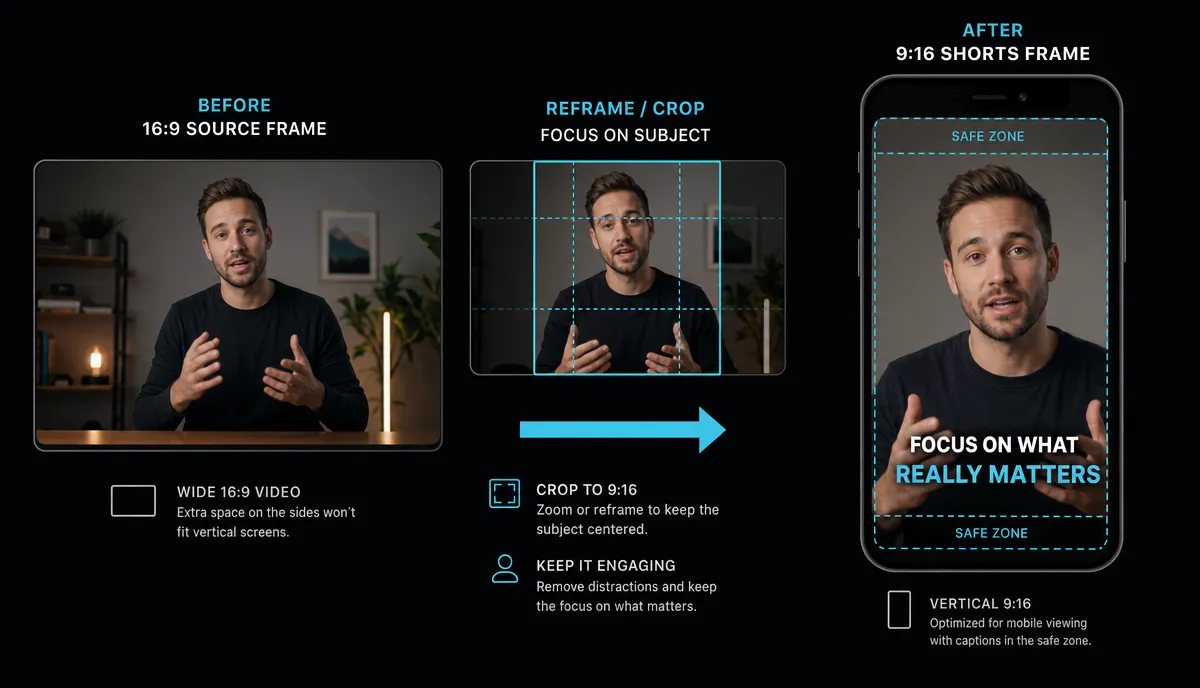
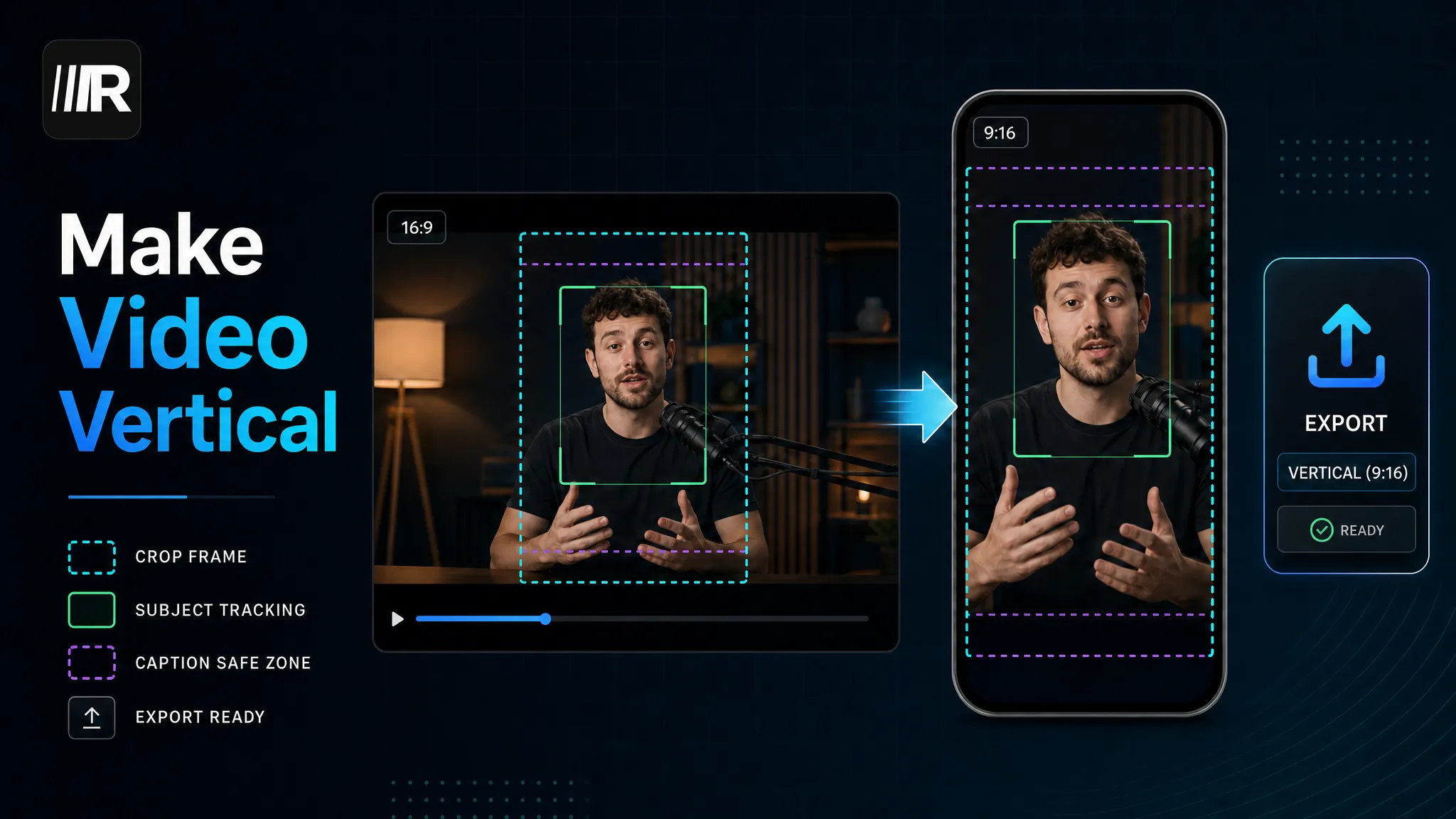
Your source is horizontal; Shorts are vertical. A static center crop is fine when the speaker sits still in the middle of the frame. For anything else, use subject-tracking reframing so the person stays in frame through gestures and camera moves — Recapo's vertical reframing handles this, but spot-check every scene change and any moment a second person enters. Tracking follows a subject well; it cannot decide which of two people matters.
One warning for screen recordings: UI text that was readable at 16:9 usually dies at 9:16. Zoom into the active region, or drop the segment.
Step 5: Front-load the hook
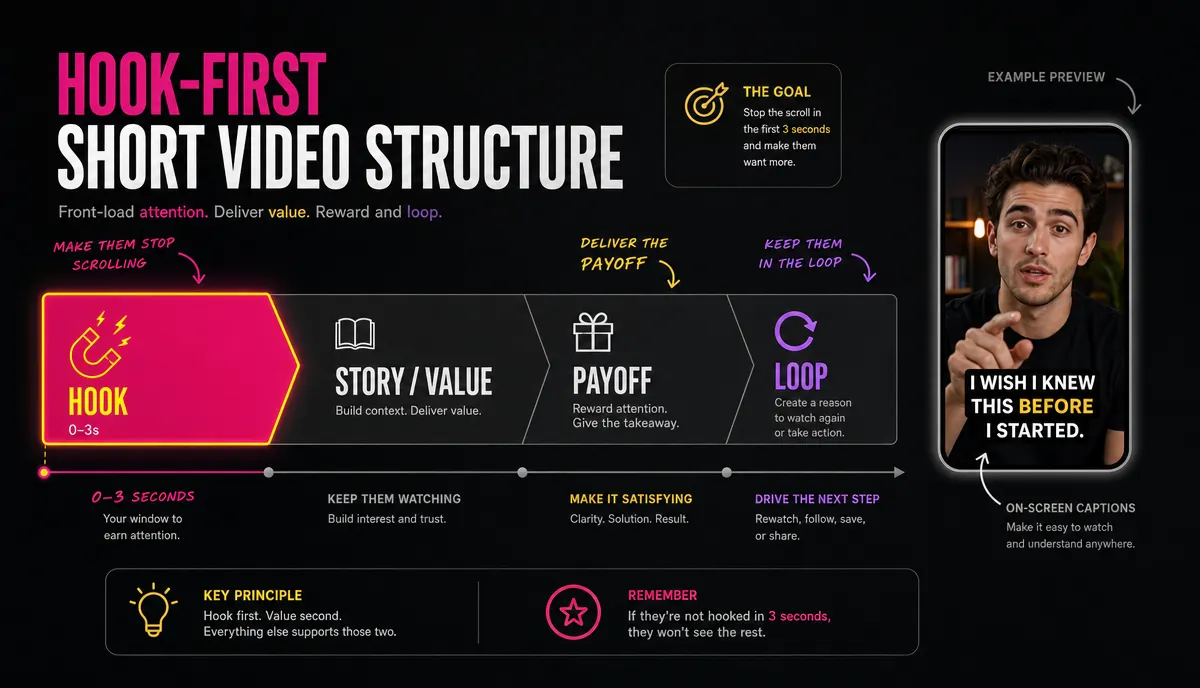
The first three seconds decide whether anyone watches the rest. Do not tease — pay off. If the segment's strongest line lands at 0:20, restructure: open with the result or the claim, then show how you got there.
The classic dead opener: "In this video I want to talk a little bit about thumbnails." The same content, reworked: "Your thumbnail is why nobody clicks — here's the fix." Nothing changed except which sentence goes first.
A hook generator helps draft variants fast. Write the spoken hook and the on-screen text hook separately — they do different jobs, and the text version has to work in silence.
Shorts also loop. Write the ending so it collides into the opening; a final line that makes the first line land better earns quiet replays.
Step 6: Burn in captions
Assume part of your audience watches with the sound off. Captions come from the transcript you already generated, so this step costs almost nothing: one to two lines, high contrast, positioned above the platform UI zone at the bottom of the frame. Styling and placement are covered in detail in our guide to adding subtitles to a video.
Step 7: Package each Short individually
A Short titled "Clip 4 from Episode 12" is dead on arrival. Each clip needs its own title — the question or the claim, never the episode reference — and its own cover for your channel grid. A YouTube Shorts maker lets you finish this packaging in the same place you cut the clip, then export everything together.
How many Shorts per long video is realistic
Fewer than your candidate list suggests. A talky 40-minute video might surface a dozen candidates across the three selection lenses; expect to reject half or more at the trimming stage. Three strong Shorts beat ten mediocre ones — weak clips teach viewers to skip your channel, and no amount of volume compensates for that.
A useful bar: if you would not post this clip as a native Short you filmed today, do not post it as a repurposed one.
Publishing cadence: batch the work, spread the posts
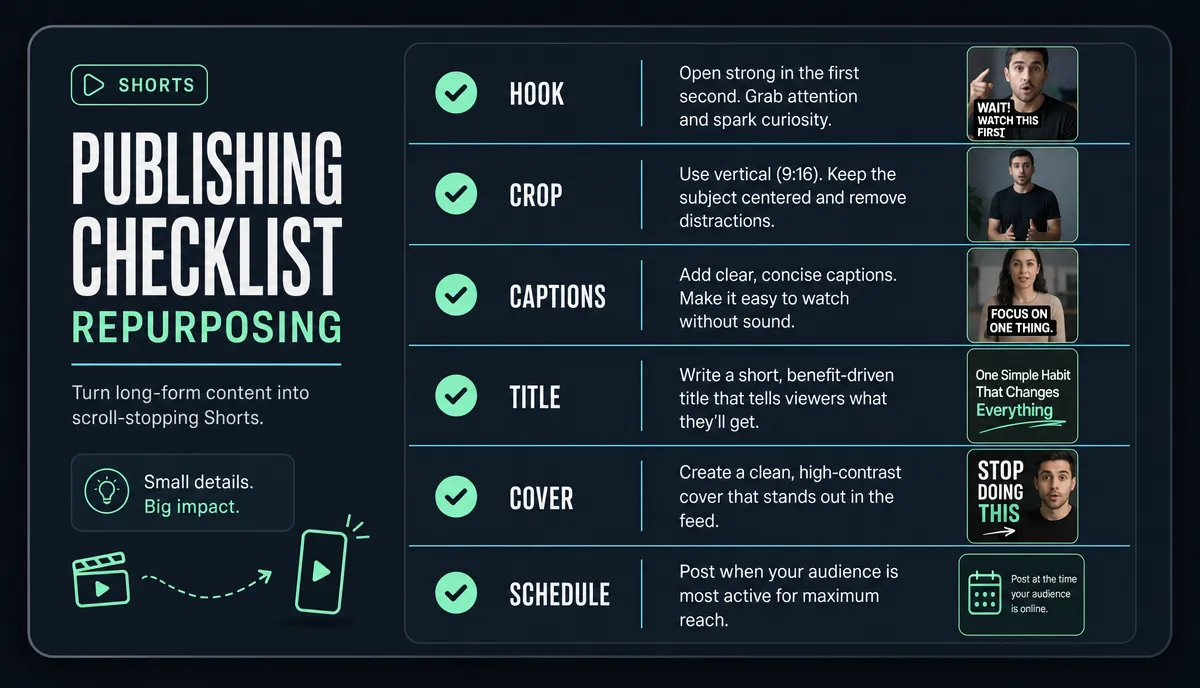
Produce in batches. Cutting five Shorts in one session from one transcript is much faster than five separate sessions, and the clips stay stylistically consistent. Then schedule across the week instead of publishing everything at once — a steady drip keeps the channel active between long uploads and gives each clip its own window.
Run every Short through the same checklist before it goes into the queue:
- Payoff or tension inside the first 3 seconds?
- Understandable with zero context from the long video?
- Subject fully in frame after the 9:16 reframe?
- Captions clear of the bottom UI zone?
- Unique title and cover set?
- Scheduled, not just exported?
What not to clip
Knowing what to reject is half the workflow:
- Context-dependent segments. Anything with "as I said earlier" or a callback to a previous section. The Shorts viewer was not there earlier.
- Inside jokes without setup. To a cold audience they read as confusing, not charming.
- Nuanced arguments. A carefully hedged position, cut to 30 seconds, becomes a strawman of itself — and the comment section will treat it as one.
- Wide shots and dense screens. Two-person wide framing and busy screen UIs rarely survive the vertical crop. If you cannot zoom into the part that matters, skip it.
If you are still deciding how much of this to automate versus judge by hand, our overview of AI video editing breaks down which steps AI handles reliably and which still need a human call.
FAQ
How long should a YouTube Short cut from a long video be?
Long enough for exactly one complete thought. For talking content that usually means 20–45 seconds. Platforms allow longer, but a repurposed segment has to earn every extra second — if a second idea creeps in, cut it and make it another Short.
How many Shorts can I get from one long video?
It depends on density, not runtime. An interview or Q&A yields more because it is built from self-contained answers; a single continuous argument might honestly yield one or two clips. Whatever the source, plan to reject at least half of your initial candidates.
Can AI pick the clips automatically?
As a first pass, yes. AI clip selection reads the transcript and surfaces segments that are structurally self-contained, which removes the most tedious part of the job. What it cannot judge is whether a claim is interesting to your particular audience — use it for the shortlist and keep the final call yourself.
Do repurposed Shorts need different captions than the original video?
Same words, different formatting. Shorts captions need shorter lines, larger type, higher contrast, and placement that clears the platform UI at the bottom of a 9:16 frame. Because they generate from the existing transcript, you are fixing styling and position, not re-transcribing.
Should a Short point viewers back to the full video?
Mention it, but never depend on it. A Short has to satisfy on its own; the click-through to your long-form video is a bonus that only happens when the clip already worked without it.
Turning your back catalog into a Shorts pipeline takes one workflow, not a new production habit. Recapo runs in the browser: upload a long video (MP4/MOV, up to 6GB per task), pick clips straight from the transcript, reframe to 9:16, and export with captions and covers in one place. Create an account and cut your first batch of Shorts from a video you have already made.