Long Video to Short Video AI
Turn long video into short video with AI strategies tuned to the source — livestreams, courses, podcasts — and get ranked clips, captions, and 9:16 crops.
Click to upload or drop a video
Live-preview and trim in your browser; cloud rendering continues after you leave the page
Up to 2 GB per file
Livestream replays: clip the reaction peaks
Streams are flat for long stretches and electric for seconds at a time. The AI looks for the spikes — raised voices, laughter, sudden scene changes, the moment the plan goes wrong — and skips the waiting-room stretches. A replay nobody will rewatch becomes the handful of moments everyone actually remembers from the live chat.
- 01
Import the long recording
Paste a link to a replay or upload the file. Multi-hour recordings are the expected input here, not an edge case.
- 02
Match the strategy to the source
Choose the angle that fits — stream highlights, course takeaways, or conversation quotes — and the AI scores moments against that strategy.
- 03
Caption, crop, ship
Take the ranked clips into captions, vertical cropping, and covers, then export a set of shorts from a single long source.
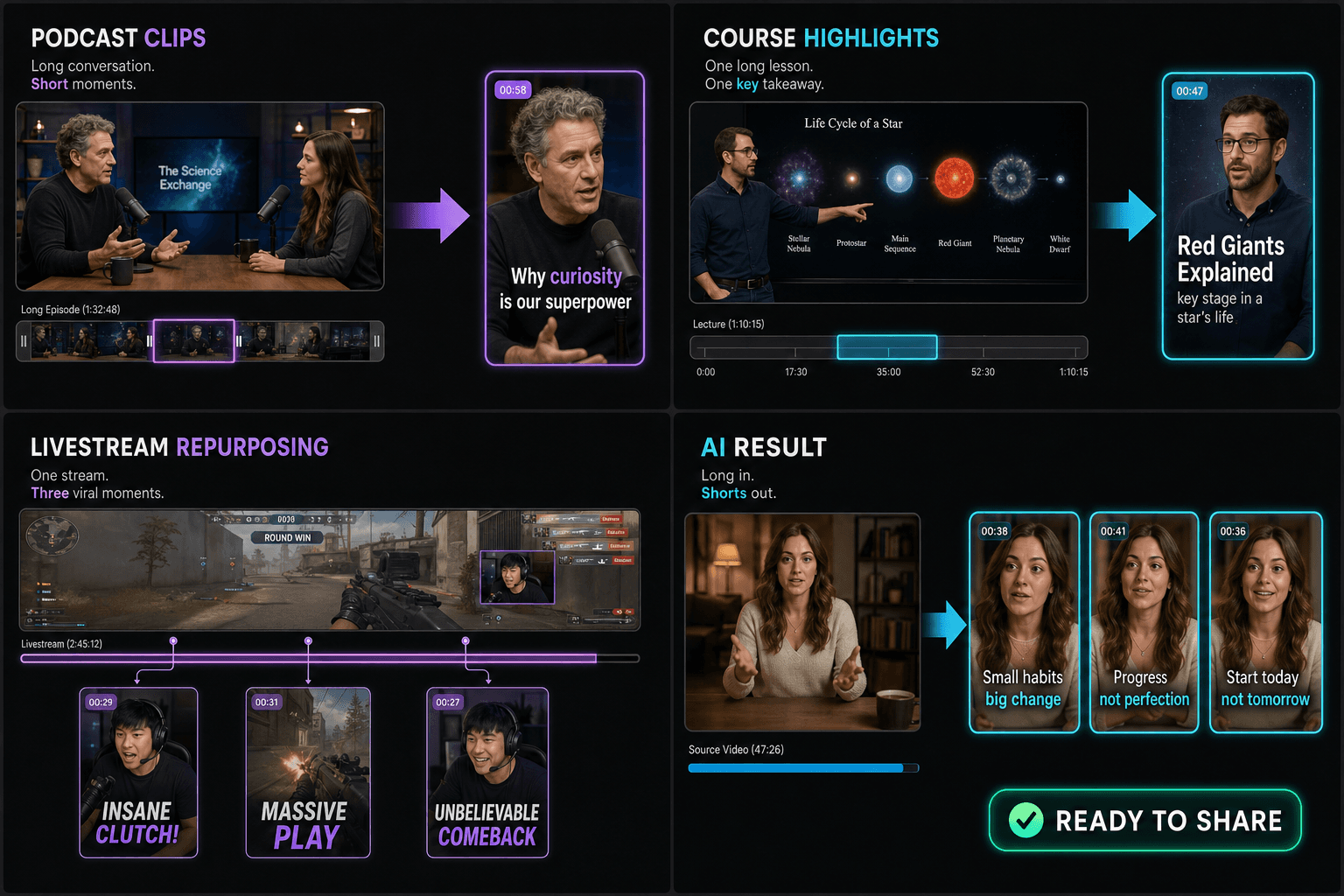
Courses and tutorials: cut by takeaway
Educational footage clips best when each short carries exactly one idea a viewer can use without context. The strategy favors self-contained explanations with a clear start — 'here's the trick' — and a clean resolution, rather than mid-lesson fragments that assume the previous chapter. One recorded course can seed weeks of single-tip shorts.

Podcasts and interviews: lead with the quote
Conversation clips live or die on a single line — the bold claim, the punchline, the story beat. The AI hunts for complete, quotable exchanges and trims them so the strongest sentence lands early. Since talking heads carry little visual information, captions do the heavy lifting; every clip comes out with an editable, styleable subtitle track.
Built for these real workflows
Manually select one podcast segment
Trim one continuous course section
Export one replay clip per task
Continue with the next step
Long video to short video frequently asked questions
Can it handle multi-hour recordings?
Yes — long sources are the core use case. Import replays by link to skip giant uploads, and use the generated transcript and summary to navigate the recording without rewatching it.
Does it work for podcasts, webinars, interviews, and livestreams?
Yes. Recapo describes separate strategies for livestream replays, courses and tutorials, podcasts, and interviews. Streams are evaluated for reaction peaks, educational footage for self-contained takeaways, and conversations for quotable exchanges. Results depend on the source, so test a representative file before committing a large archive or monthly production backlog.
Do the short clips come with subtitles?
Each clip gets its own ASR captions, regenerated for the clip's exact boundaries. Edit the text, style it, then burn it into the video or export SRT/VTT alongside.
Does it automatically crop the clips to vertical?
This tool focuses on finding and trimming the short segments out of your long video. For reframing to a vertical 9:16 shape and burning in captions, you continue into Recapo's cropping and caption tools as the next step.
How long are the clips it produces?
You're aiming for short-form lengths that fit Shorts, Reels, and TikTok, so the cuts pulled from your long video are meant to land in the short-clip range rather than stay full-length. Recapo is still in active development, so exact length controls are being refined.
Can I turn a 30-minute podcast into multiple Shorts?
Yes. A 30-minute podcast is a suitable transcript-rich source for Recapo's long-to-short workflow. The tool looks for complete, quotable exchanges and can produce multiple candidates, but it does not guarantee a specific count. Review every clip, correct captions, and confirm that each segment makes sense without the full episode.
Can I edit each short clip before exporting it?
Review the ranked candidates before export and adjust the chosen interval with Recapo's clipping or cutting controls. Captions should also be corrected for the final boundaries. If a requested change is not exposed in Long Video to Short Video AI, continue the candidate in AI Clip Generator or Video Cutter rather than re-uploading the original source.
Can one export be used for YouTube Shorts, TikTok, and Reels?
Usually, one clean 9:16 captioned MP4 can be uploaded to YouTube Shorts, TikTok, and Instagram Reels. Platform length limits, cover behavior, safe areas, and caption conventions still differ, so review the latest publishing requirements before posting. Keep a text-safe master and make platform-specific adjustments when overlays or cropping would be obscured.
What is the difference between this tool and AI Clip Generator?
AI Clip Generator is the general-purpose discovery tool: it scores moments against goals such as hook, talking clip, or 9:16 short. Long Video to Short Video AI starts from the source type and applies strategies for livestreams, courses, podcasts, or interviews. Use the first for flexible highlight discovery and the second for a repeatable long-form workflow.
Start using Long Video to Short Video AI
Provide the input and essential settings above. Your result stays in the current tool workflow.
Back to tool