AI Voiceover
Add an AI voiceover to your video: type the script or upload a subtitle file, pick a voice, get a voiced video in minutes. Voice only — picture untouched, original audio kept. Source under 3 min. Free on Recapo.ai.
Click to upload or drop a video file
Supports MP4, MOV, MKV, WebM, MPEG, MPG, 3GP, 3GPP
Up to 2 GB per file
Source video up to 3 minutes
Processing continues in the background, even if you leave this page or switch languages.
Voiceover only — the picture stays
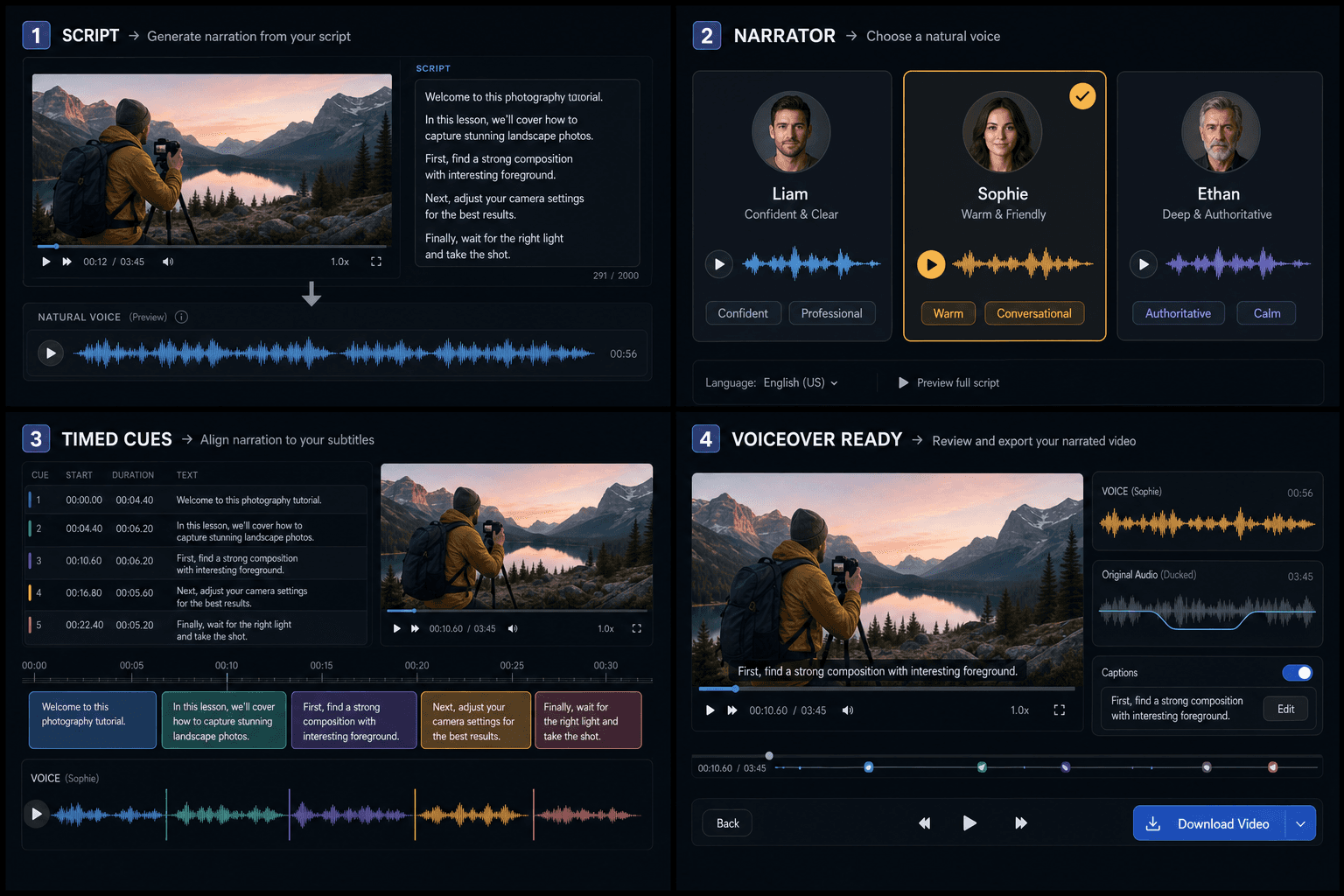
AI Voiceover adds a narration track while keeping the original background sound and music, ducked only while narration speaks. Captions are off by default; enable Show captions to render the same script or subtitle timing into the video.
- 01
Upload the video
Drop or pick the video to voice (≤3 min). The voiceover is only laid over the picture — no subtitles are burned in.
- 02
Provide the content
Type the script, or upload a script file (txt / md / docx); to keep the voiceover on the picture's beat, upload a timed subtitle file (SRT / VTT). Either one is enough.
- 03
Pick a voice and generate
Choose a voice (with preview) and hit generate. Minutes later you get a video with AI voiceover; the original audio is kept and ducked while the voice speaks.
You control the content
type a script, upload a script file, or upload a subtitle file.
A subtitle file carries timing
the voiceover lines up to each cue's timestamp.
A plain script has no timing
one continuous voiceover from the start.
Why the 3-minute limit?
Voiceover is synthesized line by line and then composed with the video — cost and time grow with length. Keeping the source under 3 minutes makes export faster and fits single clips, trailers, and shorts. For longer videos, split them first.
Built for these real workflows
Turn scripts into natural narration
Compare multiple system voices
Sync voiceover with subtitle timing
Continue with the next step
Frequently asked questions
How do I provide the content?
Three ways, pick one: type the script, upload a script file (txt / md / docx), or upload a timed subtitle file (SRT / VTT). The tool never reads text off the screen — you provide the content.
Does it burn subtitles onto the video?
No. This is a voiceover tool — it only adds a voice track; the picture is untouched and no subtitles are burned in.
Will the original audio be replaced?
No. The original audio is kept and only ducked while the AI voiceover speaks, so music and ambience remain.
Subtitle file vs typed script — what's the difference?
A subtitle file carries timing, so the voiceover aligns to each cue against the picture; a plain script has no timing and plays as one continuous voiceover from the start.
Is the AI voiceover generator free?
You can start generating narration without paying upfront, and the tool is listed at no cost while Recapo is still in development. As the product matures, longer scripts and premium voices may move into paid credits, but voicing a recap script to try it out does not require a purchase.
Can I use the AI voiceover for YouTube and TikTok?
Yes. The narration audio you export is meant for faceless and short-form videos, so you can drop it onto recaps and commentary clips for YouTube, TikTok, Shorts, or Reels. You keep the output file and add it to your own timeline alongside captions and footage.
What voices and languages are available?
You pick a narration voice and adjust pace and tone so the read fits your channel. Recapo is still in development, so the lineup of voices and supported languages is expanding over time rather than fixed, and English narration is the primary focus today.
Start using AI Voiceover
Provide the input and essential settings above. Your result stays in the current tool workflow.
Back to tool