Edit AI-Generated Background Music into a Clean Loop
Loop AI-generated background music in an external editor with beat checks, reversible seam edits, tail handling, timing arithmetic, and export verification.

A track can begin and end quietly yet still make an obvious jump when repeated. The final chord may lead somewhere the first chord does not, the rhythm may restart half a beat late, or a long tail may vanish at the boundary.
To loop AI-generated background music, choose a musically compatible passage, establish its real beat or phrase boundaries, preserve the intended cycle length, and handle the seam in an external audio editor or DAW. Then audition several repetitions and test the exported file in the intended player. A “loop-friendly” brief is a useful starting direction, not proof of a seamless delivered loop.
The timing example below is constructed arithmetic. No generated track has been auditioned, edited, or tested for this guide.
Choose a passage before choosing a fade
Listen for a section whose end can lead naturally back to its beginning. A steady groove or stable texture may offer a candidate. A verse with a clear lyrical sentence, a dramatic buildup, or a final cadence may announce its ending each time it repeats.
Do not assume that instrumental music is automatically loopable. A prominent melody can have an unmistakable beginning and conclusion even without lyrics. Likewise, a nearly beatless texture can reset abruptly when its tone or density changes at the seam.
Identify what needs to remain continuous: pulse, harmony, bass movement, texture, ambience, or a repeating motif. You may accept a deliberate rhythmic restart while needing the atmosphere to continue. Write that intention down so the review has a target beyond “sounds smooth.”
If no passage is compatible, choose a longer section, another candidate, or a revised generation brief. Crossfading is not a universal repair for incompatible harmony or a melody that clearly expects the next phrase. It can hide a waveform discontinuity while leaving the musical discontinuity obvious.
Keep generation separate from loop editing
Recapo's AI music generator page describes creating a production card, reviewing it before paid submission, and tracking a job to saved deliverables. It also describes loop-friendly directions for relevant music projects. Those public statements do not establish built-in waveform editing, sample-accurate looping, crossfade controls, or automatic game integration.
Use the generator to request suitable material: stable texture, a compatible repeating section, restrained transitions, and no large ending gesture inside the intended loop region. Review the production card before submitting any paid task. The actual audio still needs inspection after delivery.
If an existing job has an unclear status or uncertain charging state, investigate it before making another submission. Do not blindly regenerate because a download or preview is missing. Creative dissatisfaction, failed processing, and unknown task state are different problems.
Once you have a file you are permitted to edit, retain the original and work on a copy in a DAW or audio editor that supports the required operations. The steps below are external editing methods, not instructions for unverified Recapo controls.
Establish the actual pulse and loop boundaries
If the music has a stable beat, find a clear downbeat and verify several following beats by listening. A tempo estimate can help locate a grid, but typing the requested BPM into a project does not prove the delivered performance follows it. Check whether the grid stays aligned across the whole candidate passage.
If the beat drifts, decide whether to choose a shorter stable region, make a more flexible musical edit, or use supported time-adjustment tools carefully in the external editor. Any processing should be auditioned for artifacts and changes in feel. Do not force a rigid grid onto a passage that works better without one.
For beatless material, use phrase and texture boundaries rather than inventing a tempo. Look for compatible density, tone, and ambience at the proposed start and end. A cycle can be defined by seconds or samples without pretending it contains a regular bar structure.
Keep the candidate start and end markers separate from any fade handles or tail extensions. The markers define the repeat period. Extra material used to smooth the join should not silently change how often the loop starts again.
Constructed example: eight bars at a stable 100 BPM
Suppose an original hypothetical track has been verified to maintain 100 beats per minute, with four beats per bar. You choose an eight-bar passage. These assumptions are for the calculation only, not a claim about any generated output.
Seconds per beat = 60 / 100 = 0.6
Seconds per bar = 4 × 0.6 = 2.4
Eight-bar loop length = 8 × 2.4 = 19.2 seconds

At a chosen editing rate of 48,000 samples per second:
Loop length = 19.2 × 48,000 = 921,600 samples
If the selected downbeat is at 1.2 seconds in the source, the nominal endpoint is 20.4 seconds. The repeat region is the interval from 1.2 up to 20.4 seconds: its duration is 19.2 seconds. A DAW may display boundary selections differently, so verify the resulting region length rather than relying only on two rounded labels.
Copies should begin 19.2 seconds apart in this constructed example. If you overlap whole clips by half a second and allow that overlap to shorten the start-to-start spacing, the loop period becomes 18.7 seconds. That would no longer match the intended eight-bar grid. The problem is not the existence of a fade; it is the unintended change in cycle length.
The 48,000-sample rate is an editing choice in this example, not a required or verified Recapo output specification. Use the actual project rate and calculate or inspect the corresponding length. Preserve the original file if you convert it for the editing workflow.
Inspect three different kinds of seam
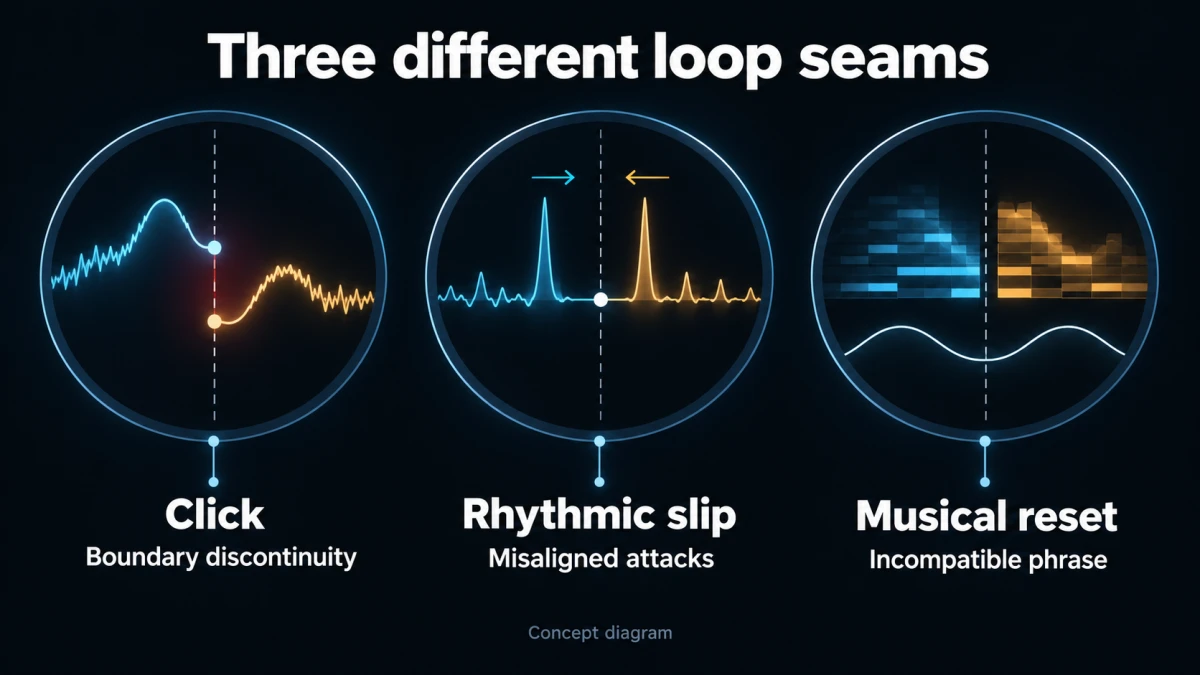
Concept diagram; not a product-interface screenshot.
First, listen for a click or abrupt waveform jump. Very short discontinuities can be audible even when the musical phrase is compatible. A small fade or a better cut point may help, but do not assume that any particular fade length is correct for every sound.
Second, listen for rhythmic displacement. A kick, pluck, or other attack may be doubled, weakened, or late at the seam. A long crossfade across two attacks can create a flam or blur the pulse. Inspect the transient relationship and keep the starts aligned to the intended repeat period.
Third, listen for a musical reset: a chord that does not lead back naturally, a bass note that changes the implied harmony, or a texture that suddenly thins. A perfectly smooth waveform does not guarantee a coherent musical return. Choose another boundary or a more compatible passage if the problem is structural.
Checking a zero crossing can be useful for a cut, but it is not a complete loop method. The stereo channels may not cross at the same instant, and a crossing says nothing about harmony, rhythm, or reverb continuity. Let the listening result decide whether the edit is acceptable.
Handle the tail without adding a new beat
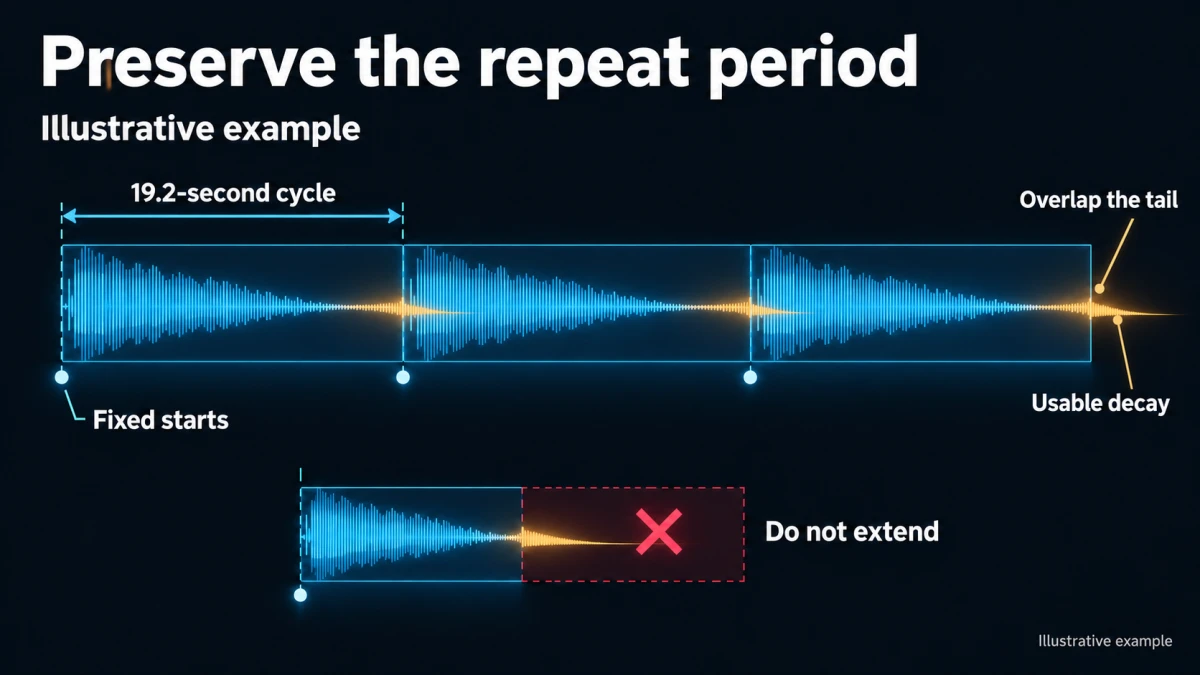
Illustrative example; not a measured product output.
A reverberant ending may continue beyond the nominal loop boundary. If you simply discard that decay, the next cycle can sound unnaturally dry. If you append the whole tail to the loop file, you may lengthen the repeat period and interrupt the pulse.
In an external editor, one option is to let the outgoing decay overlap the next cycle while keeping the next cycle's start at the original marker. This requires suitable source material: a genuine tail without a new unwanted performance. If the source continues with another drum hit or melody, treating that whole continuation as “reverb” will layer extra events onto the next cycle.
When you have an isolated usable decay, test wrapping or overlapping it into the beginning while preserving the nominal cycle length. Adjust the overlap by ear and inspect whether it changes the opening attack or level. Keep the untouched candidate region so you can compare the result.
If no clean tail can be separated from the continuing performance, choose another endpoint or use a different passage. Do not claim that a mixed stereo track contains an independently editable reverb stem unless such a stem actually exists. A generator's delivered file and a multitrack session are different assets.
For a steady repeating arrangement, audition multiple copies with the chosen overlap and inspect a middle cycle after the preceding decay is present. That can reveal whether the loop reaches a stable repeated state. The exact construction depends on the editor and material; record what you actually did rather than copying a generic fade recipe blindly.
A reversible external-editing workflow
- Preserve the delivered original and make a clearly named working copy.
- Mark the candidate start, nominal endpoint, and intended cycle length.
- Duplicate the region for several consecutive repetitions without changing start-to-start spacing.
- Listen first with no seam processing to identify the actual problem.
- Make the smallest justified adjustment: a different boundary, short fade, compatible overlap, or different passage.
- Compare processed and unprocessed versions at a sensible matched level.
- Save a new version with the reason for the change and the final region length.
Do not apply a large fade merely because a tutorial calls it smooth. A sustained pad and a percussive groove need different treatment. The expected observation is continuity of the intended pulse and texture, not the presence of a visually symmetrical overlap.
If a seam becomes louder, inspect the summed material. Overlapping two copies can add energy or create cancellations depending on their relationship. Change the overlap or level in the external editor and listen again. Avoid solving the problem by clipping the result or normalizing blindly without checking the musical balance.
Failure branches for common loop problems
| What you hear | What to investigate | Possible recovery |
|---|---|---|
| A small click at every restart | Abrupt boundary, edit discontinuity, or export behavior | Refine the cut or fade, then test the actual file |
| A double drum hit | Two attacks overlap around the seam | Align the intended beat and avoid blending incompatible attacks |
| A missing beat | Region is short or the fade removes the attack | Restore the nominal cycle and review fade placement |
| A swelling first note | Tail or overlap adds too much energy | Reduce or reshape the overlap while preserving period |
| A clear musical ending every cycle | Phrase choice is strongly cadential | Choose a different region or a less conclusive arrangement |
| A gap only in the target player | Playback or file-delivery behavior differs from the editor | Test the supported format and loop implementation there |
These are diagnostic possibilities, not reports from an actual generated track. Keep the observation and remedy separate in your log so a later editor can understand why the version changed.
Test repetition, not only the join
Listen across several cycles without staring at the boundary marker. Then listen while watching it to inspect the exact seam. The first pass asks whether the loop feels continuous; the second helps locate any problem you heard. Neither replaces testing it in the intended context.
For a video, place the loop under the actual narration and effects. A seam that is acceptable alone may coincide with an important word or effect. For a game, test in the actual playback system or a representative implementation; a DAW's loop playback does not prove that the runtime will repeat the exported asset the same way.
Check headphones and an ordinary speaker where those are relevant to the audience. Also review the start from silence and the final stop separately. A seamless repeating interior does not automatically provide a suitable entrance or exit for a finished video. Those may require separate edit decisions.
No listening result is assumed here. Record what you actually hear, how many cycles or contexts you checked, the device or playback route, and any unresolved issue. Do not call the loop artifact-free simply because no problem was visible in the waveform.
Export the loop region and a separate review preview
Export the intended cycle with its verified boundaries using a format supported by the destination. If the delivery pipeline supports an uncompressed or lossless working asset, it can make troubleshooting easier by avoiding an additional lossy-encoding variable. It still does not guarantee seamless playback in every application.
Keep a separate preview containing several repetitions. That file lets collaborators hear the intended seam, but it is not a substitute for the single-cycle asset when a system expects one. Name and document the difference so the preview is not accidentally installed as the loop.
Reimport the exported cycle into the external editor and inspect its duration. Then test it in the actual target player. Some delivery paths or codecs may handle boundaries differently; verify the actual combination instead of promising gapless behavior from a filename extension alone.
The broader video audio quality checklist is a related final-pass resource. For this task, the decisive checks are cycle length, musical continuity, and the behavior of the actual exported asset under repetition.
Copy-ready loop record
SOURCE
Delivered file and permission/terms review reference:
Original preserved at:
Working copy and external editor:

LOOP DESIGN
Purpose and foreground audio:
Actual pulse or phrase observations:
Nominal start / end / cycle length:
Project sample rate:
Calculated or inspected sample length, if relevant:
Tail or overlap method:
What must remain continuous:

VERIFICATION
Unprocessed seam observation:
Edit performed and reason:
Repeated-playback observation:
Target-player observation:
Single-cycle export identifier:
Multi-cycle review preview identifier:
Remaining issue or approval decision:
Before using the loop publicly or commercially, check the applicable terms, input permissions, and intended distribution. Editing a generated track into a loop does not itself establish a blanket music license, exclusivity, or permission for every use.
Start by finding a phrase that wants to return to its beginning. Once that musical relationship is sound, the technical seam becomes a focused editing problem rather than an attempt to force an unsuitable track into repetition.