
Variable Frame Rate and Audio Sync: Diagnose Before Converting
Diagnose variable-frame-rate audio sync with timestamp checks, multiple anchors, and a limited real CFR fixture showing why cadence is not enough.

Variable frame rate can be relevant to an audio-sync problem, but its presence does not prove it caused the problem. Compare the source and export at several identifiable sound-and-picture events, inspect timestamps and durations, and locate where the mismatch first appears. Then test a constant-frame-rate copy as one controlled intervention, not an automatic cure.
A constant offset, steadily growing drift, and a sudden jump after an edit point are different symptoms. Moving the entire audio track may address one while making another worse. Converting frame cadence can create a regular output without proving that its timing, endpoint, or lip synchronization is correct.
This guide includes a limited real synthetic timestamp test and a separate fictional diagnostic example. The synthetic check used generated color-pattern video and a continuous tone, not phone footage or human speech.
First describe the mismatch you can observe
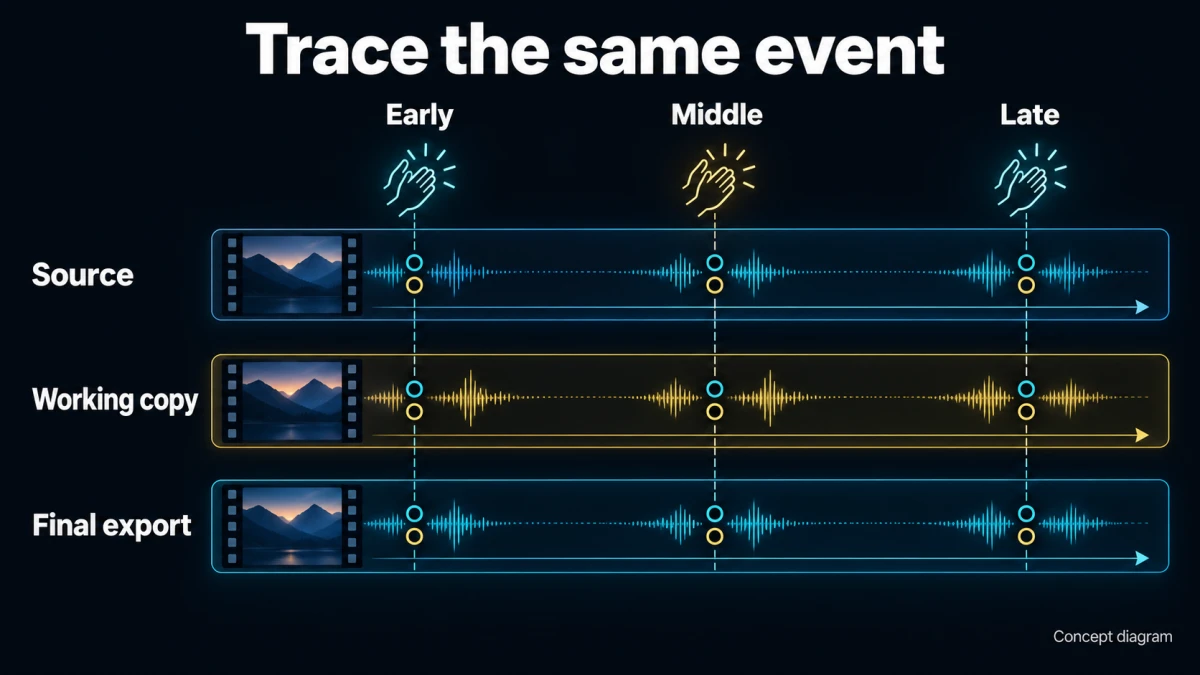
Concept diagram; not a product-interface screenshot.
Avoid starting with “the file is VFR.” Start with the behavior: “Audio is late by about the same amount throughout,” “the difference grows toward the end,” or “sync changes immediately after this cut.”
Use clear events rather than a general impression of talking. A visible clap with its sound, a deliberate tap, or a sharply defined action can serve as an anchor when the recording contains one. Spoken mouth movement is useful for practical review but may not give one unambiguous sample point.
Compare the same event in the untouched source, the editor or working copy, and the final export. If the source itself is offset, a later conversion did not create that original offset. If the source is acceptable but the timeline is not, investigate import and editing behavior. If the timeline is acceptable but the exported file is not, focus on the export path and playback.
Also repeat playback in a second suitable local player when possible. A playback-only problem should not automatically trigger a destructive timing correction to the file.
Use a consistent sign convention
Define offset as audio-event time minus video-event time. A positive value means the sound occurs later than the corresponding image event. A negative value means sound leads the image.
Write down the event, both times, and the difference. The measurement method and uncertainty matter. At a frame-based visual inspection, you cannot claim unlimited precision simply because a spreadsheet displays many decimal places.
A copy-ready log is:
SYNC CHECK
File and version:
Source, working copy, or export:
Player/editor and review settings:
Event description:
Video event time:
Audio event time:
Offset = audio time minus video time:
Measurement uncertainty:
Difference from the source at the same event:
Relevant cut, speed change, or transition nearby:
Use at least early, middle, and late anchors for a long clip, with additional points around a suspected edit. This is a practical sampling plan, not a universal guarantee that three checks capture every defect.
Interpret the pattern before choosing the repair
| Pattern | What it suggests checking | What not to assume |
|---|---|---|
| Similar offset at all anchors | Start offsets, an edit slip, playback path | That VFR caused accumulating drift |
| Offset grows roughly with elapsed time | Timeline interpretation, time scaling, recording-clock differences | That one audio shift will fix the whole file |
| Sudden step after a cut | Trim, gap, speed change, or clip-specific treatment | That the complete source needs conversion |
| Local irregularity around one section | Timestamp discontinuity or damaged/missing material | That a single global rate change is appropriate |
| Different behavior by player | Playback or decoding path | That the media itself must be retimed |
These are hypotheses to investigate. The table is not a diagnostic verdict. Multiple problems can coexist, and a visual review alone may not reveal their exact technical cause.
If an offset is constant, a supported editor may allow a deliberate track-position correction after you establish the source of the mismatch. If the error grows, inspect timing and rate assumptions before applying a correction that changes duration. If the error jumps, inspect that boundary first.
Keep the original file and record every transformation. Otherwise a later improvement may hide which earlier operation introduced the problem.
Inspect timestamps, not only a headline frame rate
Frame rate describes how frequently frames are presented. Variable-frame-rate material can have changing intervals between presentation times. A file's displayed average rate is not a complete record of those intervals.
A useful inspection includes the video stream's time base, frame timestamps or presentation intervals, start time, duration, and frame count where available. For audio, inspect start time, duration, sample rate, and the selected stream. Keep container duration separate from individual stream durations.
The time base is the unit in which timestamps are expressed; it is not itself a claim that frames arrive at that rate. Likewise, two rate fields that appear equal do not replace examination of the actual intervals when timing is the suspected problem.
Use a media inspector or technical tool that exposes these fields. If you cannot obtain them, report that limitation instead of diagnosing VFR from the recording device's name. Different capture modes and processing paths can produce different timing behavior.
Do not remove timestamps or force a new interpretation merely to make a metadata report look tidy. The objective is preserving the intended event timing in a compatible workflow.
What CFR conversion actually does
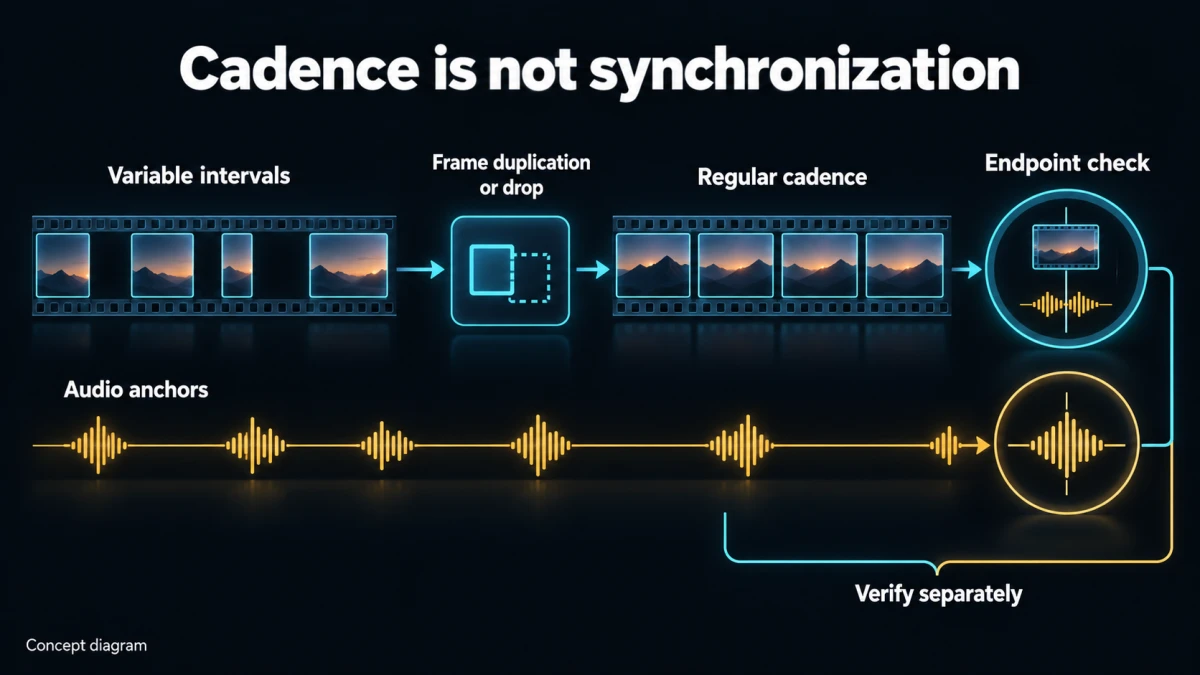
Concept diagram; not a product-interface screenshot.
FFmpeg documents constant-frame-rate mode as duplicating or dropping video frames to achieve the requested rate. It also notes that a muxer may modify timestamps afterward. Those operations regularize presentation cadence; they do not independently establish audio alignment or correct endpoint duration. FFmpeg frame-rate mode documentation
This matters when a conversion appears to “fix” a file. You still need to inspect the result. Regular intervals can coexist with an extra final frame, an altered start, lost content, or an unchanged audio offset.
Choose a target rate that fits the project and source intent. Do not select a higher number simply because it sounds better. Duplicated frames do not recreate motion that was never recorded, and dropped frames can change the visible cadence.
A CFR test is most informative when other decisions remain stable. Changing resolution, audio processing, color conversion, and frame cadence together makes it difficult to identify which operation affected the problem.
A real limited fixture: cadence passed, endpoint differed
A local check performed on October 8, 2026 used FFmpeg 8.1.2 to create a four-second, 320 × 180 synthetic color-pattern clip with a 600 Hz continuous tone encoded as 48,000 Hz AAC audio. The video retained approximately 66.67 ms frame intervals in the first portion and 33.33 ms intervals in the later portion.
The source contained 90 video frames, with reported video and audio durations of four seconds. A conversion requesting 30 fps with CFR mode produced regular approximately 33.33 ms intervals, but the initial expectation of exactly 120 frames was wrong.
| Version | Video frames | Rounded frame intervals | Video duration | Audio duration |
|---|---|---|---|---|
| Synthetic VFR source | 90 | 66.67 and 33.33 ms | 4.000000 s | 4.000000 s |
| CFR conversion without an explicit duration bound | 121 | 33.33 ms | 4.033333 s | 4.000000 s |
| Separate CFR output bounded to the known four-second fixture | 120 | 33.33 ms | 4.000000 s | 4.000000 s |
The first conversion passed the cadence check but did not match the intended video endpoint. That observation was retained rather than hidden by the later bounded output.
The separate bounded conversion used the fixture's known four-second duration. This is not advice to truncate an unknown recording or use an arbitrary duration limit to conceal drift. Real source endpoints must be established from the material and delivery requirements.
The continuous tone provides no discrete clap or speech event against which to judge lip sync. The test therefore supports only a narrow conclusion about frame intervals and reported durations. It does not reproduce a real phone desynchronization problem, test an editor's import behavior, or validate Recapo conversion.
A qualified command example, not a universal fix
For a compatible, already-understood SDR sample with one intended video stream and a first audio stream suitable for MP4, this command illustrates the kind of conversion used in the fixture:
ffmpeg -n -i "timing-sample.mp4" -map 0:v:0 -map 0:a:0 -r 30 -fps_mode:v cfr -c:v libx264 -crf 18 -pix_fmt yuv420p -c:a copy "timing-sample-cfr.mp4"
Use a separate output name. The no-overwrite option protects an existing destination. The stream selections choose the first video and first audio; they intentionally do not preserve every subtitle, alternate audio, attachment, or data stream. Review the stream inventory before using such a selection on your own material.
The example copies the selected audio instead of retiming it. That helps isolate the video-cadence experiment, but it also means an existing audio timing problem is not automatically repaired. The selected audio must be compatible with the output container.
The pixel-format and encoder choices are not an HDR conversion workflow. Do not apply this example blindly to HDR, high-bit-depth, or otherwise specialized material. The quality value is an example setting, not a universal quality recommendation.
No duration-limiting option is included. The fixture's separate four-second bound belongs to that known synthetic test, not to an unknown user file. Inspect beginning, ending, content preservation, and all sync anchors after any conversion.
Fictional worked diagnosis: a steadily growing delay
Now consider a constructed ten-minute interview example. These numbers are invented to demonstrate reasoning, not measured on user footage.
Suppose an export has these anchor measurements:
| Anchor | Video event | Audio event | Audio-minus-video offset |
|---|---|---|---|
| Opening tap | 1.00 s | 1.04 s | +0.04 s |
| Second tap | 61.00 s | 61.28 s | +0.28 s |
| Third tap | 121.00 s | 121.52 s | +0.52 s |
The difference grows by 0.48 seconds over 120 seconds. That pattern is unlike a single fixed shift. Moving the whole audio track earlier by 0.52 seconds would align the later anchor in this example while making the opening wrong.
The next step is not immediately to time-stretch audio. First measure the same anchors in the source. If the source stays aligned, inspect the timeline's handling of the clip and any rate or speed interpretation. If the source already shows the drift, investigate the recording and its timestamps.
Create a controlled CFR test copy if variable intervals or import behavior make that a reasonable hypothesis. Import it into a separate test sequence, preserving the intended project timing. Compare the same anchors without changing the edit at the same time.
If the CFR copy improves all sampled anchors, that supports the tested workflow as a candidate repair. It does not prove that every VFR clip requires conversion. If the drift remains, retain the finding and investigate other timing causes rather than repeatedly encoding the same file.
The full ten-minute source would also need later anchors. The short table demonstrates a pattern, not a complete validation of the fictional interview.
Keep Recapo's verified scope separate
Recapo's H.264 Transcoder publicly describes codec conversion, bitrate, and resolution controls. The public page does not establish explicit CFR controls, timestamp repair, audio retiming, or detailed stream selection.
If your diagnosis requires those controls, use a documented external workflow that exposes them. Do not invent a Recapo timeline, waveform, or advanced timing setting. A successful H.264 conversion is not proof that a sync defect has been repaired.
Likewise, do not repeatedly submit a paid conversion while its status is unknown. Inspect any saved result and current task state before deciding whether another attempt is necessary. A diagnostic process should reduce uncertainty, not multiply untracked versions and charges.
Verify the edited export, not only the intermediate
An intermediate CFR file can be acceptable while the final edit introduces a new offset through trimming, speed changes, or export handling. Repeat the anchor check after the actual edit and again on the delivered file.
Inspect starts and ends separately from the middle. The synthetic fixture demonstrates why a regular frame interval is not an endpoint guarantee. Confirm that no meaningful final action or audio tail has been removed and no unintended frame or silence has been added.
Check around every suspicious edit boundary. If the mismatch appears only after one clip, compare that clip's source, test copy, and timeline treatment. Rebuilding the entire project may be unnecessary.
Choose an acceptance tolerance appropriate to the delivery and measurement method before declaring success. Do not claim sub-frame precision from a rough visual inspection. Record ambiguous anchors and use a clearer event where available.
A handoff record for unresolved sync problems
SYNC DIAGNOSTIC HANDOFF
Untouched source identifier and provenance:
Observed symptom: constant / growing / stepped / irregular
Where it first appears: source / import / timeline / export / playback
Source and output stream start times and durations:
Video interval findings and inspection method:
Audio stream selected and sample rate:
Anchor table with sign convention and uncertainty:
Transformations attempted, one per named output:
CFR test result, including endpoint and content checks:
Known missing evidence:
Next hypothesis and the observation that would support it:
This record is more useful than “please fix the VFR.” It gives another editor or engineer the evidence needed to continue without repeating every experiment.
For broader listening and viewing checks, use the related video and audio quality checklist. Here the narrow acceptance rule is that the timing matches at the relevant anchors, the intended content and endpoint survive, and the actual delivery path has been reviewed.
Start by measuring three clear events in the source and export. If their differences do not support your initial hypothesis, change the hypothesis before changing the entire file.
