
Build a Video Editing Handoff Package Someone Can Reopen
Prepare an editable video handoff with clear versions, source media, audio stems, captions, and a reconstruction test the receiving editor can repeat.

A video editing handoff package is complete when the receiving editor can locate the approved timeline, reconnect the required media, understand the version, and make the agreed changes without reconstructing your decisions from a finished MP4. Start by defining what must remain editable. Then package the relevant project, source assets, separate audio and text, reference exports, and a short manifest. Test the package outside its original working location before declaring it ready.
“Editable” is not one universal file type. A client who needs a translated caption has different requirements from a colorist who needs camera originals or an editor who must replace an entire scene. A compressed preview may be useful to all three, but it is not a substitute for the material each needs.
The workflow below uses a fictional product tutorial to show how to make those requirements concrete. It is a proposed handoff procedure, not a report of a completed client transfer or a tested cross-application conversion.
Define the changes the recipient must be able to make
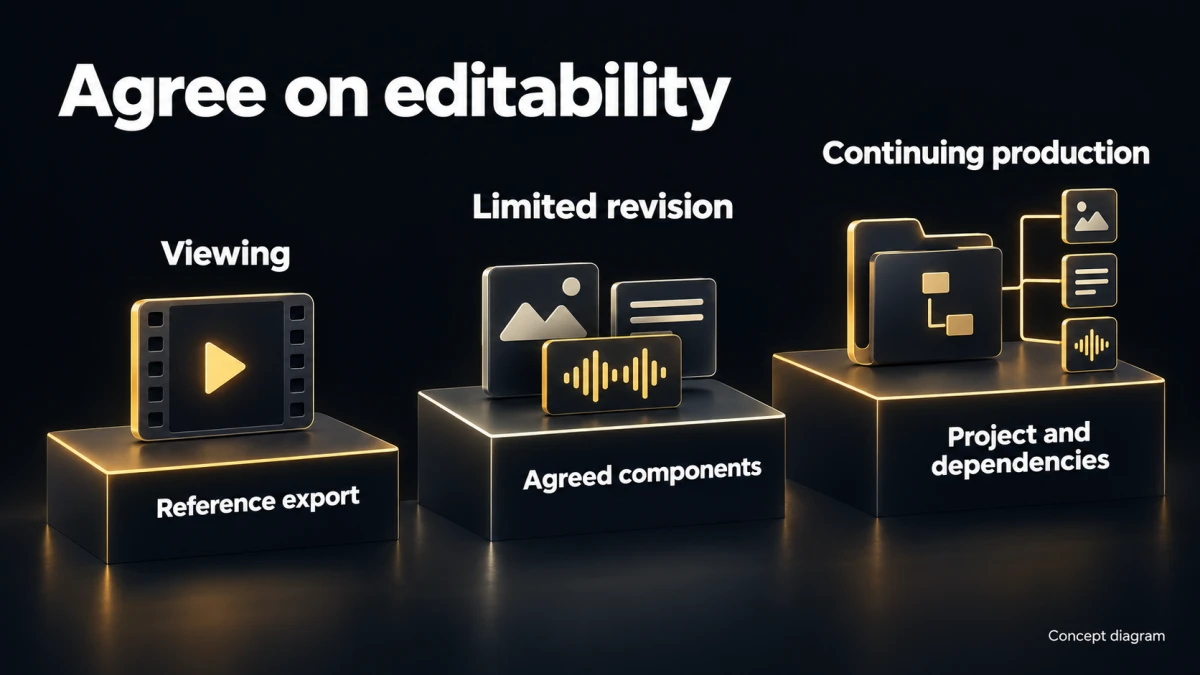
Concept diagram; not a product-interface screenshot.
Ask the recipient to describe the next operation, not merely request “all the files.” Will they change wording, replace music, rebuild a crop, relink a higher-quality source, or continue the edit in another application? List those operations in the handoff agreement.
Identify the destination application and version where known. A project that opens in your editor may require conversion or reconstruction elsewhere. Do not promise that an interchange file preserves every effect, title, transition, speed change, or audio treatment. The recipient must test the actual operations they need.
Separate the package into three practical levels:
| Delivery level | What the recipient receives | What it does not establish |
|---|---|---|
| Viewing and approval | A clearly labeled reference export and notes | Editable layers or access to original media |
| Limited revision | Agreed source components, such as clean video, caption text, and separate music | A fully reconstructable original timeline |
| Continuing production | Compatible project data, media dependencies, versions, and reconstruction instructions | Automatic compatibility with every editor or plug-in |
A limited-revision package can be a valid deliverable if everyone understands the boundary. The problem is calling a flattened export fully editable when the intended changes require layers that no longer exist.
Identify the authoritative timeline before collecting files
Choose the timeline or sequence that represents the accepted state. Record its name, revision, frame dimensions, frame-rate treatment, audio layout, and expected duration. Distinguish approved content from experimental alternates.
Save an identifiable project version before packaging. Keep a reference export from that same version. If you change the sequence after making the export, update the package or clearly label the difference. Otherwise the recipient cannot tell whether a mismatch comes from relinking or from comparing different revisions.
List unresolved decisions separately. “The client has not chosen the final music” is not a missing-file error. Include the approved temporary treatment and explain which decision remains open. Do not disguise an unresolved choice by naming the project “final.”
For generated assets, keep the actual selected output and its source record where appropriate. A prompt is useful context, but it does not guarantee that regenerating the asset will reproduce the same pixels, timing, or performance. The chosen file is a dependency in its own right.
Collect dependencies without silently changing them
Use the editor's supported collection or project-management workflow if it has one. Otherwise build a deliberate media inventory and copy the necessary files into an agreed package. Preserve the source assets until the transfer and retention requirements are settled.
Check more than video clips. Dependencies can include audio, still images, graphics, caption files, fonts, linked design documents, nested sequences, externally rendered effects, and files stored outside the main media folder. A timeline may appear complete because your workstation can still access a dependency elsewhere.
Record whether each item is included, licensed for the recipient to obtain, flattened into an approved render, or unavailable. Font and plug-in licenses may not permit simply copying the software to another person. Provide the product and version information or an approved replacement route rather than assuming redistribution rights.
Do not delete unused-looking files solely because a filename is unfamiliar. A short sound or graphic may appear in a nested section that a quick timeline scan misses. Use the application's dependency tools where supported, and confirm the result through a reconstruction check.
If media is trimmed during collection, agree on handle requirements: extra material before and after an edit that permits later adjustments. A package with no handles may reproduce the current cut but make the recipient's requested transition impossible.
Separate originals, working conversions, proxies, and exports
Give each category a distinct location and role. Camera originals preserve the available source. Working conversions may improve compatibility with a specific editing environment. Proxies are substitute working files intended to reconnect to the correct higher-quality sources. Exports are rendered deliverables or references.
Do not let a low-resolution proxy become the only remaining copy merely because it plays smoothly. Record the mapping between a proxy and its source, and retain the timing and identification needed for the receiving application to reconnect them.
Recapo's H.264 transcoder publicly describes converting video to H.264 for compatible playback and downstream processing. That can help produce an agreed viewing or working copy. It does not establish native project export, automatic proxy relinking, preservation of every camera metadata field, or compatibility with every professional finishing workflow.
H.264 conversion is therefore a specific preparation step, not the whole handoff. Confirm what the recipient needs before converting, keep the best available original, and inspect duration, picture, audio, and any required metadata in the result. A playable MP4 does not prove the original timeline remains reconstructable.
Do not convert every file simply to make extensions look consistent. A conversion can change characteristics that matter to the next task. If the recipient already supports the source, an additional generation of lossy encoding may provide no useful benefit.
Keep names stable and versions explicit
Use names that distinguish project, asset role, revision, and any important language or variant. The exact naming scheme matters less than consistency and an unambiguous mapping to the manifest.
For example, a fictional project could use:
cedar-demo_project_r03
cedar-demo_reference_r03_en
cedar-demo_clean-picture_r03
cedar-demo_dialogue_r03_en
cedar-demo_music_r03
cedar-demo_captions_r03_en
These are role labels, not a prescription for any particular file extension or codec. Add the actual extension produced by the selected software. Do not rename a container extension as a substitute for converting its contents.
Avoid ambiguous chains such as “final-new-final2.” A revision identifier should connect the project, reference export, and notes. If the recipient reports a defect in revision three, you should be able to find exactly the files they reviewed.
Be cautious about renaming source media after building the timeline. Some applications depend on paths, filenames, identifiers, or a combination of these. Use a supported relinking procedure when changes are necessary and test the result. Renaming everything at the end of production can create a failure that the original edit never had.
A fictional handoff: a 45-second product tutorial
Imagine an original teaching example for a fictional desk organizer called Cedar Tray. A 45-second English tutorial has been approved for picture. The next editor must create a Spanish version, replace temporary music, and adjust the final caption. No actual client assets or completed language version are implied here.
The required package is not just the approved English MP4. The recipient needs the accepted picture sequence or an agreed clean-picture export, an editable caption source, a narration script, separate dialogue and music where available, and notes about the final caption's timing.
Suppose the English captions are already burned into the only exported copy. The receiving editor cannot simply turn them off. The sender must return to the source project for a clean version, provide the editable timeline if compatible, or disclose that removing the text requires a different repair. Calling the flattened export “editable” would hide that constraint.
Suppose a music fade extends beyond the final picture frame in the working timeline. The handoff note should identify the intended ending and export range. Otherwise an audio stem with a longer tail may be interpreted as a synchronization error.
The team agrees to provide a reference export of revision three and a separate clean-picture export from the same picture state. Dialogue, music, and effects exports share an agreed starting point. Captions retain their timing and are labeled English; they are not represented as a finished Spanish translation.
The recipient's acceptance task is equally specific: reopen or reconstruct the agreed sequence, compare it with the reference, mute the temporary music independently, and edit the final caption. Until that happens, the package is prepared for validation, not proven editable on the recipient's system.
Make audio reconstruction possible
Describe what each audio file contains. A final mix, an isolated dialogue stem, and an extracted stereo soundtrack serve different purposes. A file called “voice” is ambiguous if it also contains music bleed or room sound essential to the scene.
Agree on a common timeline origin and export range for stems. A simple handoff can use files that all begin at the same sequence point, including leading silence where necessary. Do not trim each stem to its first audible event without recording the resulting offset.
Record channel layout and intended routing. A stereo file can contain a balanced mix, two independent microphones, or usable dialogue on only one side. The receiving editor should not have to discover that distinction after applying a generic downmix.
State which processing is baked in. Compression, equalization, noise reduction, reverberation, and fades may be irreversible in the provided export. If revisions require a cleaner source, include the appropriate earlier version where authorized.
Do not describe separated stems from a mixed recording as untouched production tracks. Algorithmic separation can leave residuals and alter the signal. Label their origin and keep the original mix available so the recipient can compare context and recover when a separated component is unsuitable.
Deliver text as text when revision requires it
Keep narration scripts, caption text, and exact on-screen wording in an agreed editable form. A screenshot of a caption is a useful reference but a poor source for translation or precise correction.
For subtitle files, record language, format, encoding when known, and the corresponding picture revision. Verify that the file reopens and that timing aligns with the intended sequence. A clean UTF-8 text file can still be the wrong revision or have the wrong offset.
Keep burned-in and clean-picture exports clearly distinguished. The presence of a separate subtitle file does not remove text already rendered into the video. This distinction is especially important when another editor must produce localized versions.
Describe any exact brand spelling, product identifiers, numbers, and qualifications that must survive adaptation. Separate those invariants from wording that a language reviewer may change. Do not label a machine-generated translation approved unless the relevant review has occurred.
If text uses fonts or graphics unavailable to the recipient, decide whether to provide licensed assets, use a supported substitute, or deliver an approved flattened layer. Each choice changes the degree of editability and belongs in the handoff note.
Write a manifest that answers the recipient's first questions
A useful manifest can be short. It should point to the authoritative assets and explain how the package fits together.
Project:
Package revision:
Prepared date:
Responsible contact:
Recipient's agreed next task:

Authoritative sequence:
Editing application and version:
Required extensions or plug-ins:
Reference export:
Expected duration and picture format:
Audio layout and shared start point:

Original media location:
Working conversion or proxy mapping:
Caption language, format, and picture revision:
Editable graphics and font dependencies:
Permissions or access restrictions:

Included items:
Excluded items and agreed reason:
Known limitations:
Unresolved decisions:
Steps to reopen or reconstruct:
Checks actually completed:
Checks still requiring the recipient:
Keep passwords, access tokens, and unrelated personal data out of this document. If an asset requires access, arrange it through the approved sharing system. The manifest should identify the dependency, not expose credentials.
The agency video-repurposing workflow addresses the broader coordination problem. For the handoff itself, the crucial distinction is between a production instruction and evidence that the receiving editor can actually perform it.
Validate from the packaged copy, not the working folder
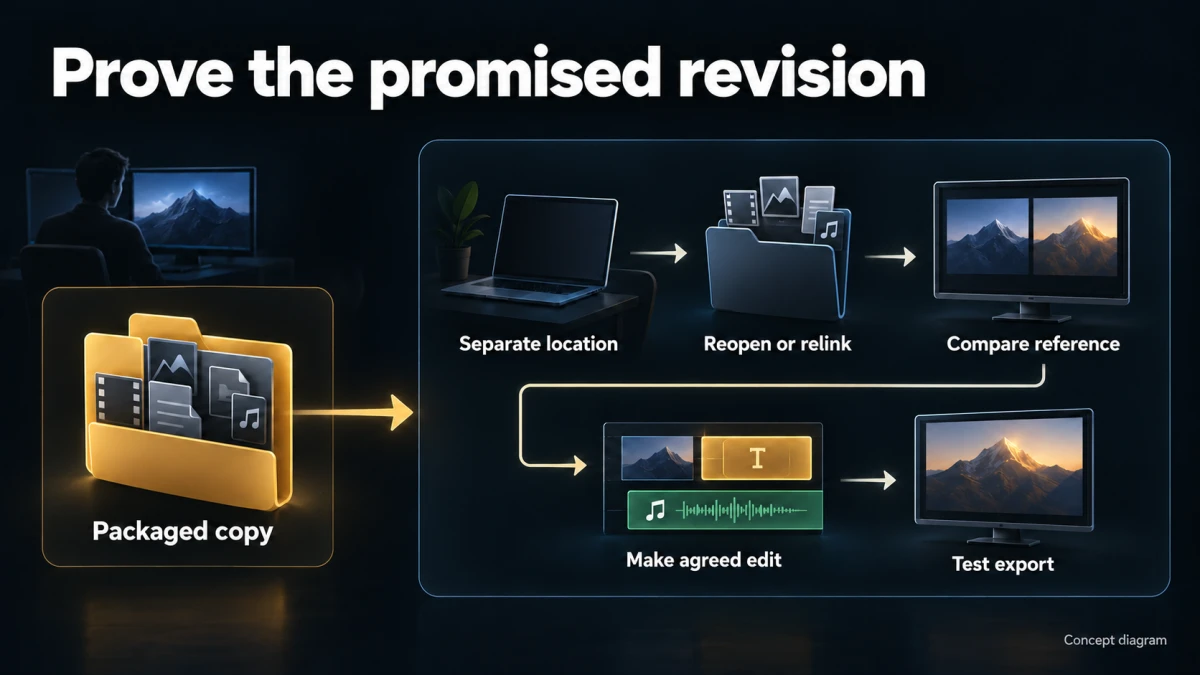
Concept diagram; not a product-interface screenshot.
Open the packaged project or reconstruct the agreed deliverable from a separate location. A different machine is a useful stronger check when available and authorized. The purpose is to expose dependencies that your original workstation silently supplies.
Do not delete originals to force the test. Use the editor's supported relink workflow or a separate environment where the original media path is unavailable. Preserve a reversible route back to the source.
Compare the rebuilt result with the reference at the start, at major edits, around effects and titles, and at the ending. Watch the whole sequence when practical. Matching the first frame does not establish that the correct take, audio routing, or transition appears later.
Perform the actual promised revision. If the recipient must replace music, confirm it can be changed independently. If they must alter a caption, edit a copy and produce a test export. Opening a project without errors is weaker evidence than completing the intended task.
Record differences instead of concealing them. A substitute font, unsupported effect, or altered color treatment may be acceptable under the agreement, but it must not be described as an exact reconstruction.
Close the transfer without losing the recovery path
Check that the recipient has access to the complete package and knows which revision to use. For an unchanged file transfer, a checksum comparison can help establish that the bytes match; it does not establish editorial correctness or project compatibility.
Keep the source project, package, manifest, and reference until the agreed acceptance and retention conditions are met. Do not assume receipt of a download notification means the recipient has reopened the project successfully.
When a defect appears, repair the smallest affected package component and issue a clearly labeled revision. Include a change note so the recipient does not combine an old project with new media unintentionally.
A successful handoff is not the largest folder you can send. It is the smallest complete, authorized, understandable set of assets that lets the next person perform the agreed work—and provides a clear path back when something does not reopen as expected.
