AI Music Generation Failed? Recover the Task Before You Submit Again
Recover an AI music task without blind resubmission. Check production cards, accepted jobs, downloads, credit records, and the evidence support needs.
If an AI music generation appears to fail, first determine whether the service accepted the paid job. A frozen page, missing download button, or interrupted connection does not prove that generation stopped. Preserve the job identifier and check the existing task before creating another paid request.
The safe sequence is: identify the stage, record the evidence, recover the accepted task if one exists, verify any delivered files, and investigate charges separately. Retry only when the previous request is confirmed not to be active, or when the service gives a clear supported retry action for that task.
This guide explains that sequence using Recapo's publicly described music workflow. It does not reproduce a paid failure or claim that a particular account has received a refund. The examples are constructed troubleshooting scenarios, not incident reports.
A production card is not a paid music job
Recapo's AI music generator describes a staged flow: provide the creative input, review a production card, then confirm the model and credit cost before paid submission. The card organizes the proposed music. It is not evidence that a finished song has been generated.
That distinction changes the first troubleshooting question. If you only completed the card, a missing audio download may be expected. If you confirmed submission and saw an accepted job, the problem belongs to a later stage.
The public page also describes a recoverable queue, one active music task per user, and idempotent submission. These are descriptions of the service's intended behavior, not instructions to click repeatedly. A new production request can still represent a different job. Do not assume that repeating a prompt in another tab will always be treated as the same submission.
Before touching the creative settings, write down what you last saw: input form, completed card, confirmation, accepted task, queue progress, finished result, or failed download. If you cannot identify the stage, treat the state as unknown until the account's task view or support resolves it.
Use observable evidence to locate the problem
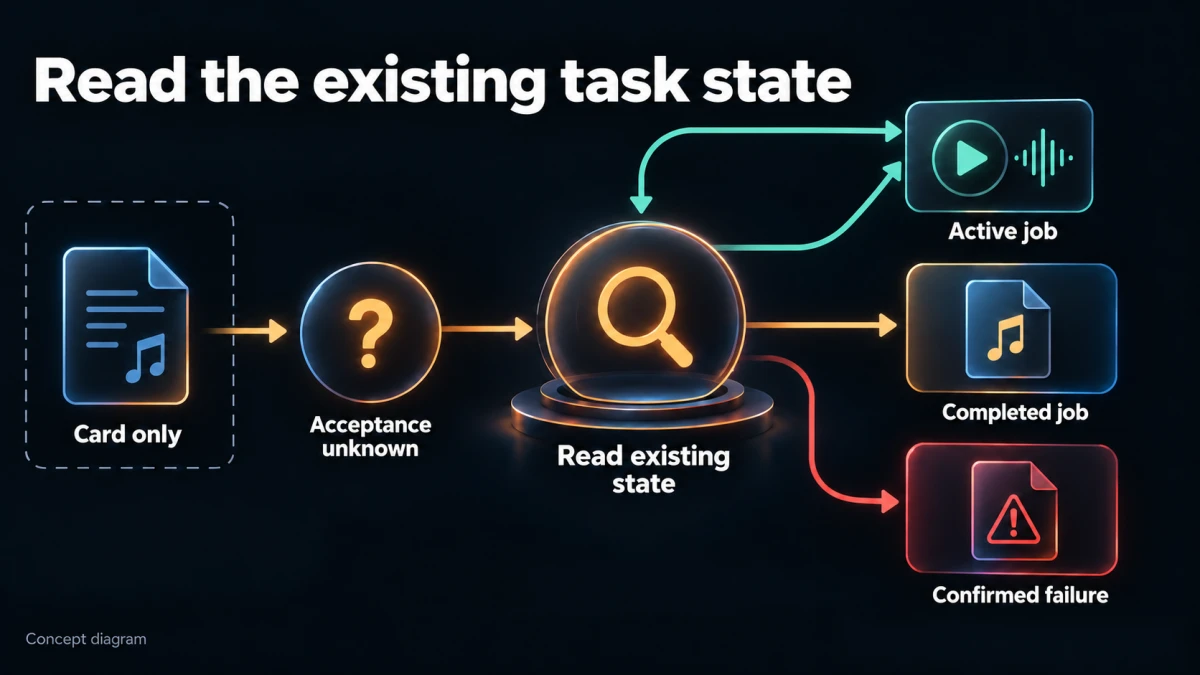
Concept diagram; not a product-interface screenshot.
| Last reliable observation | What it supports | Safest next action |
|---|---|---|
| Input entered, no production card returned | The planning step may not have completed | Preserve the brief; check the page for a validation or connection message |
| Card displayed, no paid submission confirmed | A plan exists; a generation job is not established | Review the card and current confirmation state |
| Confirmation clicked, response lost | Acceptance is unknown | Read the existing task/account state before resubmitting |
| Job identifier or accepted status appeared | The service recognized a job | Follow that job rather than creating a replacement |
| Task still queued or processing | It may still be active | Revisit its status through the supported interface |
| Completed status, file link fails | Generation and delivery may have different outcomes | Recover the saved result or report a delivery failure |
| Explicit failed terminal status | The job reports failure | Preserve the error and check credit handling before a new attempt |
A browser spinner is weaker evidence than a task record. Conversely, an old success screenshot is weaker evidence than the current job's status. Match every observation to the same job, account, and date.
If multiple people share responsibility for a project, appoint one operator for recovery. Otherwise one person may start a replacement while another is still checking the original. The relevant problem is duplicate work and potential duplicate cost, not merely untidy tabs.
First, preserve what would be hard to reconstruct
Save the creative brief, production card text, and any lyrics in your project notes. Record the selected model if visible, requested duration, confirmed credit amount, approximate submission time with timezone, and the task identifier if one was provided.
Capture the error wording rather than summarizing it as “broken.” A validation message, rejected submission, provider failure, and file-not-found message point to different stages. If you take a screenshot, crop out unrelated account details before sending it to anyone.
Do not collect passwords, browser cookies, API keys, or session tokens for a support report. Those are not appropriate troubleshooting attachments. A job identifier and relevant error message should be enough to begin an investigation.
Preserving the brief is particularly useful when the page reloads to a blank form. The form and the paid task may have different lifetimes. A lost input field does not establish that the backend lost the accepted job.
Keep the original notes even if you later simplify the request. Otherwise you cannot tell whether a successful second attempt fixed a problem or merely changed the task into a different one.
If submission has an unknown outcome
This is the highest-risk moment for accidental duplication. You clicked the paid confirmation, then the connection dropped. There is no reliable success or failure message.
Stop clicking. Reopen the supported task or result view in the same account and look for a job matching the time and brief. Compare identifiers where available; titles alone may be repeated. Check whether another active task is blocking new submissions.
There are three useful outcomes:
An active matching job exists. Continue monitoring that job. Do not create a replacement simply because the original page lost its progress display.
A completed matching job exists. Open the existing result and verify the delivery. A browser interruption may have hidden a successful generation.
No job can be confirmed. Check any visible submission or credit record, then ask support to confirm acceptance if uncertainty remains. Absence from one temporarily stale list is not conclusive proof that no job exists.
Avoid “testing” acceptance by changing one word and submitting again. That produces a new request whose behavior cannot tell you whether the first one was accepted. It can also make the account's history harder to reconcile.
For a deadline-sensitive project, move forward with an independently authorized fallback track while the status is investigated. You do not need to turn uncertainty into another paid generation to keep editing.
If a task is queued or appears stuck
A queue can be active even when progress does not change continuously. Recapo's public music page describes a single active-task limit per user, so a second request may not be the appropriate way to recover the first.
Check the latest visible state and any service message. Preserve the last update time if the interface provides one. If it does not, record when you observed the state; do not invent a backend update timestamp.
There is no universal waiting time that proves a music task has failed. Model, service load, request complexity, and delivery stages can differ. Use any current guidance supplied by the service, and contact support when the task exceeds the indicated expectation or materially blocks your work.
An effective escalation says: “This job has remained in the same visible state since these observations,” followed by times and screenshots. It does not say that a progress percentage must increase every minute unless the service has actually specified that behavior.
If the interface offers cancellation, read what it says about the effect and credit handling before using it. Do not assume cancellation is available, immediate, or refundable. A cancellation request can itself have an uncertain outcome; verify the terminal status before replacing the task.
A finished task with no usable download is a delivery problem
Generation, storage, and download are related but distinct. The public Recapo music page describes saving successful MP3, WAV, and lyric files from temporary provider URLs. A broken old link may therefore require recovery of the saved delivery, not another composition.
Return to the existing result page and use the current supported download action. Avoid repeatedly opening a stale temporary URL from an old message. Do not modify signed URL parameters or guess storage paths.
After a file downloads, verify more than its filename:
- Does it have a plausible duration and play from beginning to end?
- Does it correspond to the requested vocal or instrumental result?
- Is the ending present rather than abruptly truncated?
- Are lyrics included when expected, and do they match the audible version?
- Does the file reopen after the browser is closed?
- Can the intended editor import it without an error?
A file extension alone does not prove that the file is valid audio. An error page can occasionally be saved with a misleading name. If a local player cannot recognize it, preserve the failing file and the download error for support; do not keep renaming it until it appears to work.
When only one format is missing, describe the missing asset precisely. Recovering a WAV export is a different request from regenerating the composition. Keep any valid delivered files while the missing one is investigated.
Separate account-credit recovery from cash refunds
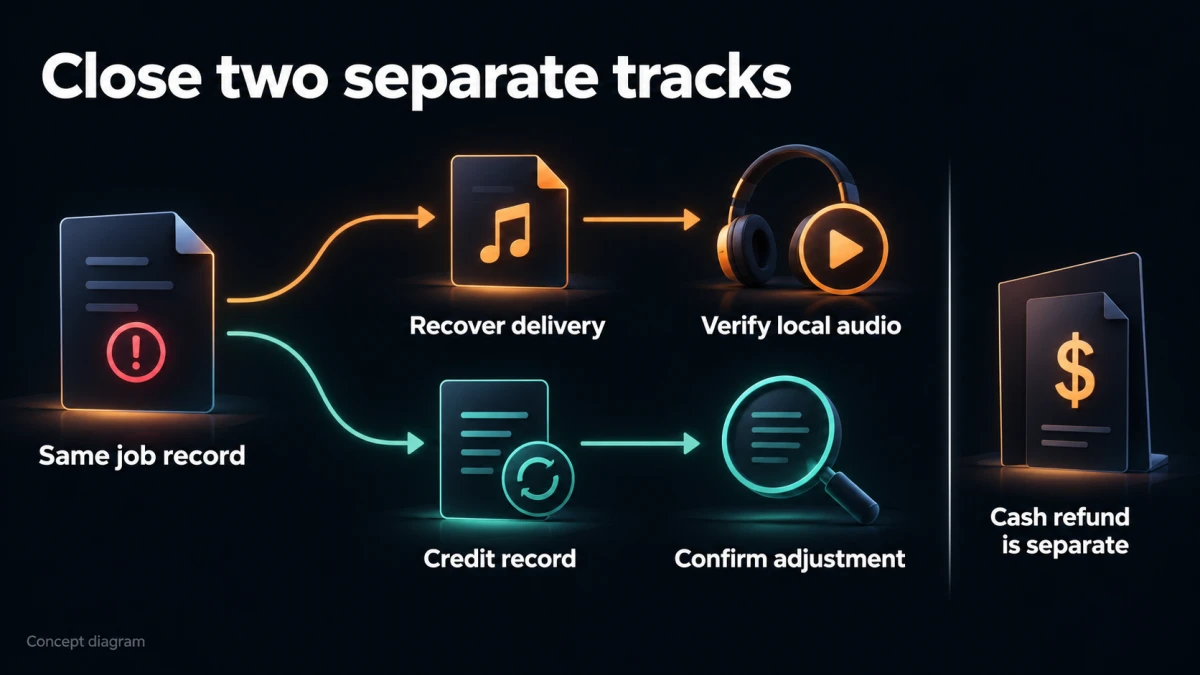
Concept diagram; not a product-interface screenshot.
The music tool's public description says the confirmed credit cost is charged when a task is accepted and that eligible failures not caused by the user are refunded in credits. That does not mean every rejected creative result, canceled task, or disliked song qualifies.
Nor should you equate a task-credit reversal with a refund of money originally spent on a plan or credit purchase. Recapo's Terms of Use contain separate payment and refund provisions, subject to applicable law and any applicable purchase conditions. Check the relevant policy and account record for your case.
Record the confirmed task cost and any visible debit or reversal associated with the job. A total account balance can be misleading when other tasks, purchases, or credits occurred at the same time. Prefer a job-linked record where the interface provides one.
If a failed job has no visible reversal, ask support to verify eligibility and processing. Do not assert that credits were permanently lost solely because a balance has not yet changed. Equally, do not mark a refund as received because the product page describes a refund mechanism.
The evidence required to close the incident is specific: either the relevant credit adjustment is visible, or support has explained the outcome for that job. Keep that outcome separate from whether you have already obtained a usable replacement track.
Three recovery examples
The following scenarios are fictional. They illustrate decisions, not observed service performance.
The browser closes after confirmation
A creator confirms a music request for a narrated product video. Before seeing a response, the browser closes. On reopening the account, the creator finds a matching job with an identifier and queued status.
The correct next step is to retain that job and continue from its record. The creator does not need to recreate the card or pay again. If the task later completes, the original interruption belongs in the incident note but does not make the generation a failure.
If no matching job had appeared, the decision would remain open. The creator would check the account record and ask for acceptance confirmation rather than interpreting the blank form as permission to resubmit.
The job finishes, but an old link returns an error
An editor saved a provider link while a result was being delivered. Later, that link fails. The task itself still shows completion.
The editor returns to the existing saved result and tries the currently offered download. If that also fails, the support request identifies a completed job with an unavailable delivery file. It does not ask to “start the music again,” because a new output might have different timing, melody, or lyrics.
The project remains blocked on delivery until a valid file is recovered. Completion in the task list is useful evidence, but it is not the same as a verified local asset.
The file downloads, but the creative result is wrong
A team requested instrumental background music and receives a file with unwanted vocal-like material. The job completed and the file plays.
That is a creative acceptance issue, not automatically an infrastructure failure or an eligible refund. The team documents the mismatch, checks whether a supported correction path exists, and decides whether a separately confirmed revision is worth the cost.
This distinction protects the recovery process from becoming a promise that every unsatisfactory artistic result is refundable. It also encourages a clearer production card on the next intentional attempt.
Send a support report that can be investigated
A concise report can follow this structure:
Subject: Music job recovery — accepted job, delivery unavailable
Account identifier: provide through the service's approved support channel
Job identifier: the visible identifier
Submitted: date, time, timezone
Last reliable state: completed
Problem: current result download fails with the attached error text
Files affected: WAV; MP3 is available and plays
Credit question: none, or the specific debit/reversal to check
Steps already tried: reopened the existing result; attempted its current download
Requested action: recover the saved WAV or explain the supported recovery path
Replace every field with real evidence. Do not send that fictional example as if it described your account. If no identifier was returned, say so and provide the approximate time and enough brief details for support to locate the request.
Describe only the relevant attempts. A long history of speculative refreshes can obscure the one observation that matters. Redact private lyrics or client information unless they are necessary and the support channel is appropriate.
For broader preparation before working with online tools, the online video tools checklist covers adjacent reliability and handoff considerations. The incident report here stays focused on the music job's identity and state.
When a retry is reasonable
A new generation can be reasonable after the original request is confirmed not to be active and the reason for failure is understood sufficiently to make another attempt useful.
Before retrying, answer four questions:
- Is the previous job terminal, or was it confirmed never accepted?
- Is a supported recovery action available for that same job?
- What will change, if anything, to address the reported problem?
- What cost and conditions are shown for the new submission?
If the service reports a specific invalid input, correct that input. If it reports an unavailable model, use a currently supported option if suitable. If it gives no actionable cause, a blind sequence of identical paid attempts is a poor diagnostic method.
Save the new job as a separate record and connect it to the incident. Do not overwrite the old identifier. If the first task later reappears as completed, you need to distinguish the deliveries and reconcile the account accurately.
Close the incident with an asset and a record
A recovered job is finished operationally when its outcome is known, the relevant files are valid and safely retained, and any credit question is resolved or explicitly assigned for follow-up.
Keep an untouched copy of the delivered audio, the production card, and the job record. Make editing copies for fades, timing changes, or mix adjustments. A recovered file should still pass the normal creative, audio-quality, and rights review before publication.
The core habit is simple: recover by identity, not by repetition. Treat an unknown submission as unknown, a queued job as potentially active, a missing download as a delivery issue until shown otherwise, and a credit refund as an account event that must be verified. That approach preserves both the work and a clear explanation of what happened.