
How to Turn an Interview Into YouTube Shorts
Learn how to turn an interview into YouTube Shorts with complete answers, ethical edits, two-person reframing, captions, and a practical QA workflow.
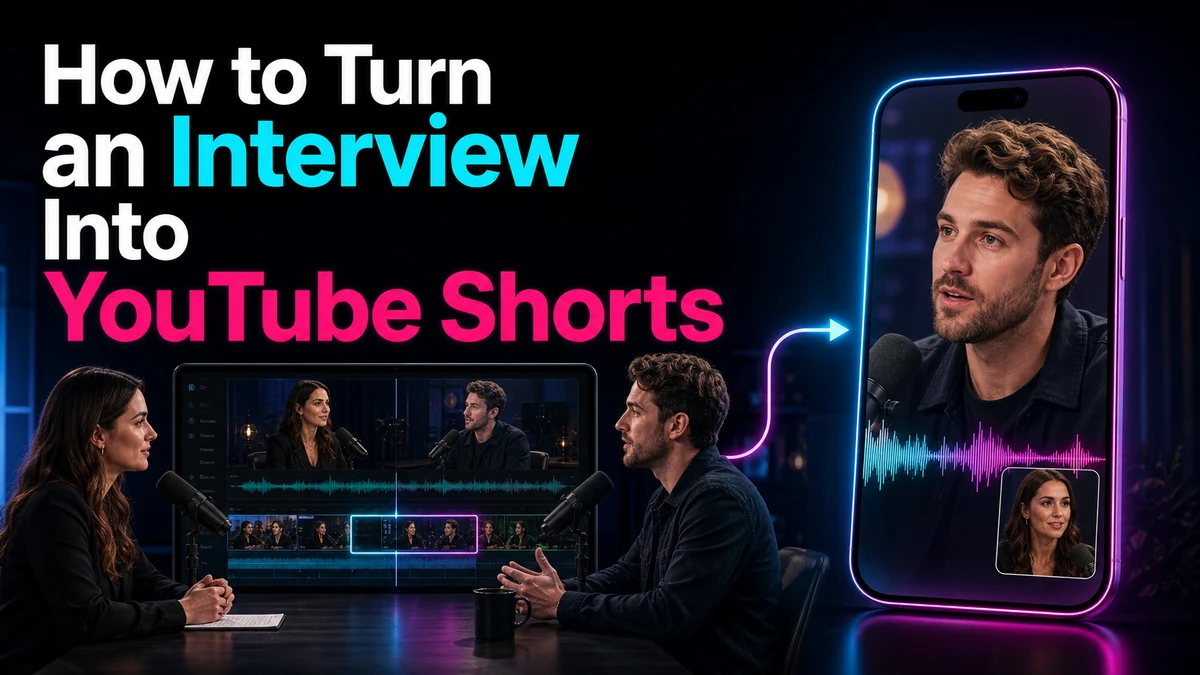
How to Turn an Interview Into YouTube Shorts
To turn interview into YouTube Shorts content that still represents the guest fairly, edit for meaning before editing for speed. A YouTube Shorts maker can help you locate, trim, reframe, caption, and export a vertical clip, but it cannot decide whether a cut preserves the speaker’s intent. Start with one complete question-and-answer unit, retain the context that makes the answer accurate, choose a two-person or speaker-switching composition, and review the result as a standalone quotation.
Key Takeaways
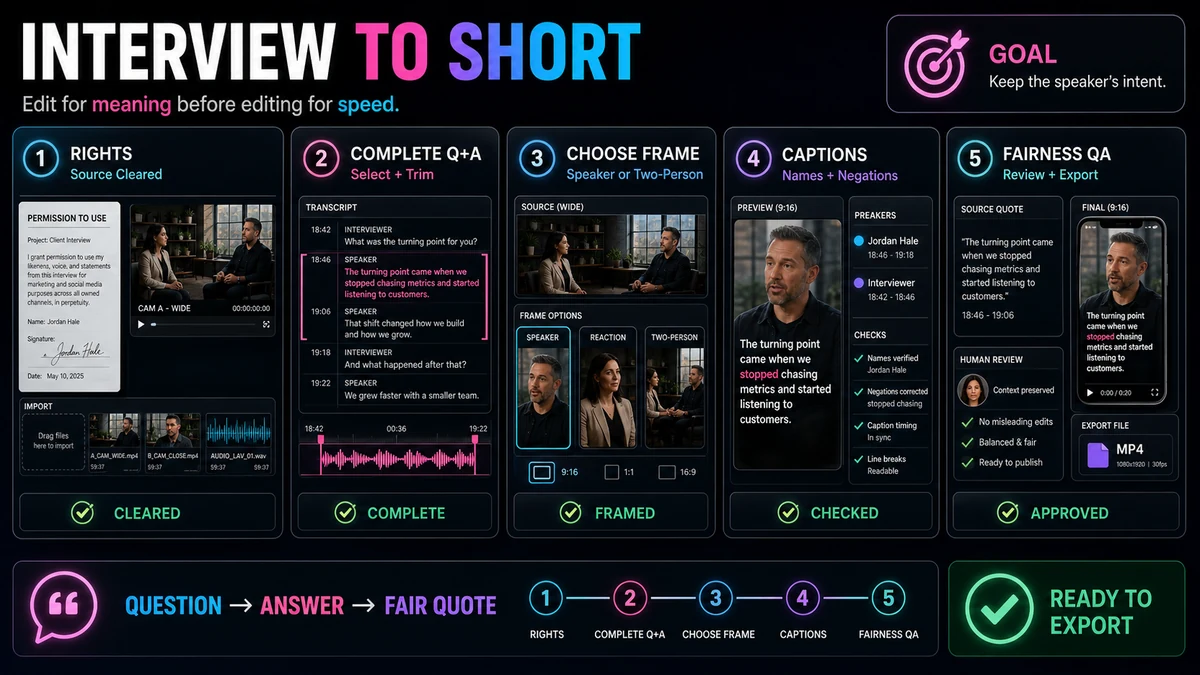
- Select one answer with a clear setup, useful point, and natural resolution; do not isolate a dramatic sentence that depends on a missing qualifier.
- Keep enough of the interviewer’s question to define what the guest is answering, even if you shorten verbal clutter.
- Choose between speaker switching, a stable guest crop, and a two-person layout according to who carries meaning at each moment.
- Preserve meaningful reactions without using reaction shots to imply an emotion or sequence that did not occur.
- Verify captions against the audio, especially names, technical terms, negations, numbers, and speaker changes.
- Run a rights, meaning, framing, audio, caption, and export review before uploading.
Why Interview Shorts Need a Different Editing Standard
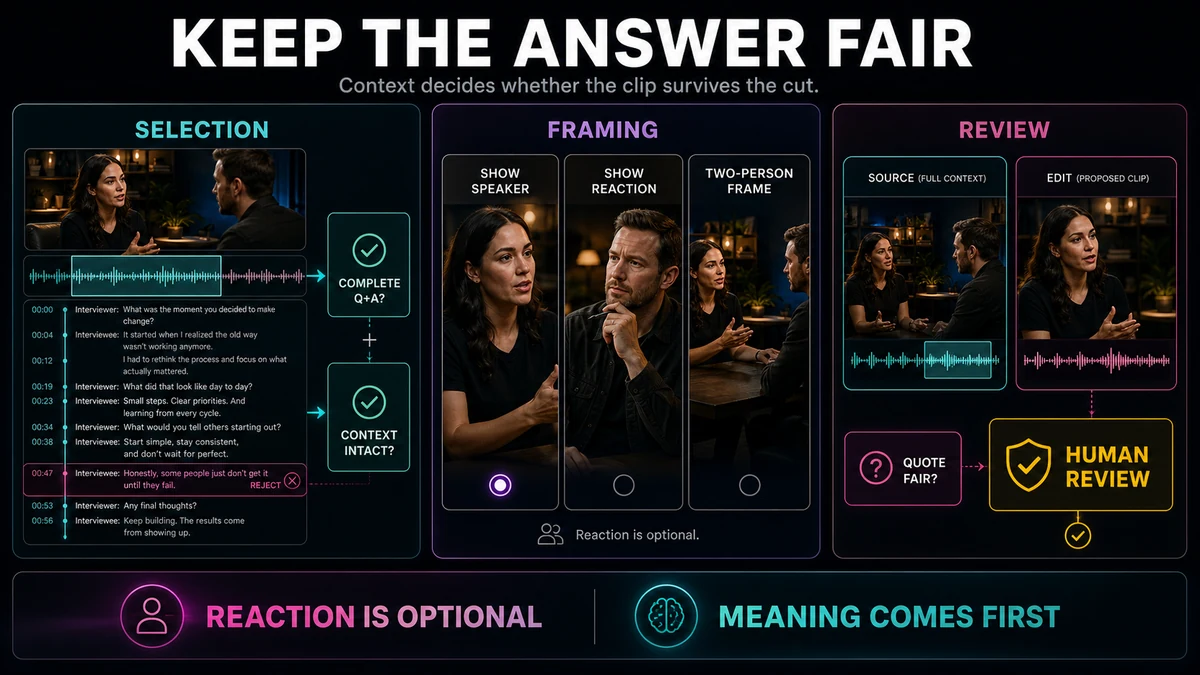
An interview is not simply a talking-head video with two faces. A question sets the scope, an answer responds to it, and a reaction may show how the exchange landed. Removing any one can change what the viewer thinks happened.
The most tempting sound bite is not always the strongest standalone clip. “It failed completely,” for example, could be a compelling opening. But if the guest actually said, “The first prototype failed completely, so we changed the design,” ending after the first clause would reverse the point. The editor’s job is to make the exchange concise without manufacturing a different claim.
Every cut must be clear to a new viewer and faithful to the source. When those goals conflict, accuracy wins.
Choose a Complete Question-and-Answer Unit
Mark candidates in the transcript, then listen to the source. Transcripts speed up search but do not reliably convey tone, interruptions, facial reactions, or recognition errors. Favor a definable question, self-contained answer, specific insight, honest endpoint, and source picture that can support a legible vertical composition.
Use this selection test before trimming:
| Editorial questionKeep the candidate when…Reject or expand it when… | ||
| Does the answer stand alone? | A new viewer can understand the topic and conclusion. | It begins with “that,” “he,” or “the second one” and the reference is missing. |
| Is the quote representative? | The retained words preserve the speaker’s position and important conditions. | Removing the next sentence makes the claim sound more certain or extreme. |
| Does the question matter? | The answer is understandable with a short on-screen prompt or brief spoken question. | The question changes the meaning and has been removed entirely. |
| Is the reaction useful? | It helps the viewer follow turn-taking or emotion that occurred at that point. | It is decorative, misleading, or taken from a different moment. |
| Can it work vertically? | The active speaker, listener, and necessary gestures can be shown intentionally. | A severe crop hides visual evidence or makes the two speakers unreadable. |
Failure modes include opening on a pronoun with no referent, deleting the premise, joining different answers as if continuous, or removing hedges such as “in our case.” A shorter clip is not better if it becomes ambiguous or unfair.
A Rights-First Interview-to-Short Workflow
The following workflow covers rights checking, import, selection, trimming, 9:16 reframing, captions, QA, and export in that order. Each stage protects decisions made in the previous one.
1. Confirm Rights and Editorial Permission
Use material you are authorized to repurpose. Check the recording agreement, guest consent terms, music and stock licenses, and restrictions on supplied footage. Permission for the long interview may not cover every excerpt, promotional use, or third-party element.
Review included clips, photographs, slides, audience members, and songs separately. Attribution and disclaimers do not automatically create permission or fair use. Fair use is fact-specific and ultimately decided by courts, while Content ID may still affect an upload. This is general risk guidance, not legal advice.
2. Import the Best Available Source
Start from the best rights-cleared master available, not a compressed social download. Recapo’s YouTube Shorts Maker describes importing local footage or a source link. Confirm the video, audio, duration, and transcript after import. For multi-camera sources, use a feed or edit containing the needed angles and avoid unnecessary re-exports before cropping.
3. Select the Complete Exchange
Search the transcript for the topic or key decision, then extend the boundaries until the full question-answer logic is audible. Keep the spoken question when its wording matters. If it is repetitive, remove filler or use an accurate on-screen question without changing its scope.
Candidate selection is editorial, not a guarantee that software has found the “best moment.” If you are comparing several possible excerpts from a long recording, use the principles in How to Find the Best Moments in a Long Video with AI as a shortlist process, then make the final choice yourself.
4. Trim Without Rewriting the Speaker
Remove greetings, repeated phrases, pauses, and filler only when the remaining speech stays natural and accurate. Protect negations, conditions, uncertainty, comparisons, and time references. Audio-only review can expose clipped breaths, room-tone changes, and impossible cadence.
Never splice sentences into a claim the guest did not make. When compressing one answer, use a visible cut, composition change, or appropriate B-roll rather than presenting it as untouched speech. Link back to the full interview when practical.
5. Reframe the Interview for 9:16
Set the vertical canvas before fine visual adjustments. For a wide interview, choose the composition moment by moment:
- Stable guest crop: Use when the guest carries the value and the interviewer is not visually necessary.
- Speaker switching: Cut or reframe as the spoken turn changes so viewers see who begins speaking.
- Two-person stack or split: Use when both reactions matter and each face remains legible on a phone.
- Guest plus reaction panel: Show a brief, genuine listener response without competing with the speaker.
Keep eye lines believable, preserve meaningful gestures, and avoid digital panning after every small head movement. A stable crop followed by a motivated cut usually feels calmer.
For deeper crop options, see How to Make YouTube Shorts from Horizontal Video and use the YouTube Shorts Safe Zone Guide during the phone-sized review.
6. Add and Correct Captions
Captions matter when voices alternate or the interview uses names and specialist language. Recapo’s Auto Captions page describes language and style choices, editable synchronized captions, timing and position review, and captioned-video output. Human correction remains necessary.
Compare captions with the full audio. Check names, numbers, acronyms, negations, and homophones. Break lines naturally, distinguish speakers when needed, and keep words away from likely interface overlays without covering faces or reactions. The guide to adding auto captions to YouTube Shorts provides a focused review process.
7. Run Meaning, Picture, Sound, and Platform QA
Watch normally, muted, audio-only, and at phone size. These passes expose unclear turn-taking, caption timing, unnatural audio edits, cramped faces, tiny type, and edge collisions.
Ask a fresh reviewer to state the question and conclusion. If the summary differs materially from the source, restore context or choose another passage. A factual review by the guest or designated editor can also be an external editorial practice.
YouTube’s current Help guidance says qualifying square or vertical videos can be Shorts up to three minutes. For standard channels, the cited rule applies to qualifying uploads on or after October 15, 2024. That is a ceiling, not a target: use the length the idea needs. YouTube also warns that a Short over one minute with an active Content ID claim may be blocked globally.
8. Export and Inspect the Final File
Export a vertical MP4 and play the file rather than relying only on the editor preview. Recapo’s public page supports vertical MP4 export, not automatic publishing. Check the endpoint frames, lip sync, audio, captions, crop, and duration before uploading through YouTube’s current workflow.
Illustrative Example: Editing an Interview Answer Fairly
The following is a hypothetical editorial example created to demonstrate the method. It is not a customer story, performance claim, or transcript from a real interview.
Imagine a host asks, “When did you know the community workshop format was working?” The guest answers:
“The first session was quiet, so at that point we did not know. In the second session, people stayed afterward to help each other finish their projects. That was the moment we saw the format could create a real peer group.”
A weak Short might stop after “The first session was quiet,” withholding the answer. Another might retain only the final sentence, leaving “that” undefined.
A fair edit could use the on-screen question “When did the workshop format start working?” and retain the contrast between sessions. Show the guest, briefly use the host’s genuine reaction during its natural pause, then return for the conclusion. Captions must preserve “did not know”; dropping the negation reverses meaning.
The goal is the shortest version that still contains the uncertainty, evidence, and conclusion—not the shortest possible excerpt.
Match Selection, Framing, and Review
Treat these as one connected decision rather than three separate polish steps.
| Source situationSelection choiceVertical treatmentReview focus | |||
| Guest gives a clean answer after a long question | Replace verbal repetition with an accurate short prompt | Stable guest crop | Does the prompt preserve the original scope? |
| Host challenges a claim and the guest revises it | Keep the challenge and revision together | Speaker switch on each turn | Is the revision visible, not edited into certainty? |
| Listener reaction adds warmth | Keep only the reaction recorded at that moment | Brief two-person view or reaction panel | Does the reaction imply anything the source does not? |
| Two speakers overlap | Retain enough overlap to show the interruption | Split view or clearly motivated cuts | Can viewers identify each speaker and follow captions? |
| Essential gesture occurs outside a face crop | Include the gesture-bearing shot | Looser crop or alternate angle | Is the evidence visible without shrinking both faces too far? |
If no crop preserves the evidence, use a stacked layout, another angle, or another answer.
Final Checklist and Limitations
- The source footage, music, images, and excerpts are cleared for this use.
- The clip contains one complete question-answer idea with an understandable beginning and ending.
- Removed words do not change the guest’s position, confidence, conditions, timeline, or attribution.
- Any reaction shown occurred in the relevant sequence and does not create a false implication.
- Speaker switches happen for a reason, and both faces remain readable when shown together.
- The 9:16 crop protects eye lines, gestures, and visual evidence.
- Captions match the audio and correctly render names, terms, numbers, and negations.
- Caption and title placement avoids likely interface overlays at phone size.
- Audio edits sound continuous and lip sync remains intact.
- The exported file has been watched in full.
- The editorial length fits the idea even though qualifying square or vertical Shorts can currently be up to three minutes.
- A human has reviewed the standalone meaning before upload.
No workflow can guarantee that a selected excerpt is the best moment, that transcription is error-free, or that a Short will grow an audience. Difficult accents, cross-talk, poor source resolution, missing camera angles, and ambiguous permission can all require more manual work or make a candidate unsuitable. Platform rules and interface placement can also change, so verify current YouTube guidance before publishing.
Use Recapo as an Editing Starting Point
Recapo’s YouTube Shorts Maker supports the mechanical path: import authorized local footage or a source link, locate passages through the transcript, trim, adjust a 9:16 reframe, and export a vertical MP4. The editor still decides whether the quote is fair, the context is sufficient, and the clip is ready.
If that division of labor fits your process, open the tool with one rights-cleared interview and one candidate answer. Build a first vertical cut, then use the meaning and QA checks above before publishing anywhere.
Frequently Asked Questions
How much of the interviewer’s question should I keep?
Keep enough to define the answer’s subject and scope. An accurate on-screen version can replace repetition, but must not broaden, narrow, or sensationalize the question.
Should an interview Short show both speakers?
Only when both faces aid understanding. Use a stable guest crop for a self-contained answer, speaker switching for back-and-forth, or two-person framing for a meaningful reaction.
Can I remove pauses and filler words from an interview quote?
Yes, if cuts preserve meaning, cadence, and tone. Protect uncertainty, negation, and conditions; review every audio edit and avoid presenting reconstructed speech as an untouched sentence.
How long can an interview YouTube Short be?
Qualifying square or vertical videos can currently be Shorts up to three minutes. Keep the question, evidence, and conclusion, then end when the idea is complete.
Can software automatically choose the best interview moment?
Software can locate candidates, but “best” depends on context, rights, visual quality, and faithful representation. Review the surrounding exchange before selecting one.
Do captions still need review after automatic transcription?
Yes. Check names, accents, overlapping speech, specialist terms, numbers, negations, timing, speaker clarity, and position against the audio.
Is crediting the original speaker enough for copyright permission?
Not necessarily. Attribution or a disclaimer alone does not establish permission or fair use. Rights depend on the source and intended use; this is general guidance, not legal advice.
References and Official Sources
- Recapo YouTube Shorts Maker
- YouTube Help: Understand three-minute YouTube Shorts
- YouTube Help: Upload YouTube Shorts from a computer
- YouTube Help: Copyright and fair use
Related Recapo Guides
- How to Make YouTube Shorts from Horizontal Video
- YouTube Shorts Safe Zone Guide
- How to Add Auto Captions to YouTube Shorts
- How to Make YouTube Shorts on Desktop
- How to Find the Best Moments in a Long Video with AI