
How to Turn an Online Course Into YouTube Shorts
Turn course lessons into clear YouTube Shorts by preserving prerequisites, instructional accuracy, usage rights, vertical framing, and a useful next-step CTA.
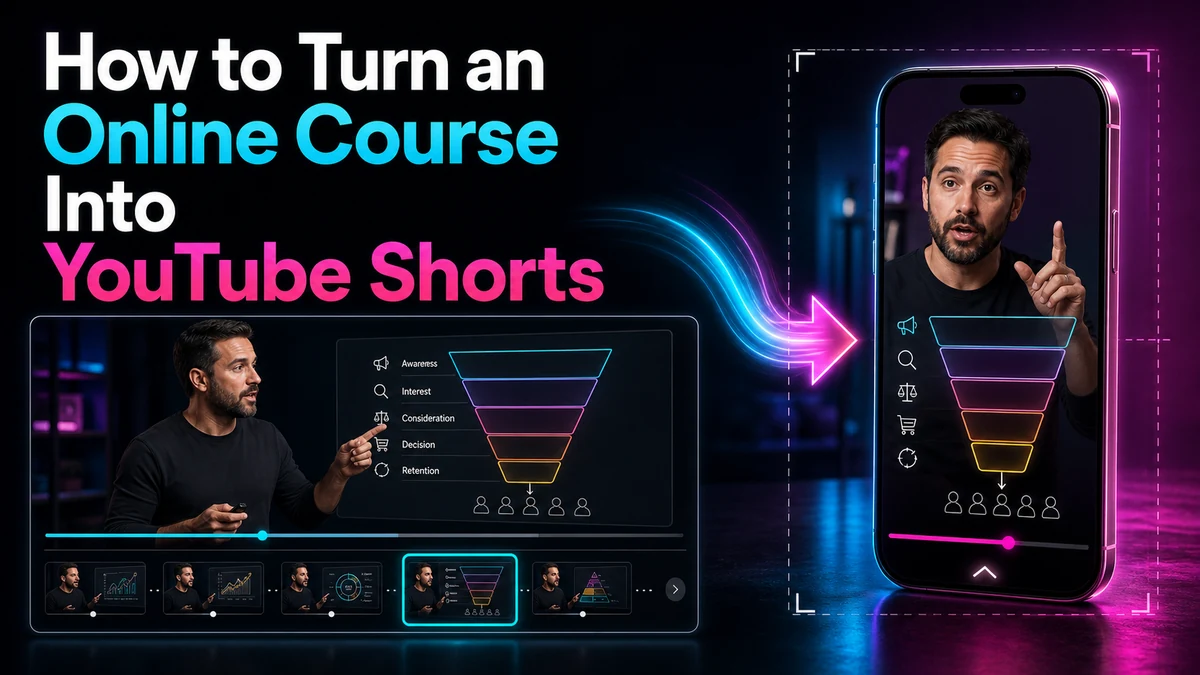
How to Turn an Online Course Into YouTube Shorts
To turn online course into YouTube Shorts content without weakening the teaching, extract one independent micro-lesson rather than compressing an entire module. Define one outcome, identify the knowledge a new viewer needs, preserve the steps and qualifications that make the instruction accurate, and end with a clear route to the full lesson. The Short should teach something useful on its own while honestly showing where deeper learning continues.
YouTube currently classifies qualifying square or vertical uploads of up to three minutes as Shorts. Use only the time needed to preserve the lesson's setup, method, and result.
Key Takeaways
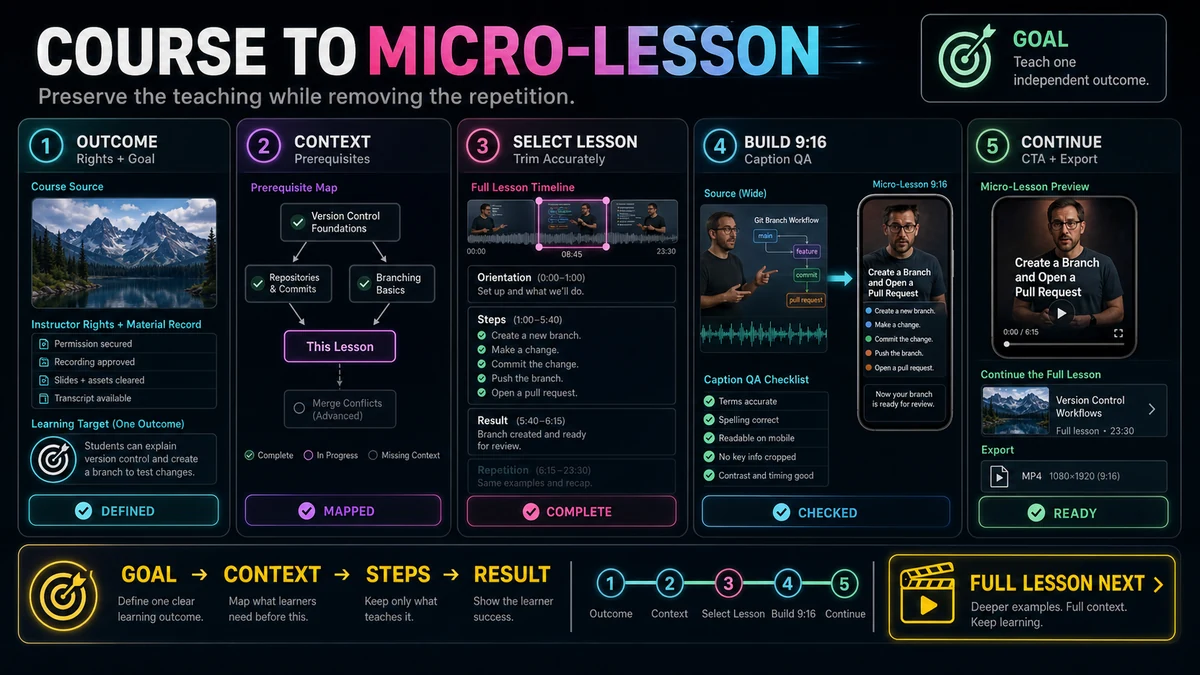
- Build each Short around one learner outcome, not a chapter summary or promotional montage.
- Choose a segment that can stand alone, or add the minimum prerequisite context before the first step.
- Condense pauses and repetition while preserving definitions, conditions, sequence, warnings, and the demonstrated result.
- Confirm that you can reuse the instructor video, slides, examples, music, guest material, and learner contributions in a public Short.
- Reframe the instructor and teaching artifact deliberately for 9:16, then review technical terms and caption timing by hand.
- Use a continuation CTA that names the next lesson, resource, or course page without pretending the Short contains the complete course.
Treat the Short as an Independent Micro-Lesson
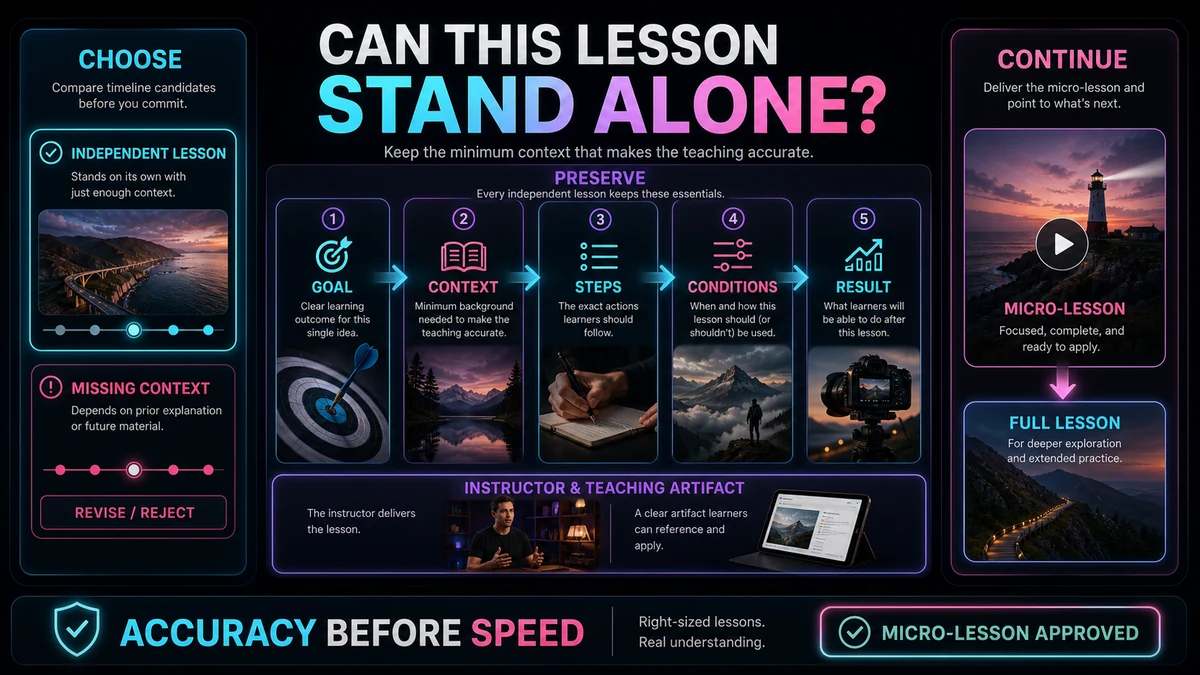
Courses are cumulative, but a Short reaches viewers outside the sequence. Vocabulary, source files, or earlier exercises cannot be assumed. Start with one outcome: “After this Short, the viewer can explain, identify, or perform one specific thing.” “Understand the whole course” is not specific enough.
A self-contained micro-lesson normally contains four parts:
- Orientation: What is the viewer about to learn, and why does it matter in this example?
- Required context: The definition, starting state, or prerequisite needed to follow the instruction.
- Teaching action: The explanation or demonstration in the correct order.
- Result and continuation: A visible conclusion plus an honest next step for deeper study.
Select Course Material That Can Stand Alone
Review the lesson transcript and visuals together. A passage can sound complete in text while relying on a slide, worksheet, code sample, or earlier demonstration that is no longer visible after trimming.
Use these selection criteria:
| CriterionStrong candidateWarning sign | ||
| Learning outcome | One observable skill or clear concept | Several objectives are combined in one passage |
| Prerequisites | None, or they can be stated accurately in one short bridge | The segment depends on multiple earlier modules |
| Complete reasoning | The explanation includes the important “why” or condition | The clip preserves a command but removes when it applies |
| Visual independence | The relevant slide, action, or example fits a vertical edit | Essential details are spread across a dense widescreen layout |
| Clean boundaries | The passage has a natural question, method, and result | It starts with a backward reference or stops before feedback |
| Rights status | Every included element is cleared for this public use | Guest, learner, licensed asset, or music rights are uncertain |
| Continuation | A specific next lesson or resource follows naturally | The ending makes a vague promise or unrelated sales pitch |
A definition, worked example, misconception correction, single demonstration, or short practice prompt often survives extraction well. A complex assessment debrief, multi-step lab, or lesson built around protected reading material may need the full course environment.
Map Prerequisites Before You Trim
List every term, tool, source file, previous result, and assumption the instructor uses. Classify each item:
- Common for the defined audience: it can remain unstated.
- Essential and easy to bridge: add one accurate sentence or opening visual.
- Essential but substantial: choose another micro-lesson or direct viewers to the prerequisite.
- Not needed: remove it with the surrounding tangent.
Do not disguise a missing prerequisite with a faster edit. Show the starting state and define essential terms, or choose a cleaner example. A bridge can use an approved pickup, rights-cleared context card, or exact source line, but it must not imply the instructor said something they did not say.
Condense Without Changing the Instruction
Accurate condensation removes time, not meaning. Greetings, navigation pauses, repeated examples, long cursor travel, and verbal filler may be removable. Qualifications that limit a claim are not filler.
Pay special attention to:
- negations, units, ranges, and ordered steps;
- safety, accessibility, or compliance warnings;
- conditions, uncertainty, and exceptions;
- the difference between an example and a universal rule;
- the result used to check whether the method worked.
Read the trimmed transcript as a new document and check it against the source. A clean audio edit can still create a false causal relationship when it removes a condition. If the reasoning cannot fit intact, narrow the topic or keep it in the course.
Check Course IP and Participant Rights
Owning or selling a course does not establish that every component can be reused in every format. Check the agreements and licenses for the instructor performance, slides, photographs, diagrams, screen recordings, readings, music, stock media, guests, and learner submissions.
Remove learner names, faces, account details, assignment responses, and discussion posts unless the required permission and privacy review are in place. Confirm that asset licenses and instructor, contractor, or guest agreements cover public social-video reuse.
Attribution or a disclaimer does not itself create permission. YouTube also explains that fair use depends on the facts and is ultimately decided by courts; Content ID can still affect uploaded material. This is general risk guidance, not legal advice. Replace uncertain material, obtain permission, or seek qualified advice for a specific case.
Workflow: Turn a Course Lesson Into a YouTube Short
1. Define One Learner Outcome
Write the outcome before choosing a quote. Use an action a viewer can complete or recognize after watching.
2. Confirm Rights and Remove Private Material
Audit the selected range. Clear or replace restricted media, learner work, confidential screens, and personal information before import.
3. Import the Cleared Source and Locate the Full Teaching Unit
Recapo's YouTube Shorts Maker supports importing a local video or authorized source link, locating passages through the transcript, trimming, applying an adjustable 9:16 crop, and exporting a vertical MP4. Use the best available source so instructional details remain readable.
Search for the outcome, then mark the lead-in, required definition, complete teaching action, and result. This wider selection exposes prerequisites and qualifications before trimming.
4. Build the Prerequisite Bridge
Resolve references such as “this formula” or “our second rule” with an accurate source line, approved pickup, or context card. If the bridge becomes another lesson, reject the candidate.
5. Trim for Accuracy and Momentum
Remove repetition and inactive time only after preserving meaning. Compare the new transcript with the source and keep enough of the demonstration to show how the result was produced.
6. Reframe the Teaching Evidence for 9:16
Set a vertical canvas before finalizing captions. Decide whether the instructor, slide, software action, or physical demonstration carries each moment. Show the teaching artifact when the instructor refers to it.
Use stable crops and clean cuts when visual priority changes. Enlarge active screen areas and reveal dense slides one region at a time. Keep essential content away from likely overlays; the YouTube Shorts Safe Zone Guide provides a review method.
7. Edit Captions as Instructional Content
Caption errors can change a lesson. Review terms, symbols, negation, numbers, and punctuation manually, and keep captions clear of the demonstration.
Recapo's Auto Captions page describes language and style selection, editable synchronized captions, timing and position review, and captioned-video output. Those controls support the workflow; they do not remove the need for a subject-aware accuracy check.
8. Add a Specific Continuation CTA
End after the micro-lesson resolves, then name where learning continues: “Practice with the worksheet in Lesson 4” or “Watch the full lesson for the exception cases.”
The CTA should distinguish what the Short taught from what the full course contains. Do not imply that a single clip replaces required training, assessment, certification, or professional advice.
9. Export and Review the Actual File
Watch the exported vertical MP4 on a phone-sized display. Test the opening without course context, inspect audio joins and teaching evidence, verify captions, and confirm the CTA destination. Upload remains separate; the verified Recapo page does not claim automatic publishing.
Illustrative Course Lesson: Absolute Cell References
This is an illustrative editing example, not a reported customer result or a Recapo product test.
Imagine a spreadsheet lesson about copying formulas. One section teaches why a tax-rate cell remains fixed when a formula is filled down a column. The full lesson also covers setup, relative references, practice, and troubleshooting.
The Short chooses one outcome: recognize why the fixed tax-rate reference uses dollar signs. It shows the tax rate in cell B2, a formula referring to $B$2, the copy action, and the unchanged tax-rate reference beside a changing row value.
Viewers need a one-sentence definition of a cell reference, not the full earlier lesson. The edit preserves the dollar signs, labels, copy action, and result while cutting repeated setup and a second exercise.
For 9:16, the frame alternates between the formula and relevant rows. Captions preserve symbols exactly. The CTA—“Continue to the full lesson for mixed references and the practice file”—offers a real next step without claiming the Short covers every reference type.
Course-to-Short Review Checklist
- The Short has one precise learner outcome.
- A new viewer can understand it without watching earlier modules.
- Every essential prerequisite is present, bridged accurately, or intentionally excluded by choosing another segment.
- Definitions, ordered steps, conditions, exceptions, warnings, units, and results retain their original meaning.
- The edit does not join source lines in a way that creates a new claim.
- Instructor, guest, learner, slide, music, example, and licensed-asset rights have been reviewed for public reuse.
- Personal, confidential, or learner information is removed or properly cleared.
- The instructor and teaching evidence remain legible in the 9:16 composition.
- Captions preserve technical terms, symbols, numbers, and negation.
- Audio cuts sound natural and do not hide a qualification.
- The result or learner check appears before the ending.
- The continuation CTA names an accurate destination and does not overstate what the Short teaches.
- The exported file has been reviewed at phone size and meets current YouTube Shorts requirements.
Limitations to Keep in View
Safety procedures, regulated training, clinical instruction, complex proofs, multi-stage projects, and nuanced debates may lose essential context when condensed. Do not frame a Short as a substitute for required supervision, practice, assessment, or current professional guidance.
Transcript search cannot identify every hidden prerequisite, captions can misread specialized terms, and an initial crop can hide the evidence. Human review remains necessary for accuracy, rights, privacy, framing, and continuation.
A Practical Recapo Starting Point
With cleared course footage, use the Recapo YouTube Shorts Maker to locate a complete teaching unit, trim it, adjust the 9:16 composition, and export a vertical MP4. A youtube shorts maker supports the production steps; the editor still decides whether the micro-lesson is complete, accurate, rights-cleared, and useful alone.
Frequently Asked Questions
Can I turn one course module into several YouTube Shorts?
Yes, when each Short has its own outcome, prerequisites, teaching action, and result. Do not split a continuous explanation at arbitrary time points. A series can share a theme, but each clip should orient viewers who encounter it first.
How much prerequisite context should a course Short include?
Include the minimum context required to understand and apply the selected idea accurately. If that context consumes most of the clip or depends on several prior lessons, choose a more independent segment and direct viewers to the prerequisite lesson.
How do I shorten a lesson without making it misleading?
Remove repetition, dead air, navigation, and secondary examples before removing reasoning. Preserve definitions, conditions, sequence, exceptions, warnings, and the visible result. Compare the final transcript and edit with the original lesson.
Can I reuse slides, guest lectures, or learner examples from my course?
Only when the applicable rights, permissions, licenses, and privacy requirements allow that public use. Course access or ownership of the assembled course does not by itself answer every component-level rights question. Replace uncertain material or seek qualified guidance.
What should the CTA say at the end?
Name the next useful step: the full lesson, a prerequisite module, a worksheet, a practice exercise, or the course page. State what that destination adds. Avoid vague urgency and do not imply that the Short alone provides the complete training.
How long can the finished YouTube Short be?
YouTube currently allows qualifying square or vertical Shorts up to three minutes. For standard channels, its Help guidance says the updated classification applies to qualifying uploads made on or after October 15, 2024. A Short over one minute with an active Content ID claim may be blocked globally. Check the current official guidance before uploading because platform rules can change.
Can Recapo automatically publish the course Short?
The verified public product page supports source import, transcript-based passage location, trimming, adjustable 9:16 reframing, and vertical MP4 export. It does not support a claim of automatic publishing. Review the exported file and complete upload through your chosen platform workflow.
Make Every Short a Trustworthy Lesson
The strongest course Short is not the fastest possible summary. It is a small, accurate lesson with a clear starting point, enough prerequisite context, visible teaching evidence, and an honest route forward. Use the Recapo YouTube Shorts Maker to build the vertical draft, then complete the instructional, rights, caption, and continuation checks before you upload.
References and Official Sources
- Recapo YouTube Shorts Maker
- Recapo Auto Captions
- YouTube Help: Understand three-minute YouTube Shorts
- YouTube Help: Upload YouTube Shorts from a computer
- YouTube Help: Get started creating YouTube Shorts
- YouTube Help: Fair use on YouTube
Related Recapo Guides
- How to Make YouTube Shorts From Horizontal Video
- YouTube Shorts Safe Zone Guide
- How to Add Auto Captions to YouTube Shorts
- How to Make YouTube Shorts on Desktop