
How to Turn a Podcast Into YouTube Shorts
Turn a podcast into YouTube Shorts with complete ideas, clear speaker framing, accurate captions, cleaner audio, and a practical review workflow.
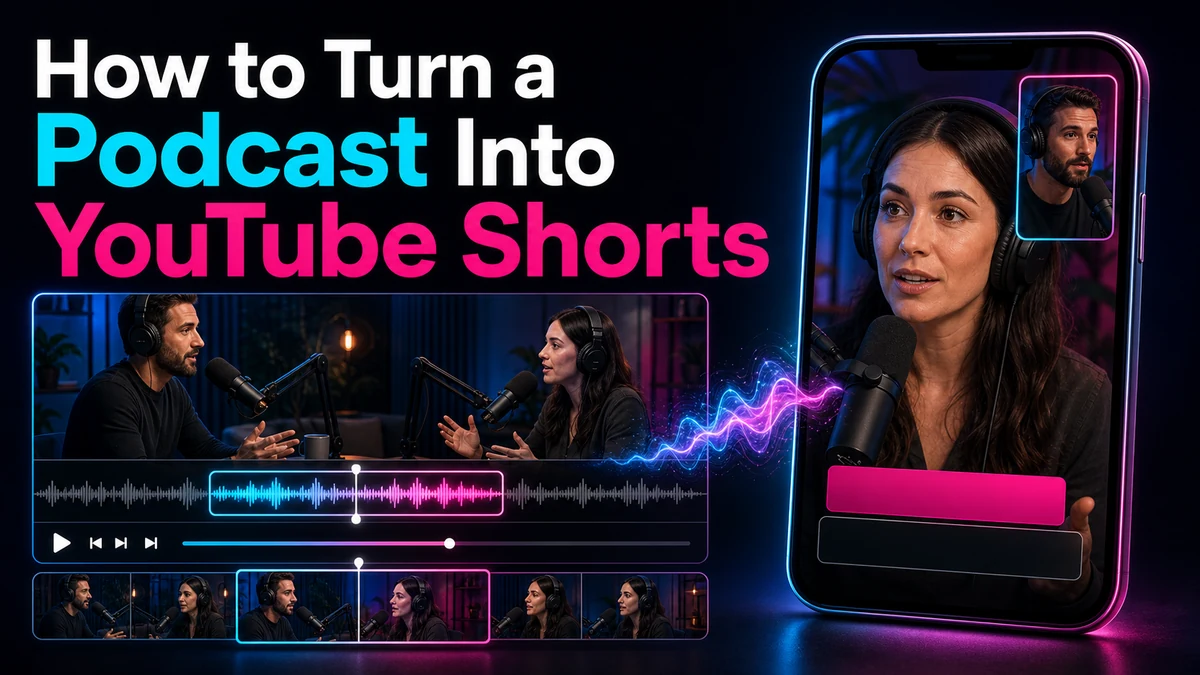
How to Turn a Podcast Into YouTube Shorts
To turn a podcast into YouTube Shorts, do more than cut out a memorable sentence. Choose one complete idea, give it enough context to stand alone, frame the active speaker for a vertical screen, clean distracting audio, correct the captions, and review the result as a new edit. A strong podcast Short feels self-contained even when the viewer has never heard the full episode.
YouTube currently says qualifying square or vertical videos can be Shorts up to three minutes long. That is a platform limit, not an editorial target. Let the idea determine the length: stop when the promise, explanation, and payoff are complete.
Key Takeaways
- Select a complete answer, story, lesson, or disagreement—not merely an isolated sound bite.
- Preserve the minimum context a new viewer needs, even when that means keeping part of the host’s question.
- Choose a stable multi-speaker layout and change framing only when the visual priority changes.
- Clean obvious noise and level problems before caption review, because difficult audio can create transcript errors.
- Correct names, technical terms, punctuation, timing, line breaks, and speaker identification by hand.
- Treat a cold open as an editorial promise, then return quickly to the context that makes it honest.
- Run a phone-sized visual, caption, and audio QA pass before export or upload.
Why Podcast Clips Need a Different Editorial Test
A conventional highlight may assume the audience knows the episode and speakers. A Short has to work without that context. The most dramatic sentence may depend on an earlier question, and removing a nearby qualification can misrepresent the guest.
The right unit of selection is therefore a complete idea. Depending on the episode, that unit might be:
- a question and a direct answer;
- a claim followed by its reason or example;
- a short story with setup, turn, and outcome;
- a misconception followed by a correction;
- a disagreement that includes enough of both positions to remain fair; or
- a practical instruction with a visible or verbal result.
This standard protects clarity and gives the edit a natural ending: stop when the opening promise has been fulfilled.
Choose Complete Ideas, Not Isolated Sound Bites
Start with the transcript and mark candidate passages, but listen to the audio before choosing. Transcripts make long episodes searchable; tone, pauses, interruptions, and emphasis reveal whether a passage actually works.
Use these selection criteria:
| Selection questionStrong candidateWarning sign | ||
| Can a new viewer identify the topic quickly? | The subject is named in the opening or can be added with a short setup | The clip begins with “that,” “it,” or “as we said” and never resolves the reference |
| Does the passage deliver one complete idea? | It reaches an answer, lesson, or payoff | It ends before the reason, example, or qualification |
| Is the quote fair to the speaker? | The edit preserves the speaker’s intended meaning | Removing nearby context changes certainty, scope, or tone |
| Does the audio support a short-form edit? | Speech is intelligible and cuts can be made cleanly | Crosstalk, room noise, or music masks essential words |
| Can the visuals work vertically? | The active speaker can be shown clearly | The meaning depends on several tiny faces or an unreadable shared screen |
| Is the source cleared for reuse? | You control the recording or have the permissions you need | Guest, music, footage, or image rights are unclear |
Read the surrounding exchange and keep any qualification needed for accuracy. A strong conclusion can become a cold open, but the edit should quickly establish what it refers to.
Podcast-to-Short Workflow: From Rights Check to Export
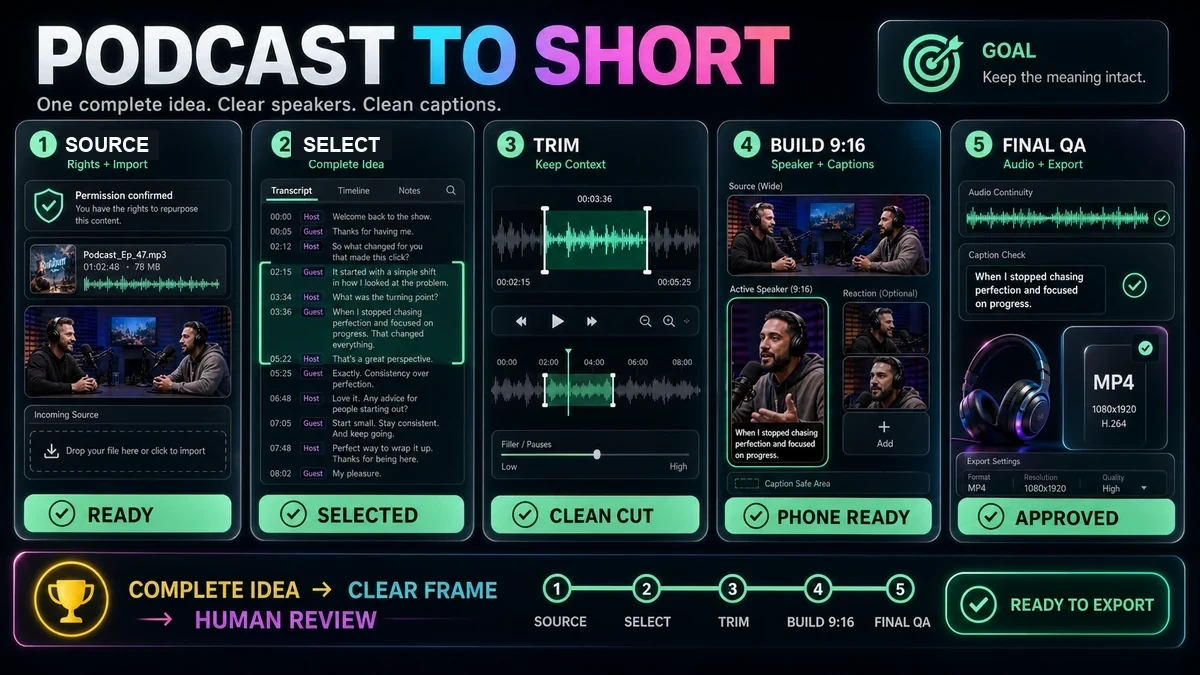
1. Check rights and participant expectations
Use material you have the right to edit and distribute. Confirm the status of the recording, guest agreement, music, inserted clips, artwork, and sponsor material. Credit or a disclaimer does not automatically create permission. Fair use depends on specific facts and is ultimately a legal question, so this is general risk guidance, not legal advice.
Resolve sensitive information, off-the-record remarks, and needed corrections before editing. A polished excerpt is still wrong if it should not be republished.
2. Import the best available source
Start with the cleanest master recording rather than a compressed social download. The Recapo YouTube Shorts Maker currently supports importing rights-cleared local footage or a source link. Its public product description also covers locating a passage through the transcript, trimming the selection, applying an adjustable 9:16 reframe, and exporting a vertical MP4.
Use the best synchronized picture and audio available. For an audio-first show, add an intentional, rights-cleared visual treatment such as speaker imagery, a waveform, a branded background, or supporting footage.
3. Select the complete idea
Search the transcript for candidate themes, repeated audience questions, concrete advice, surprising explanations, or concise stories. Then expand each candidate in both directions until it makes sense without the full episode.
Ask three questions before committing:
- What does the viewer expect after the first line?
- Which sentence or example fulfills that expectation?
- What is the earliest honest ending after the payoff?
Shortlist promising passages and evaluate them manually. A tool can help navigate a transcript, but no ranking guarantees the best moment. The guide to finding moments in long video explains why context and human judgment still matter.
4. Trim for clarity without changing meaning
Remove greetings, repetitions, and detours that do not affect the idea. Keep breaths and reactions that preserve natural rhythm. A camera change or supporting visual can cover a legitimate speech cut, but must not conceal a misleading edit.
A cold open can surface the result first, then return to the host’s question and explanation. It must match what follows; never stitch unrelated sentences into a claim the speaker did not make.
5. Reframe the conversation for 9:16
Set the vertical canvas before fine caption placement. A 9:16 composition is a practical full-screen target, although YouTube’s current Shorts rules also allow qualifying square videos.
For one speaker, a stable chest-up crop usually gives facial expression and gestures room to breathe. For two or more speakers, choose among three patterns:
| Framing patternUse it whenReview carefully | ||
| Active-speaker cut | Each person has a separate camera and turns are clear | Late cuts, missing reactions, and rapid back-and-forth |
| Stacked split | Both speakers need to remain visible | Face size, eyelines, and caption space |
| Primary speaker plus reaction panel | One person carries the idea while the other reaction matters | Whether the small panel adds meaning or only clutter |
Do not switch for every interjection. Hold the composition until attention genuinely changes. If a guest references an object or screen, show it. See the horizontal-to-Short reframing guide for more crop strategies.
6. Clean the audio before final caption correction
Address distracting hum, noise, harsh plosives, and major level differences conservatively. Keep voices natural; aggressive processing can be more distracting than steady room tone. Check with headphones and phone speakers.
Watch for audio failure modes that are common in conversation edits:
- a clipped first consonant after removing a pause;
- room tone disappearing between sentences;
- one speaker becoming much louder than the other;
- noise reduction creating watery or metallic speech;
- laughter or crosstalk masking the key phrase; and
- music continuing under dialogue without confirmed reuse rights.
If a word remains unintelligible, do not guess. Recheck the original track or show notes, consult the speaker when possible, or choose another passage.
7. Add captions and identify speakers accurately
Captions carry more than words in a multi-speaker podcast. They help the viewer follow turn-taking, names, terminology, and emphasis. The Recapo Auto Captions tool offers language and style choices plus editable synchronized captions; timing and position still require review.
Correct against the audio, especially names, acronyms, numbers, homophones, and specialist terms. Use consistent speaker labels only when identity would otherwise be unclear; never identify someone by guesswork.
Break lines at natural phrases. Keep captions away from faces and likely interface overlays. Screen size and interface state vary, so preview instead of relying on one universal measurement. See the safe-zone guide and caption workflow.
8. Run QA, then export
Watch the complete Short with sound, with captions hidden, and with audio muted. These passes expose broken speech rhythm, weak visual orientation, and captions that fail to carry meaning.
Export only after content, crop, captions, and audio pass review. Recapo supports vertical MP4 export, while upload remains a separate creator-controlled step. The desktop production guide can help organize the handoff.
Multi-Speaker Framing and Review Decisions
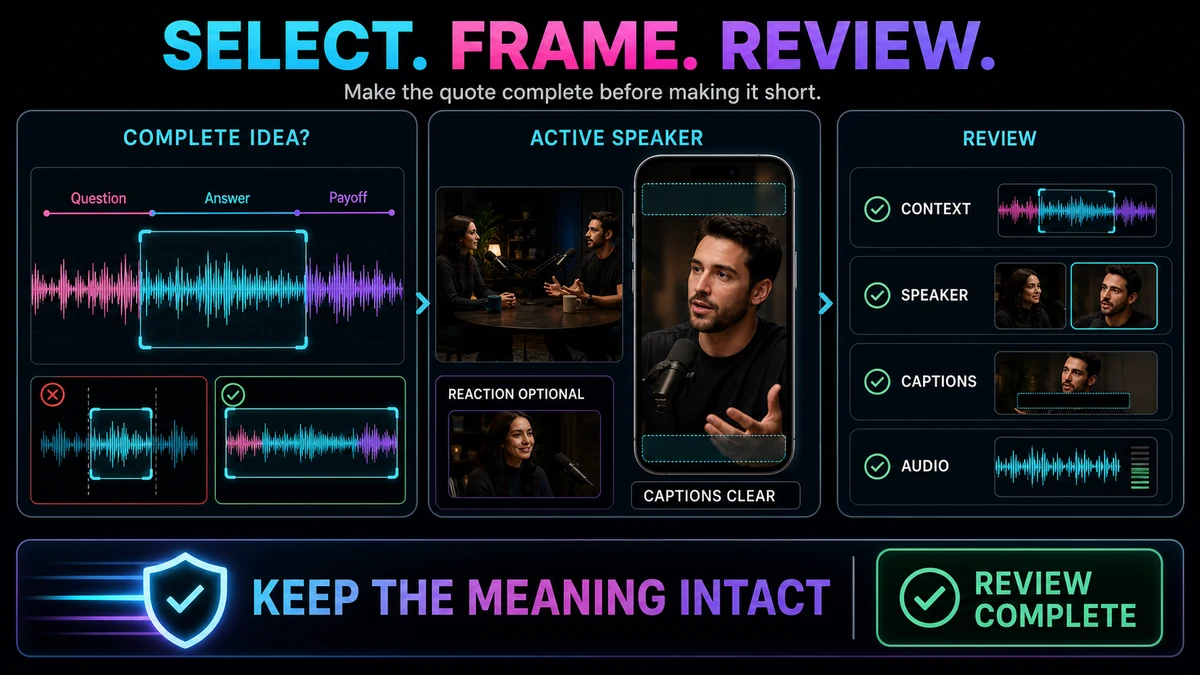
Podcast framing should answer: who or what does the viewer need to see now? It is not always the person making sound. Cutting to a host for a one-word acknowledgment creates a distracting flash, while a silent reaction may matter during a surprising story.
Use this decision sequence at every visual change:
- Select: Is the spoken passage a complete and fair idea?
- Frame: Is the active speaker or referenced object obvious in 9:16?
- Identify: Does a new viewer know who is speaking when identity matters?
- Review: Do the crop, captions, and audio preserve the intended meaning?
Failures include showing the wrong person, placing a label over another face, cropping meaningful gestures, switching layouts too often, or naming the guest while the host remains full-screen. Use fewer, better-timed changes.
Illustrative Example: A 45-Minute Creator Interview
The following scenario is hypothetical and illustrative; it is not a claim about a real Recapo customer, performance result, or measured outcome.
Imagine a 45-minute video podcast in which a host interviews a creator about a failed product launch. Transcript review finds a 78-second exchange. The guest says, “The launch failed before launch day,” explains that the team interviewed peers rather than intended buyers, and describes changing their research before rebuilding the offer.
The opening quote alone is intriguing but incomplete. A better cut uses it as a cold open, returns to the host’s shortened question—“What told you the idea was wrong?”—then plays the explanation and takeaway. The complete thought, not the three-minute limit, determines the final length.
The cold open begins on the guest, the question uses the host camera, and the explanation returns to the guest. A host reaction remains only if it adds meaning. Captions identify the guest once, correct key terms, and use readable phrases.
Audio review catches a level jump and a clipped breath. Final QA checks that the cold open is supported, the method stands alone, the guest’s meaning remains intact, and every asset is cleared.
Final Checklist and Honest Limitations
Use this checklist before handing off the Short:
- The recording, music, artwork, inserted footage, and guest excerpt are cleared for the intended use.
- The opening identifies a meaningful topic or creates a promise the clip fulfills.
- The selection contains a complete idea and preserves necessary qualifications.
- The host’s question is included when the answer would otherwise be ambiguous.
- The 9:16 frame shows the correct speaker, reaction, or referenced object.
- Speaker changes are intentional rather than triggered by every interjection.
- Voice levels are comfortable and cleanup has not damaged speech.
- Names, numbers, terminology, punctuation, timing, and line breaks are corrected.
- Captions avoid faces and likely interface overlays at phone size.
- The ending reaches the payoff and does not cut off the next required thought.
- The export is square or vertical and fits YouTube’s current Shorts duration rules.
- The final file has been watched from beginning to end after export.
This workflow has limits. Tighter trimming cannot rescue every context-dependent passage. Transcripts can mishear names and overlapping voices; vertical crops cannot preserve every person and screen detail; audio repair cannot fully restore distortion. Platform rules and interface placement can change, so verify official guidance before publishing.
Build the First Vertical Cut with Recapo
The Recapo YouTube Shorts Maker can import a rights-cleared source, navigate by transcript, trim a passage, adjust a 9:16 crop, and export a vertical MP4. It is a starting point, not a substitute for deciding whether the idea, framing, captions, speaker identification, and rights are ready.
Frequently Asked Questions
Can an audio-only podcast become a YouTube Short?
Yes, but it needs an intentional visual layer. You might use rights-cleared speaker photography, a restrained waveform, branded shapes, or relevant supporting footage. Keep the visual treatment simple enough that captions remain readable, and do not imply that a still image is live video.
How long should a podcast Short be?
Long enough to deliver one complete idea and no longer. YouTube currently allows qualifying square or vertical Shorts up to three minutes, but many ideas should end sooner. Do not stretch a concise answer or cut a necessary explanation merely to hit a preset duration.
Should I include the host’s question?
Include it when the answer uses unclear pronouns, depends on a premise, or could be misunderstood alone. If the guest naturally restates the topic, the question may be removable. Judge the result from the perspective of someone who has not heard the episode.
How do I frame two podcast speakers vertically?
Use active-speaker cuts when separate camera angles are clean, a stacked split when both people need to remain visible, or a primary-speaker view with a reaction panel when the reaction adds meaning. Avoid switching for every short acknowledgment.
Can captions identify each speaker automatically without review?
Do not assume so. Overlapping voices, similar vocal tone, names, and technical terms can create errors. Compare captions with the audio, verify identities, and correct labels, timing, punctuation, and line breaks manually.
Can I use any podcast clip if I credit the host or guest?
Credit alone does not grant permission. Rights depend on ownership, licenses, agreements, and the particular use. Fair use is fact-specific and ultimately decided by courts. Use rights-cleared material and seek qualified legal advice for a specific situation.
Does Recapo publish the finished Short to YouTube automatically?
The verified Recapo product page supports source import, transcript-based selection, trimming, adjustable 9:16 reframing, and vertical MP4 export. It does not support a claim of automatic publishing; uploading and publication review remain separate steps.
References and Official Sources
- Recapo YouTube Shorts Maker
- Recapo Auto Captions
- YouTube Help: Understand three-minute YouTube Shorts
- YouTube Help: Upload YouTube Shorts from a computer
- YouTube Help: Get started creating YouTube Shorts
- YouTube Help: Fair use on YouTube
Related Recapo Guides
- How to Make YouTube Shorts from Horizontal Video
- YouTube Shorts Safe Zone Guide
- How to Add Auto Captions to YouTube Shorts
- How to Make YouTube Shorts on Desktop
- How to Find the Best Moments in a Long Video with AI